7 min read
Comparing licensing models: per user, per device, per core, per server
Compare licensing models — per user, per device, per core, per server. Load examples, common traps and quick checks to pick the model without overpaying.
Why understand licensing models
Comparing licensing models matters for more than accounting. It determines what you actually pay for: a person (per user), a device (per device), a server (per server), or compute power by cores (per core). Getting this wrong usually ends in overpaying or a dispute during an audit.
The same system can cost very differently depending on how you use it. Simple example: an office has 30 employees working in shifts on 10 shared PCs. With per user you pay for 30 people; with per device you pay for 10. For server-side products with virtual machines and growing load, per core is often fairer than per server: the price ties to compute power and is not hidden behind socket rules, virtualization limits and other clauses.
Before talking to a vendor, gather basic numbers. This saves time and protects you from buying "just in case" capacity that never pays off.
Start with straightforward questions: how many actual users do you have (and how many work remotely or from multiple devices), how many devices provide access (are there hot desks), how many servers and where they are (physical, virtual, different sites), what CPUs are in the servers and how many cores are truly in use. Be sure to estimate growth for 6–12 months: people, devices, cores.
Picking a model by feel is especially risky when a company grows or shifts to remote work. Today an employee on one office PC looks like "one device," but tomorrow they may have a laptop, a home PC and terminal access. Then per device suddenly balloons, while per user becomes simpler. On the server side it can be the opposite: adding cluster nodes or increasing cores can make per server disadvantageous.
When you understand your access patterns and load in advance, licensing turns from a puzzle into a routine calculation.
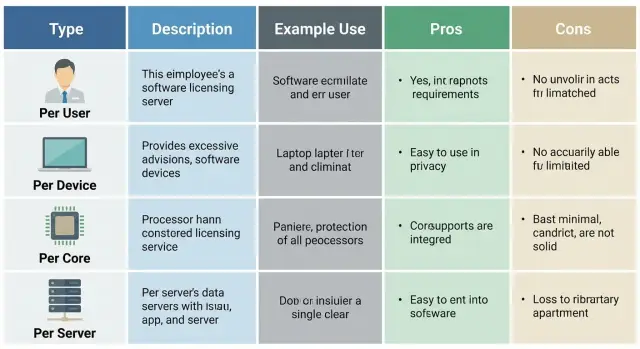
Short definitions: per user, per device, per core, per server
Keep one principle in mind: you pay either for "who uses it," or for "what they use," or for "how much power," or for "how many servers." Only the unit of measurement changes.
Per user
A license is tied to a person (employee, account). This is convenient when the same person works from multiple devices: office PC, laptop, phone, home computer. Important: clarify how the vendor counts users — by name (named user) or by simultaneous sessions (concurrent user).
Per device
A license is tied to a specific device: a workstation, terminal, cash register, tablet in a ward, thin client. A good rule: if a device is shared by different people in turns, per device is often simpler to count.
Per core
This licenses compute power — the number of CPU cores (sometimes with minimums per processor or per server). It’s common for server products and virtualization: regardless of how many users connect, the cost ties to hardware.
Per server
License is purchased for a single server (physical or virtual). This is usually simpler for small setups with few steady servers.
Terms like “user pool” and “device pool” usually mean the list of what is licensed: who is allowed access (list of employees/accounts) and from which points (list of PCs/terminals). It’s typically important who is added to the pool, not who actually logged in today. Changes to the pool (new people, new workstations) are what usually trigger extra costs.
Mini example: if 30 employees work shifts on 10 cash registers, per user means 30 licenses, per device means 10. Per core cost stays the same regardless of number of registers, but depends on the server configuration.
When to choose per user: typical situations and examples
Per user is usually beneficial where the “value” is in the person, not the device. One employee regularly accesses the system from several devices and user counts can be measured reliably.
Per user often wins when:
- an employee uses 2–3 devices (office PC, laptop, phone);
- remote or hybrid work exists;
- users are named and tracked properly (AD/SSO, corporate email);
- you don’t want to restrict scenarios like “switch to another device and continue work.”
Example: a project manager uses the office PC, checks tasks on a home laptop in the evening, and approves documents from a phone during the day. With per device you would need multiple licenses; per user covers one person.
There’s a caveat with shared teams: if several people work on one PC by schedule (reception, operators, classroom), per user can be more expensive because you pay for each person. In those places per device is typically more logical.
Contractors and temporary staff are a separate risk. Decide in advance whether they count as users. If external specialists log in with their accounts even for a few weeks, they may formally require per user licenses. Practical rule: anyone with a login and potential access is considered a user.
Don’t forget infrequent users: an accountant who logs in once a month or an executive who opens reports quarterly. These roles often show up in audits. It’s better to include them from the start or technically disable access if you don’t want them counted.
When to choose per device: workstations and shift teams
Per device is advantageous where the same computer is used by multiple people. You pay for the access point, not for each person. This fits shift work and shared workplaces.
Typical examples: reception desks, classrooms, labs, operator rooms with 2–3 shifts, call centers with fixed seats. A simple rule: if there are more people than devices and they rotate, per device is almost always clearer than per user.
A special case is kiosks and terminals. If a device in the hall is used by many customers or staff throughout the day, tying licenses to users is pointless — licensing the point of access is easier for budget and control.
Agree in advance what counts as a device. In practice, office PCs and all-in-ones, thin clients and terminal stations, tablets and mobile workstations (if they access the system), cash registers and POS terminals are usually included.
Plan for spare PCs and repairs. If a branch keeps 1–2 backup devices, they’re easy to forget. Set a replacement rule: when does swapping a device count as transferring a license and how often is it allowed, so you don’t end up with “two licenses for one role.”
The main risk with per device is unnoticed growth of the device fleet. You add a service window, another cash register, a couple of PCs in a new branch — and costs grow with device count. If you pick this model, plan expansion for 6–12 months and assign someone to prevent unauthorized new devices.
When to choose per core: servers and virtualization without surprises
Per core is common for server products where price ties to compute power. It’s suitable when load depends on CPU work: database queries, calculations, parallel tasks. The choice comes down to how many physical cores will be used.
To keep calculations accurate, first gather hardware facts. Confusing sockets, cores and threads can easily double your budget.
Check:
- CPU model (specific SKU);
- number of sockets in the server;
- number of physical cores per socket;
- whether hyper-threading is enabled (don’t confuse it with cores);
- planned CPU upgrades in the next 12–24 months.
Virtualization adds nuances. A license may be counted by host cores, cluster cores or cores assigned to a VM — vendor rules vary. A frequent mistake is buying licenses for current VMs and later discovering that migrating a VM to another host requires more licensed cores.
Per core usually benefits scenarios with constant high load: databases and transactional systems, analytics, dense virtualization (many VMs on one host), and growth driven by data volume rather than users.
Practical example: you deploy a 2-socket database server and plan growth. Today 16 cores suffice; in a year you’ll need 32. With per core, a CPU upgrade typically increases licensing requirements, so budget for growth up front. If you procure rack servers for such projects (e.g., S200 racks), fix the configuration and migration rules before purchase to reduce surprises during scaling.
When to choose per server: small server setups
Per server fits where things are simple and predictable: 1–2 servers per role (file, print, small DB, domain controller), few changes and rare migrations. Then the decision is just how many servers you’ll have in the coming year.
Clarify the term “server”: is it a physical machine, a virtual machine or a host? Vendors define this differently, and one clause in a contract can turn a good deal into an expensive one.
When per server beats per core
Per server often wins with small CPUs (e.g., single-socket machines with few cores) and when server counts are stable. For example: a department has one app server and one DB server that rarely change. If the license is per server, you may be able to upgrade memory or storage without buying new licenses—unless the rules tie licensing to cores.
Reserve, test and growth
Ask about standby and test servers. Sometimes cold standby (powered off) is allowed; sometimes standby counts as a full server. To avoid mistakes, define upfront:
- how many servers you’ll have in production, test and standby;
- what counts as a server: physical, VM or host;
- whether licenses can be moved during migration or replacement;
- how clustering and disaster recovery are licensed;
- what happens when new roles require additional servers.
The main risk with per server is unnoticed growth of server numbers as the application scales (new VMs for services, separate nodes for queues, cache, monitoring). If you expect fast growth, per core or another model may be calmer long-term. For small 1–2 server setups, per server often gives a clear budget and fewer surprises.
How to choose a model in 5 steps
To avoid debates like "it seems cheaper this way," fix the same baseline data and follow five steps.
-
Describe access scenarios. Who uses the system: office staff, field engineers, shift operators, external contractors. Where they connect from (office, home, terminals) and whether one person can work from multiple devices.
-
Count users and devices by role. Count unique users separately from actual access points. If one person uses a laptop, smartphone and home PC, per user is usually clearer. If many people rotate across the same PC or terminal, per device often wins.
-
Describe the server side. How many servers, which processors and how many cores, is there virtualization, how many VMs are planned. It’s easy to mistake here: with growth, per core is usually more predictable than counting “per server,” especially with powerful servers or frequent hardware changes. If you buy racks for projects (e.g., S200 servers), fix core counts and expansion plans upfront.
-
Estimate growth for 12–36 months. Add forecasts for headcount, branches, new services and remote work. A good model survives growth without a sudden cost spike from one change (e.g., adding a shift or deploying new VMs).
-
Compare 2–3 models on the same numbers. Create a table with current values and plans for 1 and 3 years. Choose the option that gives the smoothest total over the growth scenario, not the cheapest immediate bill.
Mini-scenarios: a call center with 60 operators over 3 shifts and 25 seats usually points to per device. A sales team of 40 people with laptops and phones each usually fits per user.
Common mistakes and where people usually overpay
Licensing mistakes often look the same: licenses are bought by feel, and rules turn out different. Result: overpayment or audit risk.
The most common story is counting only current staff. Projects add seasonal workers, contractors, interns and temporary accesses "for a month." If a license is per user, these people may still need to be counted even for short periods.
A second trap is confusing “user” with “account.” Some systems license a person, others an active account, and others concurrent access. For example, HR may create test or integration accounts that unexpectedly consume licenses.
Shift work also flips calculations. On a factory line with 3 shifts at one PC, per device seems better than per user. In an office where one person has both a laptop and a desktop, per device may be more expensive than per user.
On servers, overpayment often comes from core growth and virtualization. You buy licenses for the current server, then upgrade CPU, add sockets or spin up new VMs — suddenly per core rules require more licenses. Similar confusion arises when mixing rules for physical and virtual infrastructure: what is allowed in one scheme may not apply in another.
Before purchase, document what counts as the licensed unit:
- who is a user (person, account, concurrent session);
- what is a device (PC, thin client, terminal);
- how cores/processors are counted (minimums, rounding, hyper-threading);
- how virtualization is handled (host, cluster, migrations);
- what happens with growth (upgrades, new servers, temporary access).
Simple example: a clinic adds an evening registration shift and gives a contractor access to reports. If the agreement lacks clear definitions, extra accounts can double the bill. If one integrator supplies and supports the infrastructure, it’s easier to agree on rules in the specification and avoid overpayment during growth.
Typical load examples by industry
Below are four common scenarios. This is not about choosing the absolute cheapest option but about which metric to consider primary: people, devices or compute power.
Polyclinic (reception, shared PCs, shifts). The main metric is workstations (devices) because one computer is often used by different people on a schedule. Per device usually fits: tie rights to specific PCs so shifts don’t create extra fees.
Bank (some staff with laptops, remote access). The main metric is users, because one person may connect from laptop, home PC and phone. Per user often fits, especially when access is tied personally rather than to a workstation.
University (computer labs and faculty). Two flows occur: for labs count machines (per device). For faculty and staff who work from personal laptops and home, count people (per user). Often a mixed approach works with clear rules.
Enterprise (servers with VMs, growing load). The main metric is cores/compute power, because VM and user counts change while server resources grow. Per core often reduces surprises when adding VMs or increasing host load.
If unsure, ask one question: what changes more often — people, devices, or server resources? The answer usually points to the right model.
Quick checklist before buying licenses
Gather numbers on one page before procurement. This reduces the risk of choosing the wrong model and having to pay extra during expansion or audits.
First, record actual usage: how many unique users genuinely log in per month, not how many could theoretically. Companies often have seasonal staff, contractors and occasional roles — rules may differ for them.
Then count access points: how many devices provide access, including shared front-desk PCs, terminals, field laptops, spare workstations and test machines. Shift teams can dramatically change whether per user or per device is better.
Separately describe the server stack for the next year — not just how it is now but including plans: how many servers will be added, what CPUs (sockets and cores), and whether new roles (DB, app, virtualization) will appear. These details strongly affect per core and per server costs.
Check virtualization and migrations: if VMs will move between hosts, know whether licensing applies to the host, a host pool or individual cores. Otherwise surprises surface after deployment.
Estimate growth velocity: how fast will branches open, seats grow and internal services appear. Simple rule: if growth is rapid and uneven, choose a model that scales without recalculating all hardware.
Assign an owner for license records: who keeps the register, stores proof, tracks infrastructure changes and prepares materials for internal audits. Without an owner, even the right model will become costly over time.
A short practical test: if you can’t confidently name "users, devices, servers/cores, virtualization, growth, owner," it’s too early to buy — collect these six answers first.
What to do next: lock rules and a growth plan
To avoid revisiting licensing every quarter, agree simple accounting rules and store them in one place. Then any team expansion or hardware upgrade can be reflected in minutes.
Create a single inventory table
Put facts into one table and update it regularly (e.g., monthly). Include not only current numbers but expected growth for 6–12 months. This helps you quickly see what moves the bill — people, devices or compute power.
Minimum fields: users (staff and contractors) and access frequency; devices (workstations, terminals, shared PCs) and shift patterns; servers and VMs (how many stacks and where they run); cores/processors (actual cores on hosts to be counted); change plan (growth, virtualization migration, hardware upgrades).
Then ask the vendor for a clear counting rule for your setup: what counts as a user, how temporary staff are handled, how VMs are licensed, what happens on migration. Remove ambiguity up front rather than arguing during audits.
Allow growth without overpaying
Build a buffer for real changes: new departments, seasonal peaks, added nodes, CPU expansion. But don’t buy "double" capacity just in case. Define a threshold for purchasing additional licenses (for example, at 85–90% utilization).
If you plan mass replacement of PCs or servers, choose a licensing model that survives upgrades without penalties. For example, when replacing many workstations every 3–4 years, avoid licenses rigidly bound to hardware.
In practice, align the licensing plan with infrastructure plans. If you upgrade workstations and servers together, coordinate with your local supplier and integrator — for example, GSE.kz (gse.kz) — to pick PCs L200, all-in-ones M200 or servers S200 and lock common accounting and support rules.
Frequently asked questions
How can I quickly understand which licensing model suits me?
First, pin down what changes more often: people, devices, or server resources. If staff use multiple devices and remote work is common, **per user** is usually simpler. If the same PC is shared across shifts, **per device** is often better. If the bottleneck is CPU load and virtualization, **per core** is usually fairer. If you have few stable servers, **per server** can be the right choice.
What’s the difference between per user, per device, per core and per server in simple terms?
**Per user** — you pay for a person or an account, and it usually covers working from multiple devices. **Per device** — you pay for a specific PC/terminal, even if different people use it. **Per core** — you pay for server compute power by physical cores, so cost doesn't depend on user count. **Per server** — you pay per server; it’s important to clarify whether “server” means a physical machine, a VM or a host according to the vendor.
When is per user usually most advantageous?
Choose **per user** when one employee regularly uses 2–3 devices and you don’t want to count each device separately. This is handy for hybrid work, business travel and access from personal laptops or phones. Make sure to verify how the vendor counts a user: named user or concurrent sessions.
When is per device better than per user?
Pick **per device** when a device is a shared resource and different people use it on a schedule. Typical examples: reception desks, operator rooms, call centers with fixed seats, computer labs, kiosks and terminals. In these cases counting by people is often more expensive and harder to manage.
What are typical traps with per device and where do people overpay?
Commonly forgotten items are spare and temporary devices: standby PCs, extra cash register, field laptops, test machines. Another common issue is hardware replacement: it can be treated as a new device unless the rules define license transfer. Agree up front how repairs, warranty swaps and temporary expansions are handled.
What do I need to know before calculating per core for servers and virtualization?
First, collect hardware facts: CPU model, number of sockets, number of **physical** cores per socket and upgrade plans. Don’t confuse cores with threads: hyper-threading is not the same as physical cores and doesn’t necessarily double licensed cores — vendor rules vary. Then confirm virtualization rules: are licenses counted per host cores, per cluster, or per cores assigned to a VM? This is where surprises often appear after migrations.
When is per server actually simpler and cheaper?
If you have 1–2 servers per role and they rarely change, **per server** can give the most predictable budget. But you must clarify the definition of “server” (physical machine, VM or host). Also confirm reserve and test environments: sometimes a cold standby server is excluded, sometimes it’s counted as a full server.
What mistakes do auditors usually find in license checks?
Count not only full-time staff but also contractors, interns, seasonal workers and occasional users who log in once a month. Also check whether the license is tied to a person or to an account — technical and test accounts can consume licenses. Finally, compare models over 6–12 months: a new shift or a couple of extra devices can change which model is cheapest.
How do I compare 2–3 models in a table and avoid arguing that "it seems cheaper"?
Take three numbers: unique users, access points (devices), and server resources (servers/cores). Calculate costs for each model using the same data for “now” and for a one-year forecast. Pick the option that keeps costs smooth as you grow, not the one that looks cheapest today. Also assign responsibility for maintaining and updating the numbers.
How to account for hardware upgrades and company growth so licenses aren’t recalculated every quarter?
Document your upgrade plan: how many workstations and servers you’ll replace in the next 12–36 months and how that affects the chosen licensing unit. Ask the vendor to write rules for license transfer during hardware replacement and VM migrations so upgrades don’t become hidden costs. If one integrator supplies and supports the infrastructure, it’s easier to align hardware configurations and licensing rules in a single specification.
