8 min read
Cisco UCS vs Rack Servers: How to Choose by 3 Criteria
Cisco UCS vs rack servers: compare management, scaling and ecosystem lock-in risks to choose the right platform for your data center.
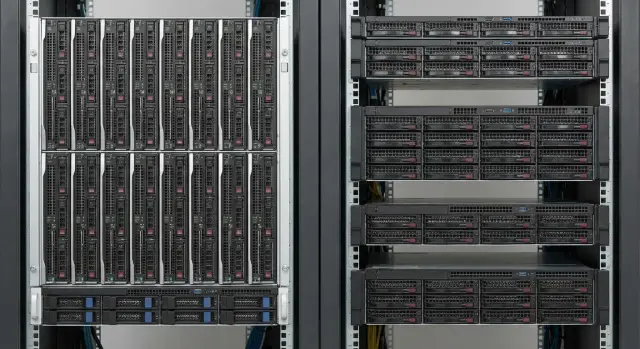
Why compare UCS and classic rack servers at all
The point of comparing Cisco UCS vs rack servers isn't just "who's faster", but how you'll live with the infrastructure every day. A platform defines rules: how quickly you add capacity, who and how maintains it, how many routine mistakes happen, and how calmly you'll handle supply delays or changing security requirements.
It's important to understand which problems the platform choice will solve and which it won't. Moving to a different server architecture won't fix a "bad network", chaotic request handling or missing backups. But it can strongly affect manageability, scaling speed and operational predictability.
Equal performance on paper often leads to very different real-life experiences. Two servers with similar CPU and RAM may require very different approaches to configuration, updates, monitoring and routine tasks. Teams lose weeks per year on these "small" differences.
Centralized management is especially valuable when you have many identical nodes, tight deadlines for deployment and a small team. Ease of replacement matters more when servers are heterogeneous, purchases happen in waves, and the priority is to swap hardware quickly with any available equivalent without being tied to a single scheme.
Before choosing, honestly record constraints: how many people will actually support the platform, how often you need to add capacity, what's more important—CAPEX now or predictable OPEX later, what happens if specific models or modules are scarce, and what security, certification and procurement requirements exist.
For example, if an organization in Kazakhstan is growing and the IT team is small, the value of "managing from one place" can outweigh added platform complexity. If the key risk is ecosystem dependency and supply, the flexibility of classic rack servers may feel safer. System integrators like GSE.kz usually start from real 1–3 year operational scenarios, not from brand preference.
Brief on approaches: UCS and rack servers without extra theory
When people talk about Cisco UCS, they usually mean not just "servers" but a complete data center system. The idea is simple: compute, networking and management are assembled into one kit where much is configured centrally and consistently across nodes.
The classic option is rack servers: separate 1U–2U machines in a rack. Each server has its own settings, its own management controller, its own connections to network and storage. This approach remains a standard because it's comprehensible, flexible and works well with hardware and software from different vendors.
If simplified strongly, the Cisco UCS vs rack servers difference is often not about "power" but about how management and connectivity are organized. In UCS you have server modules (often blades), Fabric Interconnect as the connectivity "heart", policy-driven settings via profiles and a common management layer. In the rack approach you have individual servers in racks, top-of-rack switches, server-level management plus common monitoring tools.
The difference is most noticeable when speed and repeatability matter. If you need to quickly provision identical hosts for virtualization or VDI, profiles and a unified connectivity model save time and reduce the risk of "different settings on identical servers." If you frequently change configurations, mix hardware generations, use multiple brands and want to freely replace components, classic rack servers usually offer more options.
A small example: an organization faces growing load while the IT team has 2–3 people. With UCS it's easier to keep uniform rules and add nodes by template. With the rack approach it's easier to buy and add servers as budget allows without committing to one platform.
Management and administration: what will be easier and what harder
In the Cisco UCS vs rack servers debate the main management question is: do you want a single control center with policies and templates, or the familiar scheme where each layer lives separately?
UCS: management via profiles and policies
UCS administration often revolves around profiles and policies. You define a typical server once: BIOS settings, boot order, NIC parameters, basic storage settings, firmware versions. Then you apply that profile across nodes.
This simplifies areas with many identical tasks: mass deployments, uniform standards, quick hardware replacements. If a server fails, you can move the profile to another node and restore service without lengthy manual setup.
The harder part is the initial stage. You need people who understand UCS logic, policies and domains, and the consequences of changes for the whole system. A mistake in a template affects many servers at once, so change discipline is more important than in a "one-off" fleet.
Rack servers: separate tools and more freedom
A classic rack park often becomes a "zoo" of tools: per-server management controllers, separate switches, different firmware, sometimes multiple vendors and update approaches. This gives freedom and simplifies targeted replacements, but makes unified standards harder.
In terms of people and skills: UCS reduces routine work during scaling but raises the entry threshold and increases dependence on solid templates. The rack approach requires more manual operations and coordination, but skills are more universal and easier to spread across staff.
Processes also change. UCS demands strict change procedures for policies, "golden" templates and a clear owner (who is responsible for profiles, firmware, compatibility). In a rack world responsibilities tend to be split by layers: servers, network, storage.
Before deciding, check how access control and audit will be organized: RBAC roles, separate rights for server and network admins, action logging and log retention, integration with corporate authentication, update approval workflows, and reporting for audits (who did what and when).
If the IT team is small and you need to quickly deploy identical servers for new services, UCS often wins due to templates. If your data center already has mixed models and freedom of partial replacement matters more, rack architecture can be safer from a risk and process perspective. Integrators like GSE.kz often help to predefine roles, procedures and audit schemes so management doesn't "break" as you grow.
Scaling: increased load, new services, new racks
When load grows, the key is not "how many servers to buy" but how predictably you can add capacity and bring it online quickly. In the Cisco UCS vs rack servers argument this is often decided not by the price of a single node but by the number of repeated actions required for each expansion.
With UCS scaling is like a constructor: add nodes to a chassis, apply profiles, and new capacity quickly becomes "the same as the rest." In classic rack servers scaling is more item-by-item: more manual steps, more configuration variants and a higher risk that "the new server is slightly different," which later complicates support and updates.
But growth almost always hits infrastructure limits first: ports and network bandwidth (especially for virtualization and backups), rack and circuit power, UPS headroom, cooling and hot spots, space for switches and cabling, and lead times for identical components.
A mixed fleet (some UCS, some rack) looks like a compromise: use UCS for fast growth and rack servers for specific tasks. The price of compromise is two management models, two sets of standards and more complex planning for ports and network between domains.
To plan growth for 6–18 months without overspending, agree in advance on a unit of expansion (for example, one node or one chassis) and what resources must remain in reserve. Also check where it’s cheaper to hold spare capacity: compute, network or power.
For resilience ask four minimum questions: what happens if one switch or fabric fails (will storage remain accessible), can a rack survive losing one PSU or feed, how quickly a new node can be brought up after failure and who does it, and is there a unified configuration standard so replacement isn't a project.
Ecosystem dependency: convenience versus freedom of choice
In Cisco UCS vs rack servers the decision often comes down to how ready you are to live inside one ecosystem. Vendor lock-in means key functions depend on specific components, management tools, firmware, compatible modules and support rules. In return you get predictability and a single control plane, but lose some freedom of choice.
Lock-in appears in details. Sometimes firmware updates only work with a specific manager version. Sometimes new features require licenses. Sometimes support is officially provided only if you follow a compatibility matrix. These limitations may not be critical at purchase, but become noticeable after 3–5 years when you want to change architecture, switch stacks or buy parts from different suppliers.
Before a decision clarify four things:
- how licensing works and what expansion looks like in a year (by cores, sockets or features)
- update policy: what updates are tied together and what version couplings exist
- compatibility with hypervisors, backup and monitoring (and who owns incidents at the integration points)
- whether you can mix equipment generations without losing functionality
If the organization is growing, IT is small, and a single management model and fast typical operations matter more than freedom to "build your own," lock-in may be acceptable. Then you must plan updates and budget according to vendor rules.
If you expect to change suppliers, want flexible server choices for different tasks (some for virtualization, some with GPUs, some for storage) or operate under local procurement constraints, freedom of choice is more valuable. In Kazakhstan this is noticeable when part of the fleet is better sourced and supported locally (for example via GSE.kz), while other parts are bought for specific projects. Excessive dependency on one ecosystem can slow development and complicate price negotiations.
Cost and operations: common calculation mistakes
When comparing Cisco UCS vs rack servers many only look at hardware price and miss what becomes expensive later: downtime, service, training and lead times. A platform can look cost-effective on paper but be costly in operation.
A common mistake is treating the purchase as a one-off. It's more honest to compare total cost of ownership over 3–5 years and include growth: new VMs, more disks, network expansion, lifecycle replacements. UCS may offer management and unification advantages, but licenses and ecosystem components almost always enter the calculation. Rack servers usually allow more choice of components and suppliers, but bring heterogeneity and more admin time.
Another mistake is underestimating downtime. The same failure can cost differently depending on recovery time. Review repairability: what is replaced on site, which spares to stock, how long replacements take and who performs them. If critical services must be available, the cost per hour of downtime quickly outweighs savings on purchase.
A third mistake is lead times. If servers, modules or spare parts take long to arrive, projects slip and load continues to grow. Having stock and clear logistics often matters more than a small discount.
Ask the supplier before signing:
- what are the SLA response and recovery terms, and what counts as "recovery"
- where is the service network and spare parts warehouse located; are spares in the region
- what is covered by warranty and what will be paid (site visits, labor, module replacement)
- training requirements and how long it takes
- the support plan for expansion in 12–24 months
A practical rule: if the team is small and the business cannot tolerate downtime, choose the option with predictable service and spares. Working with a local manufacturer and integrator that offers 24/7 support and a nationwide service network makes timelines and recovery easier to predict than relying on scarce imports.
How to choose: a step-by-step algorithm for your data center
When people argue about Cisco UCS vs rack servers, the conversation often becomes about tastes. To avoid mistakes, tie the choice to workloads, people and rack constraints.
-
Describe workloads and their criticality. Which services cannot be stopped even for 10 minutes, and which can be serviced at night? Note RPO/RTO requirements and maintenance windows.
-
Fix how you want to manage infrastructure and access. Do you need centralized policies and templates, strict segmentation, change control and auditing? Decide who updates firmware and drivers.
-
Plan growth for 12–36 months and check the "physics": power, cooling, rack space, number of ports, spare switches and cabling. Platforms often lose not by CPU but because kilowatts or ports ran out.
-
Choose procurement and support models. Do you need in-house spare parts, NBD delivery or only 24/7 on-site support? Decide who is responsible for component compatibility and delivery times.
-
Put 2–3 options into one comparison and evaluate them equally. That usually clears up the debate.
Include not only price but operational pain points: time to bring a new node online (box-to-production), update and rollback complexity, vendor lock-in risks, component choice freedom, network requirements (port capacity and connection schemes), power usage, heat and rack space.
Then run a short pilot: one typical service, test updates, component replacement per procedure, check monitoring and access. For example, if considering rack servers like GSE S200 for a cluster, run the real operational processes you expect in production, not just performance tests.
Typical mistakes and pitfalls when choosing a platform
Most errors in the Cisco UCS vs rack servers debate aren't about hardware but about how the solution will live in a real data center: who manages it, how it grows and how it's repaired on a bad day.
The first trap is buying by CPU and RAM and forgetting the network. For UCS ports, uplinks, fabric bandwidth and cabling design are critical. For rack servers it's easy to underestimate top-of-rack switches, the number of NICs, optics and how many cables you can route neatly. A project can fit compute but get stuck on ports and messy racks.
The second trap is underestimating training and dependence on a single engineer. UCS can simplify daily ops but requires knowledge of profiles, policies and the link with networking. If only one person knows this, their leave or departure becomes a risk.
The third trap is assuming monitoring and backups connect the same way everywhere. In practice drivers, agents and integrations with hypervisors matter: access to hardware sensors and unified templates. Check that your stack supports required versions and modes, not just "generally compatible."
The fourth is not scheduling firmware update windows and compatibility checks. Platforms often have recommended bundles: firmware, drivers, BIOS, hypervisor. Plan procedures and windows or updates will be postponed for years and become painful.
The fifth is not rehearsing emergency replacements on weekends. Confirm spares location, who can bring them, how many steps to restore a server (swap parts, apply profile, verify network), what to do if a part is not available for a week, and who decides at night if a problem is at the server-network boundary.
If you operate in Kazakhstan, check local service and spare availability. With rack servers some risks can be reduced via local production and support; with UCS you should pre-agree procedures and responsibilities across the entire chain.
Quick checklist: 10 minutes before the final decision
If time is short, don't compare platforms by marketing claims. Compare them against your constraints: growth, downtime tolerance, team resources and freedom of choice. This checklist helps quickly understand which side you're on between Cisco UCS and rack servers.
5 questions that give 80% of the clarity
- How many servers do you have now and how many in 12 months? If growth is fast and predictable, decide in advance how you'll add nodes without reworking management every time.
- Which services cannot be taken down and what are their RTO/RPO? Note 2–3 critical systems and check whether the chosen approach supports the needed redundancy and recovery without extraordinary measures.
- Will you hit rack space, power or cooling limits? Often the choice is driven by kilowatts and space. Record current limits and what can realistically be expanded in your facility.
- Who will administer, and what happens if they are on leave or leave the company? It's important not just whether management is convenient but whether skills have redundancy.
- How ready are you to accept ecosystem dependency (vendor lock-in)? If you value mixing vendors and quickly changing components, make that a conscious decision.
Add lead times to this check. Even a perfect architecture fails if parts arrive "sometime." Prepare fallback plans: temporary replacements, load redistribution and spare power.
Mini-scenario to validate
You plan to double VMs and have an IT team of two. If there are tight maintenance windows and power constraints, manageability and predictable scaling become priorities. If procurement flexibility and mixing different servers are key, favor compatibility and standard components.
Before the final decision record on one page: growth forecast, critical RTO/RPO, site constraints, operational owners and vendor rules. If you engage an integrator with Kazakhstan experience (for example GSE.kz), ask them to go through this sheet and confirm figures, not just configurations.
Example scenario: a growing organization with a small IT team
Starting conditions
The company began with two racks and a few dozen VMs: mail, 1C, file services, a small VDI. Over a year users increased, new systems appeared (internal portal, BI, DR site), while the IT team stayed the same: 2–3 people handling network, servers and support.
At this stage the platform choice usually hinges not on CPU speed but on how much time routine tasks take and how quickly you can safely add capacity.
Two growth paths and a compromise
Option A — centralize management and standardize. The team configures profiles, templates and rules, and new nodes are added by a clear process. This helps when new services appear weekly and mistakes are costly.
The risk: greater dependency on a single ecosystem and on personnel skills. If component deliveries are delayed or the key admin leaves, change speed can drop sharply.
Option B — prioritize universality and gradual replacement. You add or swap servers as needed without reshaping the whole architecture. For example, buy a couple of rack servers for virtualization now, and later add dedicated nodes for databases and backups. In Kazakhstan this is often combined with local supply and support: part of the rack uses domestic solutions (e.g., S200 rack servers) while the rest follows existing standards.
The downside is growing heterogeneity. More models, firmware and approaches increase admin load and slow updates and incident resolution.
The compromise (hybrid) — standardize what grows fastest (virtualization cluster) and keep specialized roles on classic nodes. To reduce risk: limit models and configurations, fix an update and rollback process, keep spare power and port capacity, maintain clear support and spare parts, document thoroughly, and plan growth in 6–9 month steps.
Next steps: how to decide and avoid regret in a year
Make the decision factual. Start with a one-page requirements sheet: current services, what will appear in 12–24 months, acceptable maintenance windows and downtimes, and who will operate it.
Ask each potential supplier to compare options against your three criteria: infrastructure management, data center scaling and vendor lock-in risks. The answers must be concrete: how many control points, how templates work, what happens when adding nodes, and which components are tightly tied to one ecosystem.
A practical plan:
- approve 3–5 workload scenarios (VDI, virtualization, databases, backups, AI projects if planned)
- agree on metrics: node onboarding time, update time, acceptable downtime
- request architecture and an estimate split into hardware, licenses, support and training
- run a pilot on real operations, not on slides
- document an exit plan: what to do if you need a different approach in 2–3 years
Build the pilot around routine tasks: firmware and driver updates, single-node failure and recovery, component replacement, access segregation, monitoring and alerting checks, backup and restore tests.
Assign integration owners: network, virtualization, storage, backup, monitoring, access and security. If responsibilities are fuzzy, even the right platform will seem problematic.
If you lean toward traditional rack servers, consider locally produced systems and support. For example, GSE.kz supplies high-performance S200 rack servers and provides integration and 24/7 support, which helps mitigate delivery, service and compatibility risks.
Frequently asked questions
Why compare Cisco UCS and regular rack servers if their specs look similar?
Compare not the "paper speed", but daily operations: how quickly new nodes are introduced, how many manual steps typical operations require, how updates and rollbacks work, and how predictably you recover after a failure. Two configurations with similar CPU/RAM can produce very different numbers of incidents and hours spent per year.
When is UCS actually better, and when is it better to stay with rack servers?
Cisco UCS usually wins when you need to rapidly deploy many identical hosts and keep consistent rules via profiles and policies. Rack servers are better when the fleet is heterogeneous, purchases are done in waves, and you need freedom to change models and suppliers without being tied to one platform.
What will be more difficult in UCS compared to rack servers?
UCS is often harder at the start: you need to understand domains, policies and profiles, and carefully manage changes because a template mistake can affect many nodes. The rack approach is simpler to start with, but over time routine work and heterogeneity can grow if you don't standardize configurations and updates.
Which scales faster: UCS or classic rack servers?
UCS generally allows faster onboarding of new capacity thanks to repeatable profiles and a consistent connectivity model. In the rack world scaling is more ad-hoc and the risk of a "slightly different" configuration is higher, making support and updates less predictable over time.
What does scaling usually run into besides CPU and RAM?
First check the physical and infrastructure limits: port capacity and bandwidth, power and redundancy per rack, cooling and hot spots, rack space and cable discipline. Projects often hit these limits before they run out of CPU or RAM.
What does vendor lock-in mean in practice for UCS and how risky is it?
Lock-in shows up as tight compatibility matrices, version coupling between firmware and the management controller, requirements for specific modules and licenses, and support rules. If you plan to freely change architecture or source components differently in a few years, these constraints will be felt more.
What costs are most often forgotten when calculating UCS and rack servers?
Look at total cost of ownership over 3–5 years: admin time for routine tasks, training, downtime, support and spare parts availability, and lead times for compatible components. A cheap upfront purchase can lose to a pricier option if recovery takes longer or updates are repeatedly postponed due to complex compatibility.
How to assess downtime and recovery risks in case of failures?
Check repairability and the support chain: what is actually serviced on site, how long replacements take, how spare parts are stocked, and who owns incidents at the server-network boundary. If the business cannot tolerate downtime, local service and spare parts usually matter more than a small price difference.
How to run a proper pilot before buying a platform?
Run a short pilot focused on common operations: onboarding a node from box to production, firmware update and rollback, single-node failure and recovery, monitoring and access checks, backup and restore tests. These tests reveal where you'll lose time and make mistakes faster than any benchmark.
How to approach the choice in Kazakhstan considering supply, service and public procurement?
Start by locking scenarios for 1–3 years and the constraints on people, downtime, racks and deliveries, then select architecture and hardware. If delivery times, service and local support matter, consider local manufacturers and integrators: GSE.kz produces S200 servers and offers system integration and 24/7 support, which helps reduce logistics and recovery risks.
