7 min read
Migrating to Cisco Catalyst 9500 Distributed Campus Core
Migration procedure from legacy switches to Cisco Catalyst 9500 distributed campus core: change window, cutover steps, rollback and verification.
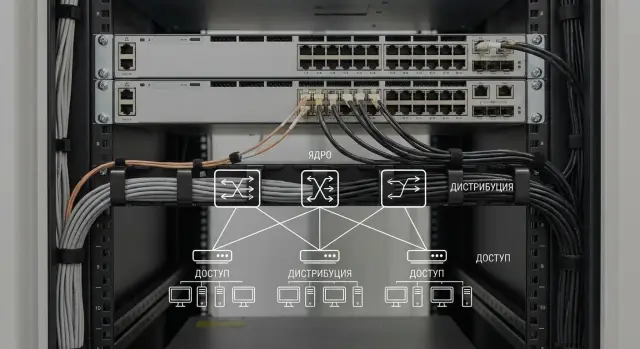
Migration goal and what we are changing
A distributed campus core is two powerful switching/routing points that operate as the network core and serve floors, buildings and server zones. Usually it’s a pair of devices placed in different racks or rooms so that one failure does not "take down" the entire campus.
When migrating to Cisco Catalyst 9500 as the distributed core, we replace the old central switches with a new pair. Along with that, uplink speeds, redundancy design and gateway logic often change.
In practice, replacements happen for several reasons. The old core hits performance limits (many VLANs, routes and heavy Wi‑Fi or video traffic), lacks required features (telemetry, modern protocols, secure managed access) or becomes risky to maintain. Another motivation is reliability: ensuring a single cable break or reboot doesn’t cause office downtime.
For users, changes are usually noticeable only at cutover: some networks may briefly lose gateway access, sessions may drop, telephony or VDI will reconnect. With a careful plan this is minutes, not hours. It’s important to agree on critical services and the change window in advance when brief unavailability is acceptable.
Key risks to control:
- L2 loops caused by wrongly connected links or STP issues at tie points.
- Routing mistakes: incorrect static routes, wrong IGP settings, mismatched metrics.
- Moving VLAN gateways (SVI) without prepared DHCP, ARP and security dependencies.
- Incorrect uplink connections to distribution, server zones or providers (wrong port or mode).
- MTU, speed/duplex or optics mismatches that cause losses.
The essence of migration is simple: move core functions to the Catalyst 9500 so addressing and policies remain predictable and resilience improves—without introducing new hidden single points of failure.
Target design: roles, L2/L3 boundaries and redundancy
A common model for a campus is two Catalyst 9500 at the core, below them distribution (aggregation) and access layers. The core handles inter‑segment routing, resilience and fast transit, not "port distribution."
The main architectural decision is where L2 ends and L3 begins. Extending large L2 domains to the core "as before" carries old problems: lengthy STP reconvergence, broadcast noise and complex dependent VLANs. It’s usually better to keep L2 at the access or distribution layer and run L3 links to the core. That way a failure or loop in one building won’t "take down" the entire campus.
Before migration, lock down basic decisions: where SVIs will live (distribution or core), how distribution connects (L3 point‑to‑point across two independent links), redundancy (two core devices in different racks and power feeds), which FHRP to use (HSRP or VRRP with unified timers), and which routing protocol to choose (often OSPF; static only for very small designs; BGP when multiple domains and strict policies exist).
A typical idea for two buildings and a data center: each building has distribution and L3 links from it to both 9500s. User VLANs stay local while the core handles routing and aggregated prefixes. This limits dependencies affected by cutover and makes the change window calmer.
Preparation: data collection and documenting current state
Before migration it’s less about “configuring the new Catalyst 9500” and more about fully understanding how the network currently behaves. Most post‑cutover incidents stem not from the switch model but from small dependencies: an unexpected DHCP relay on one SVI, a nonstandard MTU on an uplink, a forgotten ACL for printers or quirks of a Wi‑Fi controller.
Start with an inventory of logic: VLANs and their purposes, SVIs and subnets, default gateways for segments, ACLs (including direction), DHCP relay (ip helper‑address), MTU, QoS and multicast (PIM/IGMP if used). If you have VRF, separate routing tables or static routes to "special" networks, isolate these so they aren’t lost during migration.
Then collect L3 dependencies: who are neighbors (firewall, provider CE, DC, Wi‑Fi controllers, branch routers), which protocols run between them (OSPF/BGP/EIGRP or static), timers and policies. Agree in advance which services owners must confirm: internet access, telephony, key business systems, Wi‑Fi, server access.
Before the window check the "physical layer": optics and speeds match at both ends, LACP correctness (where used), and trunk/access modes and allowed VLAN lists.
Minimum snapshot of "as‑is":
- Backups of configs for all affected devices and software version records.
- State snapshots: routing tables, neighbor states (L2 and L3), port and aggregation status.
- List of critical interfaces and where they lead (port, device, contact owner).
- Communication plan: who is on call during the window, who accepts services, who gives the "ok/not ok."
- Success criteria before start: what must be working within the first 10–15 minutes after cutover.
If the campus is a government organization or university, agree on acceptance: network engineers verify routing and neighbors, security team verifies firewall traffic flow, and application teams check their services using a short checklist.
Change window: how to plan and stay in control
The change window should be short, controlled and include clear stop/go points. The principle: at each step you either confidently proceed or quickly revert—don’t guess what broke.
Choosing time and duration
Pick a period with minimal business load and with available backup personnel: on‑call engineer, administrator of critical systems (telephony, Wi‑Fi, business apps) and someone who can open the server room. Allow time padding overall, but keep short stages of 10–20 minutes each with checks.
Agree on a single communication channel and a rule for recording actions: who executed commands or cable moves and when. This greatly simplifies rollback.
Roles and control points
Minimum role matrix for the window:
- Change executor: runs commands and performs cabling moves.
- Observer: watches monitoring, logs and user reports.
- Service owner: confirms critical applications work.
- Decision maker: gives go/no‑go for stage continuation.
Prepare "hardware" beforehand: labeled patch cords, spare SFPs, working console access (preferably two independent methods), power and spare ports. Small items like a wrong transceiver can eat half the window.
Define go/no‑go points in advance. For example, continue if you have console access to both core switches and uplinks are visible, reachability to core gateways and critical servers is confirmed, no signs of L2 loops or broadcast/unknown traffic spikes, and rollback steps are clear including the physical cabling plan.
Preconfiguration of the Catalyst 9500 before production
Do as much configuration as possible beforehand while ensuring the new core does not affect production before the window.
Start with management: management VRF or a separate mgmt VLAN (as per your practice), AAA (if used), NTP, syslog and SNMP. Verify logs are sent to the correct server, time sync works, and SSH access is limited to expected addresses.
Then prepare VLANs and SVIs. SVI IP addresses are usually moved as‑is, and ACLs/policies should be made readable with consistent names and clear comments. If rules have proliferated, you can remove obvious duplicates but avoid "creative" changes—only modify what’s necessary for compatibility.
For uplinks and key nodes build LACP Port‑Channels in advance. Port numbers, LACP mode and VLAN sets should match distribution/aggregation expectations. A safe practice is to bring physical ports up but keep the Port‑Channel administratively down until cutover.
Routing and neighbors can also be prepared: configure OSPF/BGP processes, networks and policies, but keep interfaces shutdown or avoid announcing production prefixes so new paths do not appear early.
Before the window re‑verify compatibility: STP mode (PVST/RPVST/MST) and root priorities, PortFast and BPDU Guard on access, UDLD on optics if used, identical MTU on L3 links, and matching speed/duplex and trunk parameters on critical uplinks.
Cutover procedure: step‑by‑step migration scenario
A scenario that gives maximum control usually looks like: confirm the network is healthy, connect the new core in parallel, and only then move roles and traffic.
Before starting run prechecks on the old core and distribution: uplinks must be up/up without CRC/input errors; MAC and ARP tables populated as expected; STP without frequent recalculations; routing neighbors (OSPF/EIGRP/BGP) stable. If instability exists already, the change window will quickly become troubleshooting of legacy issues.
A practical sequence:
-
Connect new uplinks to the Catalyst 9500 in parallel but do not change gateways or routing. Ensure ports come up, EtherChannel (if used) forms, and no unexpected STP blocks occur.
-
Move distribution uplinks to the new core in small batches (by building, rack or pair of switches). After each "mini‑wave" verify key services (AD/DNS, telephony, Wi‑Fi controllers) so the risk zone stays small.
-
When L2 topology is stable, move the L3 role: switch the active HSRP/VRRP (priorities, preempt) and enable the required SVIs on the new core. If possible do this by VLAN groups and immediately verify default route and aggregated routes.
-
Allow convergence time and verify traffic actually flows via the new core: no asymmetry, no unexpected return via old links, and no latency increase.
-
Record results: save configs, capture statuses and counters, and note exact times of key actions.
During stabilization focus on simple metrics: interface errors and drops, CPU/memory load, STP changes, routing neighbor state and user reports across segments (office, Wi‑Fi, telephony). If degradation follows a particular step, roll back to the last stable state rather than trying to fix “on the fly” mid‑migration.
Rollback plan: what counts as a failure and how to return
A rollback exists so the team has one clear option under pressure. Agree in advance what is an incident, who decides rollback and how long to try fixes before reverting.
Failure criteria (triggers)
Rollback is typically triggered by symptoms that materially impact operations:
- Critical services unavailable (AD/DNS, telephony, access to key systems);
- Routing instability: neighbors drop, prefixes disappear or constantly change;
- Signs of L2 loop: sudden broadcast/unknown unicast spikes, rising CPU on switches, a port storm;
- Mass packet loss or high latency on major paths;
- Loss of management: no network access and no stable out‑of‑band path.
Set time thresholds in advance. For example: if inter‑building connectivity isn’t restored within 10 minutes or telephony is down, move to rollback rather than trying "one more tweak."
Fastest and simplest rollback
The most reliable rollback is to return traffic to the old core via the same physical paths you used to move it: move uplinks/trunks back to their original devices and restore gateway roles (FHRP priorities, STP root priority and routing metrics).
Keep console access to new and old cores (and key distribution) on hand, a cable map with labeled ports, saved configs and pre‑change show outputs.
Rollback safely: perform one block of actions, then a short reachability and protocol state check. After service restoration record a timeline: what changed, which symptom appeared, at which step, and which counters/logs confirm it.
Common pitfalls and mistakes when migrating the core
Even when the new switch config "looks like the old one," problems usually occur at the edges: where L2 meets L3, where aggregations form, and where security policies unexpectedly apply.
L2: trunks and STP
The most common error is an incorrect allowed VLAN list on a trunk. That can make segments "disappear" only on parts of the site. Another frequent fault is a mismatched native VLAN: traffic gets misclassified, loops appear or symptoms “wander.”
Also check who becomes the STP root. If the access layer or an old switch becomes root after cutover, the campus may shift to backup links and encounter unexpected blocking.
L3 and security: losing management by missing one rule
On L3 people often forget static routes (to management, monitoring, OOB, service subnets) or set the wrong next‑hop. Another risk is SVI IP conflicts: if old and new gateways are briefly active simultaneously, ARP will "race" and users will see session drops.
With ACLs the story is similar: a rule applied to the wrong interface or in the wrong direction can cut off SSH/SNMP or block log collection. A typical symptom: "pings work but monitoring is dead."
Aggregations and operational organization
Port‑channel errors are simple but painful: mismatched LACP modes, differing Port‑Channel parameters or speed mismatches. The link may appear connected, but traffic either only uses one member or none at all.
To avoid finger pointing, define go/no‑go criteria (what must work in the first 10 minutes), one service acceptance owner (connectivity, telephony, Wi‑Fi, key apps) and a clear rollback owner.
Example: after cutover Wi‑Fi failed in one building. The cause turned out to be that the WLC trunk missed the required VLAN due to allowed VLAN lists. These issues are found in minutes if checks and owners are defined beforehand.
Post‑cutover checklist: quick 10–15 minute checks
Immediately after moving traffic to the new core you want to know two things quickly: the network is alive and behaving as expected.
1) Check hardware and basic state
Verify software version and uptime (to rule out unexpected reboots), temperature and power, CPU and memory load. If logical redundancy is used (e.g., StackWise Virtual), ensure active/standby roles match the plan and there are no constant role flips.
Then check uplinks to distribution: interfaces up, no error spikes or discards. Rising input errors/CRC or fluctuating speed often indicate optics/patch or negotiation issues.
2) L2/L3 and services
Confirm Spanning Tree selected the intended root and there are no unexpected blocked ports on critical links. Ensure the MAC table is learning and updating on trunks.
On L3: expected prefixes appear in the routing table, routing neighbors are FULL/ESTABLISHED, and HSRP/VRRP roles match the plan. Inspect ARP: mass incomplete entries or frequent MAC changes for the gateway suggest loops or IP duplication.
For final verification pick 3–5 control services and test from different segments: DNS, AD/LDAP, telephony, Wi‑Fi controller/gateway and a key app (e.g., ERP). Review critical logs and ensure devices appear in monitoring and interface graphs update.
Command set for verification: what to look at and what’s normal
After cutover quickly confirm two areas: the physical plane (ports, optics, errors) and the logical plane (aggregations, STP, routing, gateways).
Quick command set
! Порты, ошибки, оптика
show interfaces status
show interfaces counters errors
show interface transceiver detail

! LACP и EtherChannel
show etherchannel summary
show lacp neighbor

! STP
show spanning-tree summary
show spanning-tree vlan <X>

! L3 и таблицы
show ip interface brief
show ip route
show arp
show ip ospf neighbor
! или, если у вас BGP
show ip bgp summary

! Шлюзы первого хопа (выберите свой протокол)
show standby brief
show vrrp brief

! Быстрый траблшутинг
ping <IP> source <SOURCE_IP>
traceroute <IP> source <SOURCE_IP>
show logging | include (UPDOWN|LINEPROTO|SPANTREE|LACP|HSRP|VRRP|OSPF|BGP)
Note: the fenced block above is preserved as in the original.
What to consider normal
Interfaces: essential uplinks are up/up, speed and duplex match expectations, and error/CRC/drop counters are not rising. Optics show reasonable Rx/Tx levels and no module issues.
LACP: EtherChannel shows operational (P) on member ports, not (I) individual or (s) suspended. show lacp neighbor shows neighbors on all members.
STP: topology is stable, no frequent topology changes, root is expected and critical ports are forwarding.
L3: SVIs or routed ports are up, default route and key networks appear in show ip route, ARP is populated for active segments. For OSPF/BGP neighbors should be FULL/Established without constant flapping.
HSRP/VRRP: active/standby roles match the plan and are visible on both nodes. Source‑based pings to critical subnets usually validate routing and return paths.
Example campus scenario: a step‑by‑step view
Inputs: two buildings (A and B), three access switches in each, a separate server room with multiple racks and an old core on two switches. Goal: move to Catalyst 9500 as a distributed core with no major downtime, keeping manageability and a clear rollback.
To reduce risk, migrate in stages and don’t touch everything at once. Weekend night windows are common:
- Stage 1: Building A (move access uplinks to the new core, verify users).
- Stage 2: Building B (repeat and compare behavior).
- Stage 3: Server room (move server aggregation and key L3 gateways).
- Stage 4: Cleanup (disconnect old links, align routing, final verification).
At each stage non‑network engineers should also perform checks. A short business checklist could be: open email (web and client), access ERP, make a test IP‑phone call, send a test print, reconnect to Wi‑Fi and authenticate.
Monitor a few metrics closely for the first 24 hours: port error growth, link flaps, CPU/memory on the core, and recovery time after a link replug. Consider migration complete when two business days pass without repeated incidents and all critical services pass acceptance. Then document exactly what changed: final L2/L3 diagrams, port/VLAN lists, routing, software versions and who signed off from the business.
After migration: consolidate results and plan next steps
After cutover it’s important not only to confirm "it works" but to capture the new state. Details fade in a week and temporary fixes can become permanent.
Record the as‑built facts
Collect an as‑built package. A useful minimum:
- Updated logical diagram (core, distribution, L2/L3 boundaries, redundancy);
- Port table: what’s connected to each uplink, which ports are in Port‑Channel, speeds and transceivers;
- VLAN and SVI list, current IP subnets and gateways, where DHCP relay is enabled and which ACLs apply;
- Final configs and backups with dates and change window identifiers;
- Baseline "normal" metrics: latency, loss, link utilization, CPU/memory, routing and neighbor counts.
A practical reason: if one building later "sometimes works", often the uplink was moved to a different port and the port table wasn’t updated.
Make checks a standard
Define a short post‑change regimen: which commands to run, which counters are alarming, who confirms results and where logs are stored. Minor fine tuning should be scheduled in separate small windows: segmentation improvements, cleanup of unused VLANs, tightening trunk allowed VLANs, setting up alerts and dashboards. If monitoring isn’t updated it will keep alerting on the old core and remain blind to issues on the new one.
Also evaluate headroom for 1–3 years: uplink capacity, routing table growth, readiness for new buildings and services, and failure scenarios (single link break, single core device failure, power loss in a rack).
If migration is complex or more phases remain, consider engaging a systems integrator for planning and overnight change support. For example, GSE.kz as a vendor and integrator of IT infrastructure in Kazakhstan can deliver end‑to‑end: architecture, hardware supply, deployment and support.
Frequently asked questions
How much downtime is typical when migrating the core to Catalyst 9500?
Typically the only noticeable impact is at the moment of cutover: some VLANs may briefly lose gateway access, active sessions can drop, and telephony or VDI will reconnect. With a proper plan, this is measured in minutes, provided critical services and the change window were agreed in advance.
Is it better to extend L2 to the core or lift L3 up to the Catalyst 9500?
A safe approach for a campus is to limit large L2 domains to the access or distribution layers and bring up L3 links to the core. That way a loop or failure in one building doesn’t affect the entire campus, and convergence after changes is faster and more predictable.
What should be collected and recorded before the change window?
First and foremost, document the network as it actually operates: VLANs and SVIs, gateway locations, DHCP relay, ACLs, MTU, QoS and multicast, plus static routes and VRFs if present. Most post-cutover failures come from small dependencies that weren’t migrated.
Which trunk and STP mistakes most often break a campus during migration?
Check trunk allowed VLANs and native VLANs—these commonly cause segments to “disappear” or create odd symptoms. Also verify who becomes the STP root after the change; if the wrong device is root, traffic can shift to backup links and create unexpected blocks.
How to preconfigure Catalyst 9500 so it does not affect the network before cutover?
Plan so the new core doesn’t affect production before the window: prepare management (NTP, syslog, SNMP, AAA), VLAN/SVIs and Port‑Channels, but keep critical interfaces shut or don’t advertise production prefixes. This reduces the chance that the network will select new paths prematurely.
How to safely move VLAN gateways (HSRP/VRRP) to the new core?
Choose one FHRP (HSRP or VRRP) and align timers, priorities and preempt behavior in advance. During cutover avoid a situation where the old and new gateway are both active in the same VLAN, because ARP will “flap” and users will see session drops.
Which routing to choose for migration: OSPF, static or BGP?
OSPF is often the default in a campus because it provides clear and reasonably fast convergence; static routes are suitable for very small, simple designs. BGP may be needed in complex domains or when strict policy control is required, but introduce it deliberately to avoid operational complexity.
When should you decide to rollback and how to roll back fastest?
Define triggers that genuinely impact operations: AD/DNS or telephony down, routing instability (neighbors flapping or prefixes disappearing), signs of an L2 loop, massive packet loss, or loss of management. If the issue isn’t resolved within the agreed time threshold, rollback to the old core via the same physical paths used to move traffic.
Why do losses or “flapping” speeds appear on uplinks after cutover?
Common causes are MTU mismatches, fiber/optics problems, mismatched speeds or LACP/Port‑Channel misconfiguration—resulting in a link that looks up but doesn’t carry traffic properly. Before the window check SFP types, Rx/Tx levels, speed/duplex and consistent aggregation settings on both ends.
What quick checks should be done immediately after moving traffic to the new core?
Check core physical and protocol basics: `show interfaces counters errors`, `show etherchannel summary`, `show spanning-tree summary`, `show ip route`, `show arp`, `show ip ospf neighbor` or `show ip bgp summary`, and for first‑hop gateways — `show standby brief` or `show vrrp brief`. Normal is for key uplinks to be up/up without rising CRC or drops, STP stable, routing neighbors not flapping, and ARP without massive incompletes or constant gateway MAC changes.
