7 min read
Choosing storage: NAS, SAN or object storage for your workloads
A practical guide to choosing storage: NAS, SAN or object storage by workload (files, VMs, backups, archive), network needs, scalability and total cost of ownership.
Where the choice begins: tasks matter more than storage type
A bad start sounds like: “we need more space, let’s buy more disks.” Disks only solve capacity. Soon you discover latency, outages, complex networking, expensive licenses and backups that won’t finish in the available window. So the choice of storage should start not with the brand or form factor, but with the tasks and how people and services will read and write data.
Put simply, there are three main ways to store and serve data.
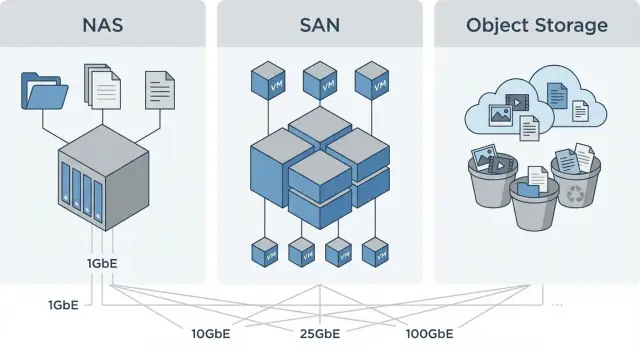
File storage (NAS) is like a shared folder: users and apps work with files and directories. Block storage (SAN) is like giving a server a raw disk: the server creates the filesystem and manages access. Object storage keeps data as “objects” with metadata: it’s convenient for large volumes, backups and archiving, but not always suitable where low latency and a disk-like experience are required.
Workloads often conflict. Virtual machines and databases need steady throughput and low latency. Archive and backups want cheap capacity and easy scaling. Shared files require clear access controls and user convenience. Trying to solve everything with one storage type typically leads to overpaying or operational headaches.
Before choosing NAS, SAN or object storage, gather a minimum set of workload inputs. Answer a few key questions:
- How much data do you have now and what growth is expected in 1–3 years?
- How many users or servers will access the storage concurrently?
- What’s more important: response time or cost per terabyte?
- What downtime is acceptable and do you need dual controllers, replication, clusters?
- How are backups organized: frequency, backup window, retention?
A simple example: a school or clinic may have shared folders, a virtualization server and a long-term archive of images. For folders NAS is often enough, for VMs SAN is usually preferable, and for archive and backups object storage is often the most cost-effective. Systems integrators, including GSE.kz, often start with this task-based separation and then choose platform, network and budget.
NAS, SAN and object: a short comparison without jargon
All three answer the same question: where to store data. The difference is how applications work with it and what network is required. When choosing storage, think about scenarios rather than names.
NAS: simplest for shared files
NAS is usually chosen when you need shared folders for people and teams: documents, projects, scans, media. It’s valued for simple setup and quick start.
The common limitation is that NAS may struggle under very demanding workloads (lots of small operations, heavy contention). This becomes noticeable when trying to host critical VMs or heavy databases on NAS.
SAN: when stable throughput and latency matter
SAN is often selected for virtualization and databases where predictable latency and continuous high load matter. Entry costs are usually higher: more complex networking, stricter configuration requirements and greater risk of mistakes without experience.
Object: great for large volumes, but not for everything
Object storage often looks like “low cost per gigabyte” and is excellent for backups and archive. But it’s not a universal replacement: some applications can’t work with it directly and access may be slower than needed for active workloads.
Practical guideline:
- Files and shared folders — mostly NAS.
- VMs and databases — mostly SAN.
- Backups — often object storage or NAS (for smaller volumes).
- Long-term archive — usually object storage.
Example: a clinic stores images, documents and virtual servers. Images and folders suit NAS, virtualization and the patient database sit better on SAN, and backups and old studies are moved to object storage so hot space isn’t wasted on cold data.
Files and shared folders: when NAS is the best fit
If the main task is shared folders for documents, projects and media, NAS is usually the most straightforward option. Users access files like a regular network drive: open, save, search, while IT configures access per groups and departments.
For file workloads what matters more than peak benchmark speed is predictability in daily use. Look at access control support (who can see and change what), proper file locking (so two people don’t corrupt a document), easy protection (snapshots, replication) and clear recovery after accidental deletion.
NAS can slow down noticeably when load becomes uneven and heavy. Typical signals: thousands of small files (scans, logs, source code), many simultaneous connections, active indexing, frequent renames/moves and archive unpacking.
In such cases, the cure is not just a more powerful NAS but data separation. A practical approach: keep “hot” working folders on NAS and move “cold” files (old projects, media libraries, archives) to object storage. Object systems handle large volumes and long retention comfortably, and access can be governed by lifecycle rules and roles.
If purchasing infrastructure for a government body, school or clinic, check in advance that the chosen NAS meets local support and on-site service requirements. In Kazakhstan this is often more important than raw specification numbers.
VMs and databases: why SAN often wins
Virtual machines and databases usually care less about peak throughput and more about predictability. They need low latency, steady IOPS and consistent response times, especially when dozens of VMs and several heavy services live on one storage. If everyone runs reports at noon and backups at night, the disk subsystem must not become a lottery.
SAN often wins here because it’s designed for block access and controlled performance. It’s easier to separate storage traffic from regular network traffic, maintain steady load and plan growth accurately. Critical VMs, virtualization clusters and databases often feel more comfortable on SAN.
A commonly overlooked point: throughput (MB/s) matters for large sequential operations, while IOPS and latency matter for many small operations. Databases and live VMs usually hit IOPS and latency limits even if MB/s numbers look modest.
NAS can also be used for VMs, but usually with compromises. That works when load is moderate, latency requirements are not strict, or simplicity is prioritized (for instance when shared files are needed nearby). In such cases you must carefully configure the network and test behavior under peaks.
Check yourself:
- Do you need stable latency during peaks, or are slowdowns acceptable?
- Is the workload many small operations (IOPS) or mostly large files (MB/s)?
- How many virtualization hosts and how quickly will the VM fleet grow?
- Can storage traffic be isolated on a separate network?
Example: with 3–5 virtualization hosts running accounting, mail and a 1C database, the decision often depends on whether you can guarantee low latency during business hours. In such environments SAN usually gives more predictability, while NAS requires a more careful network design and acceptance of possible drops under heavy load.
Backups: choosing storage for backup workloads
Choose backup storage based on how nightly writes happen and how you will restore. For backups what matters more than low latency is predictable write throughput, large capacity, reliability and isolation of copies from production.
Before choosing NAS, SAN or object storage for backups, answer:
- How much data is written each night and what backup window is realistic?
- What is the most common restore scenario: single file, whole VM, database?
- How many days/months to keep copies and how many full versions are needed?
- Is immutability required (protection against ransomware and accidental deletion)?
- Where will the second copy be: another site, separate network, offline?
Object storage often fits nearly perfectly as a backup target: it scales well and is convenient for large volumes. Limitations: restores can be slower than local disk arrays, and compatibility depends on backup software (it must support writing to object storage).
NAS is convenient for backups when you need a quick SMB/NFS repository, for office files or small VMs. The main risk is mixing production and backups in the same domain and network. In case of infection backup copies can be lost together with production data.
Good practice: use a separate storage contour for backups: separate credentials, separate network rules, its own retention policy and immutable copies where possible. For example, keep a fast repository for daily incrementals near compute, and send a second copy to isolated object storage.
Archive and long-term retention: when object storage pays off
Backup and archive are often confused, but they have different goals. Backup is for quick recovery after failure: it’s updated regularly and restorations are tested. Archive keeps data for years; access is rare but retention and preservation requirements are stricter.
Object storage is often the most convenient choice for archive, especially as volumes grow. With objects you focus on retention and lifecycle rules rather than speed.
Why object storage is convenient for archive
In object storage data is stored as independent objects with metadata. That simplifies long-term retention and policy management: what to keep for 1 year, 5 years, or what cannot be deleted until a set date.
Typical example: a hospital stores patient images and documents for many years but only retrieves them on request. Reliability, deletion control and searchable metadata matter more than minimal latency.
Things to plan so archive doesn’t become an unsearchable warehouse
Problems usually start with data organization and access rules, not cost. Before launching an archive, verify:
- How you will search: by name, date, contract number, patient or project.
- What metadata is mandatory and who fills it.
- Retention and deletion policies: timeframes, deletion locks, who can remove locks.
- Regulatory and audit requirements: who accessed data, what changed, how integrity is proven.
- Retrieval time: how many minutes or hours are acceptable and what to do if data is needed urgently.
If you work with government or financial data, agree these rules with security and legal teams and hand implementation to an experienced team so policies and access controls aren’t just on paper.
Network requirements: speed, latency and traffic isolation
The network often becomes the bottleneck that makes storage seem slow even when disks are fine. NAS typically hits throughput and overloaded shared switches. SAN is most affected by latency and packet loss. Object storage can suffer when handling many small operations over a shared network without prioritization.
Speed guidelines are useful but must be translated into real-world scenarios. Even with fast ports, results depend on client count, settings, cable quality, switch load and competing traffic (video, backups, office services).
- 1 GbE — suitable for small file tasks and infrequent backups, but easily saturated.
- 10 GbE — baseline for most NAS and reasonable backup windows.
- 25 GbE — a good balance for virtualization on NAS, fast backups and replication.
- 40/100 GbE — needed when many hosts, dense VM deployments, large databases or multiple concurrent backup streams exist.
For VMs and databases latency and stability matter more than peak throughput. Virtualization generates many small operations, and micro-losses, jitter or buffer overloads cause pauses even when utilization appears low.
A separate network or at least segmentation usually pays back in predictability. This is especially true when choosing storage for multiple different workloads at once.
Short set of best practices:
- Separate storage, backup and regular traffic by VLAN.
- Enable QoS/prioritization for critical VMs and databases.
- Provide redundancy: dual paths, dual switches where needed.
- Check MTU and NIC settings to avoid extra CPU load.
- Plan for growth: adding ports early is easier than rearchitecting later.
Example: if users actively work with files on NAS during the day and a full backup runs at night, isolate backup traffic or schedule windows and limits to avoid affecting users and restores.
Total cost of ownership: how to compare without self-deception
The sticker price of hardware rarely equals actual storage costs. For fair comparison keep two parts in mind: CAPEX (one-time purchase) and OPEX (ongoing costs). This matters if you choose storage not just for now but for 3–5 years.
CAPEX includes controllers, disks, shelves, options and sometimes initial licenses. OPEX covers power, cooling, support, disk replacements, admin time and downtime caused by architectural mistakes.
Hidden costs often include network (switches, ports, optics/cables), licenses/subscriptions, racks and UPS, commissioning and data migration, operations and monitoring.
Scaling is counted differently per model. With NAS you often add drives or expand a pool but may hit a single-controller limit. SAN can scale performance and capacity by adding shelves but may require network upgrades and HBA replacements. Object storage typically scales capacity by adding nodes, but you still need space, power and a well-designed network.
Compare not “price per raw TB” but two metrics: price per usable TB and price for required performance. Usable TB accounts for RAID/erasure coding, reserve capacity for growth, snapshots and realistic dedupe.
Example: you need 200 TB for backups and 30 TB of fast storage for VMs. A single “universal” SAN may look convenient when only considering purchase price. But after paying for expensive SSDs, ports and support, it may be cheaper to put backups into separate object storage or NAS and keep the SAN for virtualization. That’s the honest calculation: pay for speed where it’s needed and avoid overpaying elsewhere.
How to choose: a step-by-step plan for IT and the business
A good storage choice starts from how data is used daily. To get IT and the business on the same page, agree on simple rules and validate them with real tasks.
5-step plan
-
Gather all workloads and categorize by “temperature”: what needs to be fast and always available (hot) and what can be stored cheaper and retrieved rarely (cold).
-
Fix recovery requirements in plain language (RPO/RTO): how much data you can lose and how long services must be down after a failure.
-
Estimate data growth for 1–3 years and retention rules: how long to keep backups, how many years to store documents, what cannot be deleted and what can move to archive.
-
Choose architecture (single type or hybrid) and check the network: where low latency is required, where access control matters, and where capacity and backup windows drive the decision.
-
Run tests before buying. Exercise 2–3 typical scenarios: booting VMs, copying a large file set, nightly backup and restore. For a hospital or government body it’s sensible to verify how fast a critical system can be restored and whether the network dips during business hours. Integrators like GSE.kz can usually organize such a pilot using your scenarios so the solution works not just on paper.
Common mistakes when choosing storage
The most common mistake is picking storage by maximum numbers on a spec sheet rather than real needs. The result is either overpaying for speed where capacity and reliability matter more, or skimping on the layer that must host virtual machines and critical services.
Mistake 1: buying the fastest system for archive and backups
Archives and backups are written in large blocks on a schedule and read rarely. Buying an expensive low-latency system for that yields a nice benchmark but poor economics. Often better to split: a fast tier for working data and a larger, cheaper tier for backups and archive.
Mistake 2: everything on one array without priorities
When VMs, shared folders and backups live together, conflicts arise: nightly backups consume IOPS, users complain in the morning, and databases suffer latency. If you keep everything together, define priorities, limits and separate pools, and test peak behavior.
Simple rule: critical services (VMs, DBs) should not depend on whatever backups are doing at the moment.
Mistake 3: underestimating the network
“ We have 10GbE” on paper does not guarantee stable performance. Drops come from overloaded switches, shared user traffic, wrong MTU, lack of path redundancy. For SAN and virtualization latency and predictability are especially important, not just gigabits.
Mistake 4: no growth plan
Storage is often bought “just enough,” then cameras, new VMs, more copies and longer retention are added. Without a growth plan you end up rearchitecting, migrating data and stopping services. At minimum, estimate capacity growth, IOPS growth and how many copies/versions you will actually keep.
Mistake 5: backups exist but recovery isn’t tested
Backups can be created for months but fail on restore. Require regular recovery tests (at least selective) and clear RPO/RTO control. Simple routine: once a month boot a test VM from backup and confirm the service starts and data is readable.
Quick checklist, example and next steps
If you need to decide fast, start with a short checklist. It doesn’t replace a project but quickly shows which storage type will cause the fewest problems.
- Workloads: files, VMs, DBs, backups, archive — what is critical for speed and what just needs reliable storage?
- Capacity and growth: how many TB now, how many in 12–24 months, how does user or VM count change?
- RPO/RTO: how much data can be lost and how fast must recovery occur?
- Network: is there a dedicated network/ports for storage, what speeds, is low latency important?
- Operations: licenses, disks, warranty/service, expansion margin, who will support it?
Example: a typical organization has shared folders, 2–3 virtualization hosts for 30–60 VMs, daily backups and a 5-year document archive. The answer is often a combination: NAS for shared folders, NAS or SAN for virtualization depending on latency and predictability, and object storage for backups and archive to get better economics at scale.
To move from assumptions to a working design:
- Gather inputs: current workloads, growth forecast, RPO/RTO, network and space constraints (racks, power).
- Draft target architecture: what lives where, required network channels, where to isolate traffic.
- Compare total cost of ownership: hardware plus network, support, expansion margin and staffing needs.
- Assess risks: single points of failure, recovery after ransomware, component replacement timelines.
If you need help with selection and design, GSE.kz as a systems integrator can discuss target storage and network architecture, and select server hardware for your needs including rack servers S200, with deployment and support across Kazakhstan.
Frequently asked questions
Where should I begin selecting storage to avoid mistakes?
Start from the workloads and usage profile: **files**, **VMs/DBs**, **backups**, **archive**. Then estimate growth for 1–3 years, acceptable downtime and recovery requirements (how much data you can lose and how quickly services must be restored). Only after that choose the type: NAS is usually for shared folders, SAN — for predictable latency for VMs and databases, object storage — for capacity and long-term retention.
How can I quickly understand whether I need NAS, SAN or object storage?
By default: - **NAS** — when users and applications need access to files and folders (documents, projects, scans). - **SAN** — when you need **stable latency and IOPS** for virtualization and databases. - **Object storage** — when **large capacity**, scalability and retention are important (backups, archive). If you have several different workloads at once, a **hybrid** approach that separates hot and cold data is usually better.
When is NAS really the best choice?
NAS is convenient when you need: - a familiar “network drive” experience; - clear access controls by department/group; - simple file recovery (snapshots, replication); - fast deployment without complex infrastructure. NAS is a poor fit when you expect many **small operations** and high contention (thousands of small files, active search/indexing, many concurrent connections) — performance can become unstable.
Why is SAN often recommended for virtualization and databases?
SAN is recommended for VMs and databases because they require: - **low and predictable latency**; - stable **IOPS** under mixed load; - the ability to isolate storage traffic from the general network; - more predictable behavior during peak periods. If simplicity is more important and load is moderate, VMs can sometimes run on NAS, but the risk of performance drops under peaks is higher.
In which cases is object storage the most economical?
Object storage is a good fit when you need to: - store large amounts of data with clear scalability; - keep data for long periods and access it infrequently; - keep backups/archives separate from production. It’s not always suitable for active working data: not every application works with objects natively, and access can be slower than required for live VMs and databases.
How to choose storage for backups and keep copies safe?
A common problem is mixing production data and backups in the same environment: same credentials, same network segment, same domain. In case of ransomware or an access error, backups can be affected along with production data. Practical minimums: - separate credentials and access policies; - separate network/VLAN or at least traffic restrictions; - retention policies and regular recovery tests. If you need protection against deletion/encryption, verify in advance whether the chosen storage and your backup software support **immutability**.
How does an archive differ from a backup, and why does this affect storage choice?
They serve different purposes: - **Backup** — for restoring after failure. It’s updated regularly and should be quickly restorable. - **Archive** — for long-term retention over years; access is rare, and retention rules are stricter. Archive usually values retention policies, search and metadata more than minimal latency. That’s why object storage is often more convenient: it simplifies managing retention rules and large volumes of cold data.
What kind of network is needed for NAS/SAN/object storage to avoid bottlenecks?
Network guidelines: - **1 GbE** — suitable only for small file tasks and infrequent backups; it fills up quickly. - **10 GbE** — a baseline for most NAS and acceptable backup windows. - **25 GbE** — a good balance for virtualization on NAS, fast replication and backups. - **40/100 GbE** — needed when many hosts, dense virtualization, large DBs or parallel backup streams exist. For VMs/DBs latency, stability and no packet loss matter more than raw gigabits. Segmenting traffic (VLANs) or dedicating storage networks almost always pays off.
How to compare NAS, SAN and object storage costs without self-deception?
Look at total cost of ownership over 3–5 years, not just the upfront hardware bill. Often overlooked items: - network (switches, ports, optics/cables); - licenses/subscriptions and support; - power, cooling, racks, UPS; - admin labor and downtime risks; - the “usable” capacity after RAID/erasure coding, snapshots and realistic deduplication. Compare two metrics: **price per usable TB** and **price for required performance** (IOPS/latency where critical).
What pilot or tests should I run to choose storage for real workloads?
Minimum tests before purchase: - run and operate 2–3 representative VMs under real load; - copy a large dataset and test many small-file operations; - run a nightly backup in your real window and **perform recovery** (file/VM/DB). Also check network behavior under competing traffic and peaks. The goal is not a benchmark record but to verify **stability** and predictability in your scenarios.
