6 min read
Choosing optics, DAC and AOC for switches and servers
A practical guide to choosing optics, DAC and AOC: which modules you need, how to pick lengths and ensure compatibility with switches and servers without overspending or causing downtime.
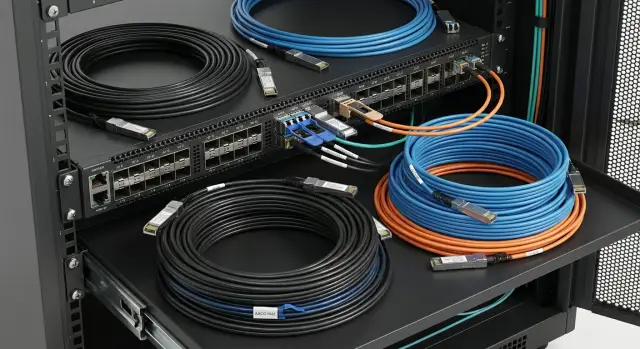
Why it’s worth understanding: common causes of downtime
Link issues almost never appear at purchase time — they surface during installation when equipment is already racked and work windows are short. Downtime often starts with small things: a module fits but the link won’t come up, or it comes up and immediately drops under load.
The most common trap is “the connector looks the same, so it should fit.” In practice, a physically identical SFP or QSFP does not guarantee operation. Port speed, medium type (optics, DAC or AOC), standards (SR/LR etc.), FEC requirements and encoding compatibility (how the switch firmware and NIC accept the transceiver) all matter.
On site, the same causes keep repeating. People buy cheaper modules and the switch refuses a third-party encoding and disables the port. They mix up optics types: buying SR for single-mode, or installing LR on multimode with incompatible patchcords. Speed and mode mismatch happens (e.g., a 25G port but a 10G module, or needing a breakout but buying a full QSFP). Length mistakes occur: the cable is too short or there’s so much excess it’s hard to route without tight bends. Another common story: a DAC used at its limit seems to work but under load errors appear.
The risk of saving money without checking isn’t only “it won’t start.” Worse cases are a link that comes up but shows CRC errors, packet loss, services stalling and hours spent diagnosing.
When you buy, you repeatedly decide the same things: medium (optics, DAC, AOC), speed, length and compatibility. If you lock these parameters in the requirements in advance, the likelihood of installation downtime drops dramatically.
Optics, DAC and AOC: the difference in plain terms
When you buy a switch and NICs for servers, it’s important to choose not only the speed (10G/25G/100G) but also how to connect the ports. There are usually three options: optics (transceivers plus fiber), DAC (copper cable with modules on the ends) and AOC (active optical cable with transceivers on the ends).
Optics is justified when you need longer distances, routing through trays and risers, or protection from interference. You pick SFP/QSFP modules for the speed and fiber type and choose patchcords by length and connector. This is flexible but usually more expensive and requires attention to compatibility.
DAC (Direct Attach Cable) is copper where the cable and heads are essentially one piece. It’s cheaper, easier to procure and great for short in-rack connections. Downsides are obvious: limited length and notable stiffness, which makes routing harder in dense cabling.
AOC looks like DAC but is fiber inside. It’s often chosen inside racks and between neighboring racks: thinner, more flexible, easier on airflow and usually available in longer lengths than DAC. It’s often pricier than DAC but in some cases cheaper than separate transceivers plus patchcords.
Quick length rules of thumb (starting points):
- ~1 m: DAC is usually the most sensible option
- ~5 m: DAC if routing allows; otherwise AOC
- ~20 m: often AOC, or optics if you need module flexibility
-
20 m: typically optics (transceivers plus fiber)
Form-factors and speeds: what must match
Form-factor is the module housing and the port connector. Common ones are SFP (1G), SFP+ (10G), SFP28 (25G), QSFP+ (40G) and QSFP28 (100G). Remember: a module fitting physically into a port is not a guarantee the link will come up.
Speed is set by the combination of port, module and settings. For example, SFP+ is almost always 10G and SFP28 is 25G, but some switches require manual port speed configuration. A QSFP port can operate at 40G or 100G and sometimes split into multiple channels (breakout). Speed expectation errors often appear right at installation.
Designations SR, LR, ER and why they matter
Letters in the module name describe range and medium. SR is usually for short-distance multimode fiber runs inside a rack or room. LR and ER are for longer distances over single-mode fiber. If you use SR instead of LR, the link may not work even if speed and form-factor match.
BiDi is a special case: single-fiber solutions where transmit and receive share one fiber on different wavelengths. These modules are bought in pairs and it’s easy to swap sides by mistake.
Before purchase check at minimum:
- port form-factor (SFP/SFP+/SFP28 or QSFP+/QSFP28)
- required port speed and mode (including breakout if needed)
- fiber type (MMF or SMF) and module class (SR/LR/ER)
- fiber scheme (2 fibers or 1-fiber BiDi)
- encoding compatibility and firmware restrictions of the equipment
Practical example: buying QSFP28 100G “for the future” but the switch port is set to 40G or requires a different module. Result: a delay on installation day and urgent replacement.
How to choose optical modules without surprises
Optics are often bought “by speed and form-factor,” and issues arise at installation: wrong fiber type, wrong connector, insufficient link budget, or the module rejected by equipment due to restrictions.
Start with the physics: single-mode (SM) or multimode (MM). They are not interchangeable. For MM pay attention to fiber class (OM3/OM4); for SM check wavelengths and route requirements. Also verify connectors: LC is most common; sometimes MPO/MTP is needed (for parallel optics). A typical real error: a module with LC is ordered but the cross-connect is MPO via a cassette, and on launch day the correct patchcords are missing.
What to check in the module datasheet
Don’t rely only on a name like “10G SR” or “100G LR.” Compare the numbers:
- wavelength range and fiber type (SM/MM)
- distance (calculate the link budget)
- transmit power and receiver sensitivity
- operating temperature range (commercial or industrial)
- presence of DOM/DDM (optical monitoring)
DOM/DDM is worth requesting almost always: it lets you quickly spot signal degradation, a dirty connector or a bent cable before mass CRCs occur. Exception: very short simple connections where savings matter.
Compatibility with patchcords and the cross-connect
A common trap is not the module but the cabling. Check connector polish type (UPC/APC), correct Tx/Rx pair, bend radii and routing. In dusty environments and active server rooms plan connector cleaning and protective dust caps as part of installation, not as an optional extra.
Lengths and routing: how not to misjudge the meterage
Cable length in a rack seems minor until a connector hits an organizer and the link behaves erratically. Good choices start from the real route: from port to port through cable organizers, accounting for bends and service access.
DAC (copper) has a practical limit. Passive DACs are commonly used at 0.5–3 m, sometimes 5 m, but beyond that signal issues grow and the thick cable becomes hard to manage in dense layouts. If you need to run further within or between racks, copper often stops being a good option: hard to route, doors won’t close easily, extra strain on ports.
AOC often wins where you need more distance but don’t want separate transceivers. It’s thinner and lighter, easier through organizers, and available in longer lengths (e.g., 10–30 m and up depending on standard and speed).
When routing, three things matter: bend radius, tension and route. Don’t over-tighten ties and avoid sharp turns near connectors, especially for AOC and optics. Leave a service loop so modules or cables can be removed without dismantling half the rack.
A practical approach to avoid overpaying or ending up with cable that’s too tight: walk the actual route in the rack and add 10–20% spare; account separately for organizers and sliding shelves; for inter-rack lines add entries into the rack and vertical rises. For DAC avoid lengths at the edge of the specification — choose the next step longer instead of chasing marginal performance.
One small but time-saving detail: end labeling. Many DAC/AOC cables have labeled ends (A/B or To Switch/To Server). Label both ends and record locations immediately.
Compatibility: encoding, firmware and vendor restrictions
Transceiver “encoding” (EEPROM data) is information the module reports: vendor, model, speed, medium type, wavelength and other parameters. A switch or NIC reads this and often decides whether to allow the port to operate. So compatibility is not just about connector and speed but whether the device “accepts” the module.
Compatibility usually falls into three categories: OEM (vendor-branded modules), compatible (coded for a specific vendor) and “universal” (multi-vendor). Universal does not eliminate risks: the same module may work on some hardware revisions and fail on others.
Issues often surface after a firmware update or under load. Typical symptoms: port goes into err-disable, the link drops periodically, CRCs appear, or the module runs hotter than normal. Everything may look fine until LACP or high traffic is enabled.
To reduce risk, ask the supplier for specifics, not promises: a compatibility matrix (device model, software/firmware version, transceiver model), exact part numbers and encoding description, revision and lot (if components changed), and clear replacement conditions if the port won’t come up on your equipment.
A good practice is to include compatibility checks in procurement: supported models and software versions, allowed equivalents and a test on 1–2 ports before ordering the entire batch.
Step-by-step selection algorithm before purchase
A short plan helps avoid guessing.
First, collect facts about ports and tasks: which ports exist on switches and servers (SFP/SFP+/QSFP etc.), what speeds are actually needed, where redundancy is required, and what connectors the patch panels/cross-connects use.
Next, check routes and distances. Don’t rely on building plans — follow the actual cable route inside racks and between racks. Consider entries, trays, spare for routing and bend radii.
Then choose connection types by location. Within a rack, DAC or AOC is often simpler; between racks, optics is chosen more often for distance and easier routing. If uncertain, use scenarios: frequent moves and tight density favor AOC; fixed short runs are often DAC.
Finally, remove compatibility risk before payment: request a test kit (1–2 modules or cables of each type) and verify on your real switches and servers that the link comes up, speed is correct, there are no errors and the device accepts the transceiver.
Quick checks before installation (mini-checklist)
Spend 10–15 minutes on basic checks before inserting modules and running cables. This often saves hours when trays are closed and suddenly one end expects 10G and the other 25G.
Check both ends: the switch port and the server (or second switch). Port labeling, expected speed and form-factor must match. If a port supports several speeds, confirm the configured speed/mode, not just the hardware capability.
Then check the physical side. For optics verify fiber type and connectors (e.g., LC) and clean connectors before mating. Dust and fingerprints are frequent causes of unstable links, especially if cables sat unpacked.
Check length: the cable must reach without strain, following the real path with a small service loop.
After connection, ensure the module is detected and the link stays stable. If in doubt, apply a light load for 5–10 minutes and watch for errors.
Minimal checklist before closing the rack:
- ports and speeds confirmed on both ends
- fiber type/connectors checked and connectors cleaned
- length suits routing with small service margin
- module detected and link stable
- installation recorded and labeled
Common mistakes that waste time and money
The costliest cabling mistakes look small: “wrong module,” “wrong length,” “we’ll fix it on site later.” The result is an assembly stop, a racked system and a link that won’t come up or runs at the wrong speed.
Typical time sinks: buying a module that is “almost right” (e.g., 10G where 25G is expected), mixing up SR and LR, guessing DAC length, forgetting that DAC/AOC cables are fixed-length (purchase the wrong size and you must replace the whole cable), and not ordering spares.
A concrete example: a small server room links two switches and a few servers at 10G. They bought an AOC with extra length, but it wouldn’t pass through the organizer, got pinched by a door and its performance degraded. Another link didn’t come up because a port was configured for 25G. A day was lost finding replacements and reconfiguring.
To avoid these, specify three things in the request: port speed and form-factor, medium type (DAC/AOC or optics and fiber type), and exact length with a small allowance. Also resolve compatibility before buying the batch.
Example: buying modules for a small server room
Scenario: a two-rack server room. Each rack has a ToR switch and 6–8 servers below. You need to link ToR switches between racks and provide an uplink to the core (or to distribution switches).
Inside the rack DAC is often best: short, cheap, minimal failure points. Servers with 10G SFP+ connect to ToR with 1–3 m 10G DAC cables. For 25G SFP28 servers use 25G DAC.
Between racks optics is usually preferred: easier routing, fits cable trays, easier to achieve correct lengths. For 10G that’s usually a pair of SFP+ and a duplex patchcord; for 25G use SFP28; for 100G use QSFP28. A wrong port type or insufficient distance will stop installation.
To estimate needs without surprises: list all ports and speeds, group lines by zone (in-rack, between racks, uplinks), measure actual routes and add a modest spare length, and include 1–2 spare cables/modules per common line type.
Accept the delivery while boxes are on site if possible: bring up a link for each line type, check speed and port errors, run a short load test to watch CRC/drops, then record part numbers, serials and locations.
Next steps: how to formalize requirements and avoid rework
Before purchasing, gather requirements in one document and agree them with those who will install and maintain the network. That’s cheaper than replacing modules, waiting for shipments and rescheduling work.
It helps to document requirements per line (port-to-port). Focus on matching parameters and installation conditions rather than brand: port and form-factor, speed and mode, medium and connector, length and spare, and compatibility (device model and firmware/OS version, encoding requirements).
If unsure, run a pilot on 1–2 lines before mass purchase: confirm the link comes up at the required speed, no port errors, autonegotiation behaves as expected and the module is detected correctly.
If you need a selection tailored to specific servers and switches with pre-checks, it’s usually easiest through a system integrator. For example, GSE.kz (gse.kz) as a manufacturer and system integrator in Kazakhstan often handles specification and bench testing so installers don’t hit a wrong encoding or wrong medium on site.
Frequently asked questions
Where should I start to avoid having the link fail at installation?
Start by fixing four things: the medium (optics, DAC, or AOC), the speed at both ends, the actual cable length along the routing path, and module compatibility with your switch/NIC. If these parameters are agreed in advance, the chance of surprises during installation drops sharply.
When should I choose optics, and when is DAC or AOC better?
Use optics when you need longer distances, flexibility, easy routing through trays or racks, or immunity to interference. DAC is usually best for short in-rack connections when layout isn’t too tight. AOC is chosen when you need a bit more distance or a thinner, more flexible cable without separate transceivers.
What is the practical difference between DAC and AOC?
DAC is a copper cable with fixed heads — cheaper and simple for short runs. AOC looks similar but uses fiber inside, so it’s thinner, easier to route, and available in longer lengths. Decide based on routing convenience and required length: when DAC is at its limit, AOC tends to be more reliable.
Why does the module fit but the link does not come up?
Physical insertion doesn’t guarantee operation. The port speed, supported mode, medium type and the transceiver encoding expected by the device must match. Often manual port speed/mode configuration and checking both ends’ expectations help.
How do I avoid mixing up SR, LR and the fiber type?
SR is typically for short runs over multimode fiber, while LR/ER target longer distances over single-mode fiber. Using SR instead of LR, or LR on multimode with wrong patchcords, often prevents a link from coming up. Always verify fiber type (MM/SM) and required distance, not just speed.
What should I consider when choosing BiDi (single-fiber) optics?
BiDi transmits and receives over one fiber using different wavelengths, so these modules are deployed in pairs and must match sides. Common mistakes are swapping the pair or assuming any single-fiber module will work. If your cross-connect uses a single fiber, verify the BiDi pair suits your scheme and distance.
How do I pick the correct cable length to avoid problems in the rack?
Measure the cable path "as it will be laid": through organizers, entry points, bends and service loops. Add a small service margin so you can access ports without disassembling the rack, but avoid excessive slack that must be bent or squashed. For DAC, don’t choose a length right at the limit — pick the next available size to avoid stability issues under load.
Is DOM/DDM necessary and when can I skip it?
DOM/DDM provides optical parameters so you can spot a dirty connector, bend or signal degradation before CRCs and packet loss appear. It’s recommended for most installations because it saves troubleshooting time. You can skip it only for very short, trivial links where cost is the primary constraint.
How do I avoid issues with transceiver encoding and vendor restrictions?
Devices read EEPROM data from transceivers and may block a port if the encoding or specific revision isn’t acceptable. Ask suppliers for specifics, not vague assurances: your device model, firmware/OS version, exact transceiver part numbers and replacement terms if the link fails. The most reliable approach is to test 1–2 ports on your real hardware before buying a full lot.
How should I write procurement requirements to avoid rework?
List every line as port-to-port in a table: device, port, form-factor, speed/mode, medium and connector type, real routing length. Add a modest spare length and keep 1–2 spare cables or modules for the most common line types so installation won’t stop over a single mistake. If you use a system integrator like GSE.kz, request bench compatibility tests and recorded results for specific hardware and firmware versions.
