7 min read
CDC for Data Marts: Refresh BI Without Full Nightly Dumps
CDC for data marts lets you refresh BI every few minutes without nightly full dumps, reducing load on the source system and the risk of errors.
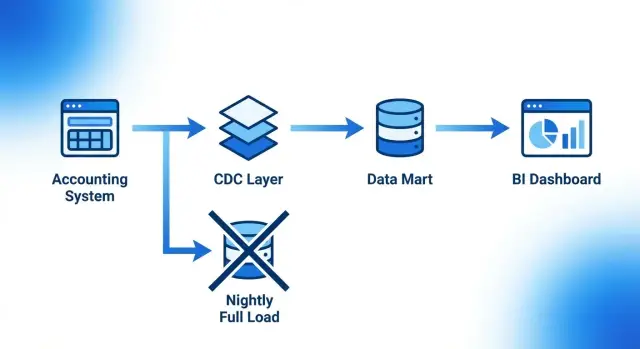
Why nightly full dumps become a problem
Nightly full dumps are often chosen as a quick start: once a day you copy all data, rebuild the mart, and open reports in the morning. When data volumes are small and queries few, this is tolerable. Over time this mode starts to hurt both the business and IT.
Typically the issue looks like this: the load window grows with table size. What used to fit in an hour often becomes 4–6 hours or more. As a result, reports become “yesterday’s” and are refreshed late in the morning or even during the day. For a sales or warehouse manager this means decisions based on stale views: demand has already changed, stock has moved, but BI still shows old numbers.
The longer the load window, the higher the risks. Any error in the middle can leave empty or partially updated data. Teams must freeze changes or accept inconsistencies. The chance the load won’t finish before the workday rises. Investigating incidents becomes harder because every run rewrites everything.
A separate pain point is the source system. Full dumps almost always mean heavy queries with large table scans, sorts and joins. At night this may be acceptable. But once the window overlaps with early shifts, daily routines or morning operations, users notice slowdowns. Sometimes IT reduces update frequency out of caution, and BI becomes even less useful.
A simple example: a retail chain wants sales every 30–60 minutes. With a nightly full dump the mart updates only once, and returns, write-offs and corrections appear in reports only “the next day.” That’s when CDC for data marts becomes a logical step: update only changes, not the whole dataset.
What CDC means in simple words
CDC (change data capture) is a way to update a data mart not by rewriting everything, but by applying only actual changes. Instead of copying every table from the accounting system every night, you record only what truly changed since the last run and pass those changes into the warehouse or mart.
Put simply, CDC works like an “event tape”: the system records changes in the source and allows you to apply them cleanly in BI.
A change is not only a new row but also edits and deletions. Most often this includes:
- an inserted record (for example, a new order)
- an updated record (status, price, or warehouse changed)
- a deleted record (document cancelled or line removed)
Don’t confuse CDC with basic incremental loads. Incremental loads often rely on a rule like “take rows where updated_at > X.” This is faster than a full run but breaks in edge cases: late-arriving edits, backdated corrections, bulk updates without correct timestamps, and deletes.
CDC focuses on the fact of change itself and, ideally, lets you reliably replay history: what changed and in what order.
In BI and marts CDC typically solves four practical problems: it enables more frequent report updates, reduces load on the source by reading less, handles deletes and corrections more accurately, and lets you recompute marts without a long nightly downtime window.
Example: during the day a manager changes an order from “Draft” to “Paid,” and later an accountant corrects the amount. CDC will send both events to the mart and revenue reports update without a nightly full reload.
When CDC fits and when another approach is better
CDC for data marts is generally needed where BI must update frequently and data no longer fits into a “nightly window.” If you load millions of rows daily and users expect changes within an hour or faster, full dumps become a constant risk: they run long, impact the source system and fail for small reasons.
Signs CDC is right for you:
- updates are needed more often than once a day (for example, every 5–15 minutes or every hour)
- tables are large while only a small portion changes
- availability of the accounting system during work hours is critical
- predictable load is required rather than a nightly “spike”
- you need to detect changes quickly for reporting, monitoring or alerts
When you can skip CDC: if changes are rare, data volumes small, and the business is fine with “yesterday’s” picture, it’s simpler and cheaper to keep a daily batch load. For example, an HR mart or reference tables that change a few times a week often don’t justify CDC complexity.
Before choosing, check constraints. Understand how you can get changes: does your DB support reading transaction logs, are triggers an option, is a stable unique key available, and will security allow this access? In regulated organizations (government, finance, healthcare) the blocker is often rights and policies rather than technology.
Also clarify required freshness. “Near real-time” sounds great but costs more: the smaller the latency, the higher the demands for monitoring, error handling and data quality. Start with a simple SLA — minutes, hours or days. Often “hourly” delivers most value without extra complexity.
Common ways to implement CDC
In practice, teams implement CDC for marts in several ways. They differ by where changes are captured and the trade-offs between reliability and maintenance cost.
-
Log-based CDC. Changes are read from the DB transaction log rather than from the working tables. This typically causes minimal load on the source and captures inserts, updates and deletes. Downsides are often organizational: not every DB or plan exposes logs, special rights and careful configuration are needed. Keeping the read position is important to avoid lost events.
-
Triggers and change tables. Triggers on key tables write “what changed” into a separate table. The plus is broad compatibility and a clear change trail. Drawbacks: triggers add write latency, complicate maintenance (especially on schema changes) and can become error sources if not updated.
-
Timestamps or version fields (updated_at, row_version). The simplest: select rows where the change time is newer than the last run. This fits smaller volumes and cases with few deletes. Risks include timezone and timestamp precision issues, backdated fixes, and separate handling for deletes.
-
Event-driven approach. The application publishes change events (e.g., “order updated”) and the mart consumes them. This is suitable when you have multiple systems, high change rates and need near-real-time reports. The cost is developer discipline and queue monitoring.
Choose by simple criteria: load on the source (table scans vs log reads), recovery reliability (is there a resume point?), change completeness (including deletes and bulk edits), maintenance cost (who supports it and how often schema changes), and BI refresh speed requirements.
In large integrations (banks, government or big enterprises) teams often start with log-based CDC for source friendliness, leaving simpler approaches for less critical marts.
A basic data-mart architecture with CDC
To avoid nightly full dumps, it helps to think of the mart in a few simple layers. The architecture is almost always the same; only tools vary. CDC is the mechanism to take only what actually changed.
First, the source: the accounting system and its DB. Agree which tables are “truth” (sales documents, document lines, stock balances, reference data) and which mechanism signals a change: change timestamps, a technical journal, triggers or the transaction log.
Next is an ingestion layer. Its job is to accept the stream without affecting the accounting system and to store it so it can be safely re-read after a failure. This is commonly a message queue, a staging area in a DB, or change log tables. Key idea: the source should not wait for the mart to “digest” data.
Typical steps
A common flow looks like:
- read changes from the source and record the read position (offset)
- store raw changes in staging without heavy calculations
- apply transformation rules: normalize reference data, calculate metrics, build facts and dimensions
- publish to the mart so BI sees a consistent view (for example, in batches)
- update a freshness marker for reports
BI usually boils down to two questions: how often to refresh (every 5 minutes, hourly, or on events) and how to show users the “data as of” time. A simple solution is a status table in the mart and a dashboard field like “data as of: 10:35.”
Plan for logging. Besides errors, record counts of accepted and applied changes, step durations, the last processed position, and reason for any stop. This shortens troubleshooting when “it worked yesterday” but today reports lag.
Step-by-step: deploying CDC for a mart
Start small. Don’t roll out CDC everywhere at once; pick one mart where nightly full dumps hurt the most: sales, stock, payments or requests. You’ll see impact faster and learn what to improve.
A rollout plan:
- pick one mart and 5–10 key metrics to update more frequently
- fix keys and change rules: which fields indicate a change, what is new, how to treat cancellations and corrections
- configure change capture and a place to store them separate from the accounting system (so they can be re-read)
- assemble the pipeline: ingest, transform, write to target; include quality checks (duplicates, gaps, unexpected spikes)
- define schedule and controls: refresh frequency, which metrics to monitor (lag, volume, errors) and who gets alerts
Example: for a sales mart use a compound key (document number + line), treat status or amount changes as updates, and run every 5 minutes. BI will see near-current data while the accounting system stays unharmed by a nightly “rework.”
Finally, ensure the process is reproducible: if deployed on the company infra, the pipeline should behave predictably under load and after failures.
How to reduce load on the accounting system
The principle is simple: don’t read the entire dataset from the accounting system every time. With CDC you take only changes and move heavy processing to the analytics layer.
Capture changes as close to the data as possible with minimal interference: transaction logs, change tables or triggers (if no other option). The fewer heavy queries on the production DB, the more stable it runs.
Move complex transformations outside the source. The accounting system should provide change facts (key, time, operation, new values) rather than compute mart metrics. Aggregations, joins, KPI calculations and reference normalization are better done in the DWH or a staging layer.
Practices that almost always help:
- process in small batches instead of one large operation
- set upper limits on catch-up processing so peaks do not coincide with working hours
- limit fields and tables to only what BI needs
- use a dedicated user with preapproved queries, no production experiments
- run infrequent full reconciliations on a schedule (weekly or monthly) instead of daily full loads
Agree in advance what load is acceptable, when catch-up is allowed, and who gets alerts when lag grows.
Example: if sales reports refresh every 5 minutes, don’t force the accounting system to recalc stock on the fly. Capture movement events and compute balances in the analytics layer with proper resources.
Tricky parts: deletes, duplicates and late-arriving changes
CDC works well while changes are orderly. In reality you’ll see deletes, duplicate deliveries and backdated edits. If unaddressed, reports will overstate totals and users lose trust.
Deletes: how not to overcount
The main mistake is ignoring deletes. Then the mart keeps rows that no longer exist and metrics like sales or stock are inflated.
Common options: soft delete (is_deleted flag), physical deletion in the mart, or writing a deletion marker (tombstone) that nullifies the record in aggregates. For reporting, soft deletes are often safer: you preserve history and can explain discrepancies.
Duplicates and late changes
Change streams often deliver the same event more than once. Loading must be idempotent: a retry should not alter the outcome. A practical approach is a stable event key (transaction_id + table + primary key + version) and an upsert mechanism in the mart.
Late edits look like this: an order closed Monday for 100,000 is corrected on Tuesday to 95,000 with a date from the previous week. If you only load “since yesterday,” the correction is missed. Use a lookback window: reprocess the last N days or hours each run and track a watermark by change time rather than business date.
Rules that save you from surprises:
- store change time and record version in the mart, not only current fields
- deduplicate by stable event key
- use a lookback window for late corrections and recompute affected periods
- version reference data (SCD Type 2) where historical values matter for reports
- record the effective date of business rule changes and reprocess only the necessary interval
If a product category reclassification occurs without SCD, past-quarter reports may shift categories unexpectedly. Store history where it matters, not everywhere.
Typical mistakes and pitfalls with CDC
The most common trap is chasing “near real-time” without clarifying why the business needs it. If reports are viewed hourly, updates every 10 seconds only increase load on source, network and storage without adding value. Start with an SLA: how fast must data appear and what happens if it’s delayed 15–30 minutes.
Second classic issue: unstable record keys. CDC relies on mapping changes to a single entity. Without a unique key, or if keys are reused or renumbered, you’ll get duplicates, split history and strange BI divergences.
Quality issues accumulate quietly. While things run, no one checks event order or completeness and errors persist for weeks. Add basic controls from the start:
- compare counters: how many changes arrived vs applied
- check key uniqueness and absence of duplicates
- monitor lag from source to mart
- alert on sudden drops or surges in volume
Another risk is access and auditing. CDC often exposes raw fields that previously weren’t in reports. If the mart is more widely accessible than the source, you might inadvertently reveal personal or financial data. Implement roles, masking where appropriate, and an audit log.
Finally, have a recovery plan. Example: a consumer died at night, some events were read but not applied. Without replay mechanisms and checkpoints you will either lose changes or apply them twice. Decide in advance where the read position is stored, how to replay a batch and how to quickly restore mart consistency.
Quick checklist before go-live
A short pre-launch review takes an hour or two but often saves weeks of troubleshooting when BI numbers drift.
First, agree on freshness. Don’t say “near real-time”—be specific: e.g., the mart refreshes every 5 minutes and BI is considered current if lag is under 15 minutes. Decide whether minimal latency or predictability (strict schedule) is more important.
Then verify change logic: how you capture INSERT/UPDATE/DELETE and what is “truth” if multiple edits arrive for the same row. Decide delete handling: soft delete or physical removal.
Minimum checks:
- completeness: how many rows and keys arrived and are required entities present
- duplicate control: one business key should not appear twice in active state
- sum checks: simple aggregates (revenue, counts, balances) should match the source on a test window
- monitor lag and volume: events per minute/hour and queue growth
- scheduled reconciliations: daily or weekly comparisons with the source on selected tables
If any item fails, fix it before enabling CDC in production. CDC particularly punishes unnoticed errors that surface only on a monthly report.
Example scenario: updating sales and stock without nightly downtime
Imagine a pharmacy chain: sales run all day, returns happen anytime, and management needs hourly reports. If data only appears in the morning, decisions are blind—especially for perishable stock.
Previously the flow was painful: a nightly full export from the accounting system to the mart. On peak days (inventory, promotions, month-end) it often failed due to locks and long queries. Morning BI often showed “yesterday,” and reruns hit the accounting system again.
With CDC the mart receives only changes: new sales receipts (lines, amounts, discounts), return events (added, cancelled, corrected), document corrections, and movements affecting stock (receipts, write-offs, transfers).
The mart updates in small batches every 10–20 minutes. BI shows numbers plus a clear “last updated” indicator so users know freshness and argue less about which figures to trust.
To keep trust, the team runs a weekly reconciliation: compare key sales totals and ending stock between the mart and the accounting system. Discrepancies are easier to trace to a time window and set of documents rather than rebuilding the entire day.
Next steps: a practical approach to rollout
Start with one or two marts where the pain is greatest: reports waiting until morning, failing full dumps, or a slow accounting system. Quick wins on a small scope build trust and reveal real risks.
Then write simple requirements: how old data can be (5 minutes, an hour, a day), which reports are critical, and what source load is acceptable during work hours. Without these boundaries you may design an overcomplicated solution or build CDC that still doesn’t meet business needs.
Choose a CDC approach that fits your source and constraints, and plan a test with realistic volumes. Demo data often hides issues that appear under production load: delays, locks, spikes and data-quality problems.
A practical 2–4 week plan:
- select 1 mart and 3–5 key metrics
- define change rules (insert, update, delete, late corrections)
- deploy a test contour and run a load replay for a day or week
- set up monitoring for lag, errors and duplicate events
- agree rollback window and readiness criteria for production
Don’t forget infrastructure: where will changes be stored, how fast will they be processed, how will you ensure fault tolerance and backups. Often the bottleneck is not the source but mart computations and disk subsystems.
If you need help with design and rollout, involve assistance during testing. For example, GSE.kz (gse.kz) as a system integrator can help design data-mart architecture and select S200 servers to handle real load so BI refreshes reliably and predictably.
Frequently asked questions
Why do nightly full dumps eventually “break” BI?
Typically the load window grows with table size, and reports start updating too late. On top of that, the risk of failures rises: an error mid-run can leave the mart empty or partially updated, and diagnosing issues gets harder because the whole dataset is rewritten every time.
What is CDC in simple terms?
CDC (change data capture) is a way to send to the mart only what changed in the source: new rows, updates and deletes. The mart applies these changes in order, so data refreshes more often without a daily full recompute.
How is CDC different from a simple incremental load by updated_at?
An incremental load often selects rows like “updated_at > X”, which in practice can miss late edits, backdated corrections or deletions. CDC focuses on the fact of change itself (and typically sees deletes), so it’s more reliable for marts where correctness and order matter.
When is CDC really needed, and when is it unnecessary complexity?
CDC makes sense when data must be refreshed more often than once a day, volumes are large but only a fraction of rows change. If the business is fine with “yesterday’s” numbers and changes are rare, daily batch loads are simpler and cheaper to maintain.
Which CDC approach is most often chosen for data marts?
Reading the database transaction log is the most common choice because it minimally loads the production tables and usually captures insert/update/delete. If log access isn’t possible, teams use triggers or updated_at-based approaches, but those increase load and risk around deletes and correctness.
What must be prepared for CDC to work reliably?
At minimum you need: a stable record key, a way to distinguish operation types (insert/update/delete), a place to receive raw events, and a mechanism to resume safely after failures (offset/position). Without these, changes will be lost or cause duplicates and mismatches in reports.
How does CDC help reduce load on the accounting system?
The key is not querying large production tables repeatedly. With CDC you take only changes and move heavy joins, aggregations and KPI calculations into the analytics layer. That makes the load more even and predictable, and reduces impact on the accounting system.
How should DELETE be handled in a CDC mart?
Deletes must not be ignored: otherwise the mart will keep rows that no longer exist in the source and metrics will be overstated. Common options are soft deletes (a flag), recording a deletion marker (tombstone), or physically removing rows in the mart. For reporting, soft deletes are often safer because they preserve history and make reconciliations easier.
Why do events repeat in CDC and how to protect against that?
Change streams can deliver the same event multiple times, so loads must be idempotent: a retry should not change the result. Practically, events need a stable identifier or version, and the mart should use upsert logic to avoid creating duplicates in facts and dimensions.
Which metrics and checks should be in place before running CDC in production?
Set a clear SLA for freshness and show a visible “data as of” timestamp in BI so users understand lag. Add monitoring for lag from source to mart, counts of accepted vs applied events, and alerts for drops or spikes—these detect issues long before totals drift noticeably.
