8 min read
Capture platform for high-volume scanning: how to compare
How to choose a capture platform for high-volume scanning: comparing Kofax, ABBYY FlexiCapture and Ephesoft for classification, field extraction, validation and integrations with DMS and archive.
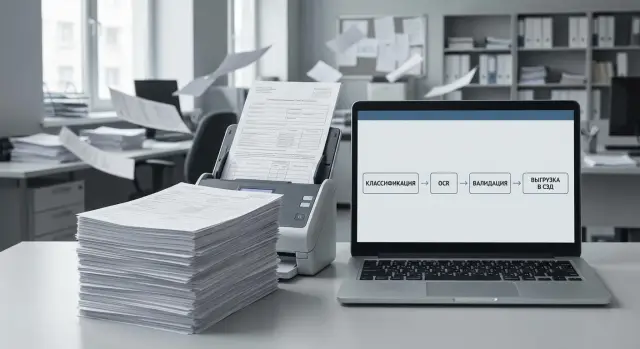
The task of high-volume document intake in simple terms
High-volume document intake is when an organization receives tens or thousands of pages every day: invoices, contracts, applications, delivery notes, letters, medical records, questionnaires. These need to be quickly turned into data and routed into the right folders and cards, not left as stacks of scans.
Several problems usually appear at once: there are many and varied documents, staff spend time on manual entry, and mistakes in details (number, date, IIN/BIN, amount, counterparty) later surface in accounting, procurement or the archive. Even with a good scan, without controls at intake an error easily propagates.
A capture platform for high-volume scanning is different from simple OCR. OCR answers the question: "what is written on the image?" Capture answers more practical questions: "what type of document is this?", "where are the required fields?", "can we trust the recognition?" and "where to send the result."
Think of the process as a conveyor:
- scanning creates files (PDF/TIFF) and basic metadata;
- capture classifies the document and extracts fields;
- validation catches doubtful items and requests checks;
- integration delivers to the DMS/archive and business systems.
It's important to understand the boundary: capture is the intake "conveyor." Document management (DMS/archive) starts where a card, approval routes, storage, access rights and search exist.
Comparing on price or a pretty demo is often misleading. Demos show one perfectly prepared template. In reality one "invoice" can have 20 variants, stamps may cover text, and some files arrive from phones. So compare on your documents and on how much manual work remains after go-live.
Gather requirements before comparing platforms
Comparing Kofax, ABBYY FlexiCapture and Ephesoft makes sense only after you fix what will enter the system and what output you expect. Otherwise the discussion will quickly reduce to a feature list that may be irrelevant in a real flow.
Start with the incoming stream. Different types behave differently: invoices and acts are usually more structured, while contracts, letters and applications often arrive in free form and with varied print quality. Note handwritten fields, stamps, signatures, multi-page attachments and mixed bundles separately.
Then measure volumes and the "dirtiness" of the flow. It's important not only the average pages per day, but also peaks (for example, month-end) and the share of poor scans: skew, faint printing, shadows from staples, phone photos. This directly affects operator speed, OCR accuracy and the volume of manual verification.
To make requirements testable, fix a short set of criteria: which documents are a priority and which fields are mandatory; pages and batches per day and the maximum peak; within how many minutes or hours data must reach the DMS; where the system can be hosted (on-prem, your data center, isolated perimeter); which roles are needed (operator, verifier/validator, administrator).
Example: if incoming mail must reach the DMS within 30 minutes of scanning and some documents arrive "crooked," you will need not only good recognition but also a clear process of queues, validation and SLA control. Without that, platform comparison will be unfair: you won't be able to test them equally under real load.
Comparing document classification (Kofax, ABBYY, Ephesoft)
Classification answers a simple question: what is the document and where should it go next. It's important that type detection works reliably in a real flow, not only on neat examples.
Usually all three vendors offer three approaches that can be combined: rules (keywords, structure, block locations), templates (fixed layout) and machine learning (when layouts change or there are many types). In practice you compare not "whose ML is better" but how much effort is needed to bring quality to the required level and keep it there.
Also check batch logic: barcodes and QR for identification, separator sheets, and how the platform splits the stream into documents and determines boundaries. This is critical if the operator scans a bundle "as is."
Mixed bundles are a common test. For example, incoming mail: contract, invoice, act and letter in one packet, plus attachments. Ask to show how Kofax, ABBYY FlexiCapture and Ephesoft handle similar documents (two variants of the same invoice) and poor-quality scans.
For classifier maintenance, clarify who will "teach" the system and how: a business user, an analyst or the integrator team. In the pilot record metrics: accuracy per type, share of documents sent to manual separation, error reasons (poor scan, similar templates, wrong boundaries), and time to setup and retrain after a form change.
Field extraction: what to check in OCR and tagging
When comparing capture platforms, don't start with "whose OCR is better overall." Start with your fields and documents. The same engine may read printed text well but fail on stamps, tables or corner fields on multi-page forms.
OCR: language, scan quality and "dirty" spots
Test recognition quality on real scans: copies, faxes, rephotographed documents, different DPI and contrast. For Kazakhstan, Russian is often critical and sometimes Kazakh too (including mixed forms where some fields are in Kazakh).
Run cases that commonly break extraction: skewed scans, fold shadows, stamps over text, seals, signatures. It's important not only whether the text is visible but whether the platform preserves correct characters (e.g., 0/O, 1/І), since that directly affects key fields.
Tagging and extraction logic: not just "word for word"
Compare how the platform extracts tables (rows, totals, line breaks), multi-page forms (a field on page 1 with continuation on page 2), key details (IIN/BIN, invoice numbers, dates, amounts), and variants of the same document (old and new templates). If you have reference data, test extraction scenarios with lookup validation (for example, BIN against a counterparty database).
A good sign is when extraction relies not only on coordinates but also on rules: regular expressions, length checks, valid date ranges and context (for example, the label "BIN" next to a number).
Another point is the confidence threshold. Settings must be flexible: what goes to manual review and what is auto-accepted. In the pilot measure two numbers: share of fields sent to verification and share of errors that slipped through. For example, if out of 10,000 invoices 30% of fields constantly require an operator, that will cost more than a licensing difference.
Validation and data quality control
Recognition and field extraction produce a result only when data passes a clear verification process. Validation in a capture platform solves two tasks: prevent obvious mistakes and quickly process disputed cases without stopping the stream.
Which checks to include immediately
Start with simple rules that catch most issues before manual review. The more precise the rules, the fewer "noisy" exceptions for operators.
A basic set usually includes format and length checks (IIN, BIN, contract number, invoice number, dates), logic checks (date not in the future, amount greater than zero, VAT matches the rate), mandatory critical fields and dependencies between fields (currency and amount, counterparty and BIN, series and number). If a number has a checksum, check whether the platform supports that.
A separate layer is reconciliation with external sources: counterparty directories, customer DB, ERP or HR systems. A practical comparison criterion for Kofax, ABBYY FlexiCapture and Ephesoft is: how easy is it to set up a "field vs directory" check, and what happens on mismatch (hint, auto-replace, block passage).
Exceptions, roles and audit
Errors should not go to a "general queue" but to the right people. An operator corrects a date typo, an accountant confirms an amount, a lawyer resolves a contract type dispute. The platform should keep a log: who changed a field, when and why (comment or reason from a list). This simplifies incident review and internal audits.
For quality control, short reports are useful: share of documents sent for manual verification, top error reasons and templates/types that fail most often. If branches systematically mix up a delivery note number format, it's easier to update a rule and run a short training than to endlessly correct manually.
Integrations with DMS and archive: what to watch for
If the platform recognizes documents well but "doesn't get along" with your DMS and archive, users will still move files and fields manually. So test integrations as carefully as OCR.
First clarify how the platform delivers results to the target system: direct API, ready connectors to popular DMS, message queues or export to folders (files plus metadata). The larger your flow and control requirements, the less suitable the "just dump files" option becomes.
Metadata, structure and mapping
It's important that the DMS receives not only the PDF but also the correct document card: type, number, date, counterparty, department, amount, plus attachments and versions.
Check support for: creating a card and attaching files in one action; sending multiple documents in one package (for example, a letter plus attachments); versioning (re-uploading a corrected file without losing history); centralized mapping rules; and logging that shows what was sent, what failed and why.
Another question is where the mapping logic lives and who will change it. If rules are "hard-coded" into the integrator's project, any new fields become expensive. It's more practical when some settings are available to the customer's administrator.
Routes and archival requirements
If the DMS starts processes (registration, numbering, approvals, signatures), clarify whether integration can trigger a needed route and return status back to capture for quality control.
For the archive check formats (often PDF/A is required), stamps and service marks, indexing and retention periods. Simple example: accounting scans invoices and acts, the system must save PDF/A, stamp "Scan copy," fill indexes and store the document for the required retention without manual steps.
If you plan a turnkey deployment, a system integrator (for example, GSE.kz) usually covers the exchange method choice, mapping setup and archive format checks during the pilot.
Performance, scaling and operations
Look not only at recognition quality but also at how the system behaves under real load. A flow can be calm during a pilot and unexpectedly "clog" at month end when accounting and administration upload everything at once.
Measure performance in your units: not "pages per minute" from a brochure but how many documents move from scanner to DMS per hour. Check parallel processing (how many streams actually run concurrently), queues and priorities (for example, contracts faster than acts), and bottlenecks: recognition, validation, export, network.
Scaling often depends on whether you can add processing nodes and separate roles. It's convenient when scanning stations, recognition servers and export servers can run on different machines and load can be redistributed without downtime.
Test resilience in practice: what happens if a scanning station loses network or a processing node crashes. A good sign is that tasks are not lost, stay in queue and resume after recovery, and the operator sees where a failure occurred.
Ask direct licensing questions: what you pay for (pages, users, modules, server roles), how peaks are counted and what happens on overuse, cost to add a node or a test environment, whether updates and support are included.
Operations often decide a project's fate. You need queue and error monitoring, clear logs, planned updates without surprises and regular backups of configurations, rules and trained models. In organizations with distributed networks and 24/7 support plan who will be on duty for incidents so scanning downtime won't halt document flow.
Security and infrastructure requirements
Security starts with a simple question: where are document images and extracted data stored and who has access. Clarify whether disk and in-transit encryption are supported and whether temporary folders, caches and OCR result databases can be separately protected.
A good sign is role-based access so not everyone is an admin. In practice clear segregation helps: an operator scans and sees minimal data, a validator confirms disputed fields, an admin manages settings, and auditors view the history.
Check what logs the system keeps: logins, rule changes, manual field edits, exports to DMS, recognition errors. Logs should meet internal policies (retention period, immutability, access for security team requests).
Before choosing a vendor clarify support: how long versions are supported, patch timelines, response to discovered vulnerabilities and whether updates can be applied without stopping critical flows.
Infrastructure questions arise around user peaks and page volumes, file types (scans, PDFs, photos), bottlenecks (CPU for OCR, RAM for queues, disk for images), disk requirements (speed, redundancy, retention volume), and whether GPU is needed (usually only for specific models/tasks).
If processing must remain inside the perimeter, check compatibility with corporate servers and policies. Projects with strict control and supply transparency often choose on-prem deployment — including servers you can buy and service locally.
Step-by-step approach to comparison and pilot
Comparing platforms by presentations yields almost nothing: all will claim "OCR, classification and validation." The real picture appears only on your documents and rules.
Step 1: prepare a test set
Gather 200–500 documents from the real flow. Add the "uncomfortable" cases: skewed and faint prints, stamps and signatures, multiple templates of the same type, phone photos, duplicates, multi-page bundles.
Predefine 3–5 scenarios the platform must cover: document type recognition, extraction of key fields and export to the DMS or archive with required attributes.
Step 2: agree on metrics and counting rules
To avoid "I feel" arguments, fix how you measure results: accuracy by document type and share of "not recognized"; share of fields sent for manual edit; average processing time per document (including validation); percent fully automated without operator intervention; and error reasons (scan quality, template, rule, integration).
Step 3: make an evaluation matrix and run a pilot
Summarize scores: functionality (classification, extraction, validation), integration with your DMS/archive, ease of configuration, support, infrastructure requirements and total cost of ownership.
A pilot usually takes 2–4 weeks. Keep a defect and change log: what is fixed by settings, what requires process change, and what hits integration limits.
If the pilot touches hardware and infrastructure (scanners, servers, operator workstations), involve a system integrator early. For example, GSE.kz often helps match document flow requirements with real equipment and support constraints.
Example scenario: document stream for an organization with a DMS
Imagine a large organization's mailroom where incoming correspondence, invoices and contracts arrive daily. Documents come in bundles, roughly 2,000 pages per shift: some on good forms, some copies with stamps, some photos or faxes. The goal is simple: quickly register documents in the DMS so they can be searched, approved and archived.
Typical flow: scanning a bundle into a single stream and automatically splitting into documents; classification (letter, invoice, contract and subtypes as needed); extraction (number, date, counterparty, IIN/BIN, amount, currency, contract number); operator checks only disputed spots; transfer to DMS (create card, attach PDF, fill metadata).
Exceptions start immediately. Poor scans cause OCR errors, nonstandard forms don't match templates, duplicates occur (same invoice in two envelopes), and blank pages can split a document. So in the pilot agree what the system must do autonomously and what goes to manual review: e.g., all doubtful amounts and dates always go to a human.
This scenario is useful to compare Kofax, ABBYY FlexiCapture and Ephesoft by the same criteria rather than by marketing lists. See how reliably the platform splits bundles and classifies without long tuning, how accurately key fields are extracted and how quickly rules are edited when a form changes, how usable validation is (screen, error highlighting, selective checks), how integration with the DMS and archive works (queues, re-sends on failure), whether duplicates are detected and whether statistics on problem fields are clear.
If you already have a DMS, ask during the pilot to show the full path of one document: from scanner to DMS card and archive record. Real limitations and maintenance costs surface here.
Common mistakes when choosing a capture platform
The most frequent mistake is selecting a platform by an impressive demo. Demos usually use ideal scans and preconfigured rules. In reality you'll meet crooked stamps, different form versions, handwritten notes and similar documents that get confused.
The second issue is underestimating the cost of living with configurations. Templates, classification rules, dictionaries, exceptions and data checks need ongoing maintenance: change with form updates, add fields, handle new error types. If you don't plan for this, the project becomes endless tweaks.
Integration with the DMS or archive often fails too. It's not only the connector but details: field mapping, naming rules, send queues, retries on failure, duplicate control and logging. Without these, operators will manually "nudge" documents and automation benefits disappear.
Another pitfall is trying to automate 100% from day one. Better to start with the most common and stable document types and send complex cases to validation.
Check you don't make these mistakes: testing on "best" samples instead of a real error-prone sample; ignoring maintenance effort for rules and templates; not planning error and retry scenarios for integration; assuming zero manual checks at launch; and skipping operator training and clear validation instructions.
Simple example: accounting scans invoices and the DMS requires strict metadata. If a date is read as 01.11.2025 instead of 11.01.2025, without validation the document will be misfiled and hard to find. In the pilot ask how the platform prevents such mistakes and how an operator fixes them in 10–20 seconds.
If you already have a DMS and local infrastructure requirements, a system integrator (for example, GSE.kz) helps predefine failure scenarios and quality criteria so the comparison of Kofax, ABBYY FlexiCapture and Ephesoft is fair and practical.
Short checklist and next steps
A good capture platform should deliver predictable data quality, not just a pretty architecture. Reduce comparison to measurable numbers.
Minimum checks in the pilot
Run the same test set (various templates, print quality, scans and photos) through all candidates and record results in a unified form: accuracy for key fields (IIN/BIN, number and date, amount, counterparty) with error examples; share of manual verification (how many documents go to validation and operator time); processing speed (documents per hour under real load including validation); integration (stable export to DMS/archive, correct metadata, file names and formats); resilience to failures (queues, retries, error logs on network or DMS outages).
Also test operations: queue and status monitoring, quality and performance reports, role-based access and audit of operator and admin actions.
What to prepare for procurement and implementation
What saves most time is not the brand but preparation of input data and evaluation rules. Before purchase prepare four artifacts: requirements (mandatory and desirable), test set, evaluation matrix (criteria weights) and pilot plan with success metrics.
Then move in short iterations: a 2–4 week pilot on a real flow with KPI capture (accuracy, manual processing share, SLA for export); design integration with DMS/archive (metadata format, error handling, rights and audit); plan infrastructure (servers, storage, redundancy, monitoring); prepare operations (procedures, training, support).
If you need a turnkey contour — from infrastructure to integrations and support — discuss it with an integrator in advance. In Kazakhstan such projects are often run by teams like GSE.kz, and for on-prem deployment local servers and workstations can be supplied as needed.
Frequently asked questions
How is a capture platform different from ordinary OCR?
Capture is the incoming conveyor for documents: it accepts scans, determines the document type, extracts required fields, flags doubtful items for review and passes the result further. A DMS and archive begin where document cards, approval routes, access rights, search and storage appear.
Where should I start if I need to compare Kofax, ABBYY FlexiCapture and Ephesoft?
Start by describing your real incoming flow: which document types, which fields are mandatory, whether there are multi-page bundles, stamps, signatures and "bad" scans. Then fix measurable goals: share of manual checks, time to enter into the DMS, placement requirements (inside the perimeter) and user roles.
Why shouldn't I choose a platform based on a slick demo?
Demos almost always run on perfectly prepared templates and high-quality scans, so they don't reflect real flows. Ask for runs on your documents and assess how much manual work will remain after go-live: batch splitting, field corrections, and re-uploads to the DMS.
What test dataset is needed for a pilot?
Collect 200–500 documents from your real flow and add the "bad" cases: skewed scans, faint printing, stamps over text, phone photos, different versions of the same form. The test must include the exact fields and document types that generate most load and errors.
What should I look at in document classification?
It's less about the "best ML" and more about how much effort is needed to tune and maintain quality. Check stability on similar forms, barcode/insert-sheet handling, how the system splits a mixed batch into documents, and where it makes boundary errors.
How to properly test field extraction and OCR quality?
Don't test "OCR in general" — test your specific fields: national IDs (IIN/BIN), dates, amounts, invoice numbers, counterparty names and tables. Also test character confusion (0/O, 1/I), stamps and signatures, and extraction across multi-page documents where a field can appear on different pages.
Which checks should be included in validation from day one?
Start with clear rules: format and length checks, mandatory fields, logical checks for dates and amounts, plus lookups against reference data and external systems. A good scheme sends to verification only truly doubtful items and records who and what changed.
What matters when integrating capture with a DMS and archive?
Test the end-to-end path: card creation, attaching files, filling metadata, handling attachments, versioning and retries on failures. If the export is just "drop files into a folder," at scale this will quickly turn into manual fixes and loss of control.
How to assess performance and resilience under load?
Look at the time from scanner to DMS under real peak loads, not brochure "pages per minute." Important: queues, priorities, parallel processing, behavior when the network or a node fails, and the availability of monitoring and readable logs to locate bottlenecks quickly.
What security and licensing questions should I ask before purchase?
Clarify where images and extracted data are stored, whether encryption is used, role-based access and auditability of operator and admin actions. For cost, clarify the licensing model (pages, users, modules, server roles), how peaks are counted and the price of scaling and test environments.
