8 min read
Budgeting Repairs and PPR: Plan vs. Actual Without Manual Reconciliations
Budgeting repairs and PPR: how to build a budget by sites and works, set up plan vs. actual, approve overruns and report deviations.
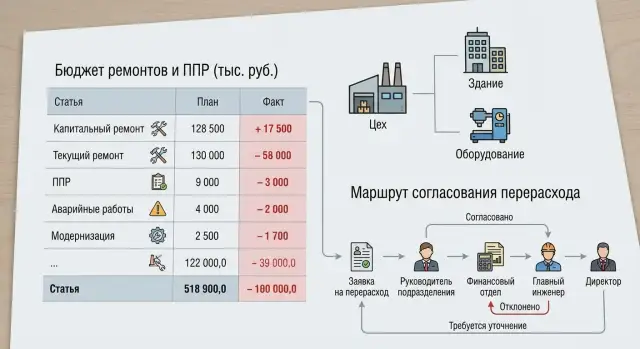
Why repairs plan vs. actual don't reconcile by themselves
Plan and actual rarely reconcile automatically because they live in different places. The plan often stays in Excel, emails and chats, while actuals are collected from invoices, completion certificates and purchase requests. As a result, everyone has their own version of the numbers and manual reconciliation begins at month end.
Usually it's not the math that's wrong but the structure. In the plan a repair can be a single line (for example, "roof repair"), while in the actual it breaks down into materials, delivery, equipment rental and contractor work. If those parts are not tied to the same object and type of work, there is nothing to compare.
Another reason is different accounting rules. Operations think in works and objects, finance — in cost items and periods, procurement — in purchase orders and item lines, contractors — in acts and stages. Without unified reference lists and mandatory fields plan vs. actual will only "match in words."
A good repair budget answers four simple questions:
- Where: site, building, section or system.
- What: type of work (PPR, emergency, modernization), major repair.
- For how much: limits by cost items (materials, services, rental, transport) and by timing.
- Why deviate: a reason and supporting document, not a comment in a chat.
There are usually more roles than it seems. Operations create the need and accept the work, procurement converts it into purchases, finance controls limits and closes the period, contractors provide primary documents and confirm volumes. If even one participant doesn't record the linkage (object + work type + cost item), plan vs. actual stops being management and becomes an argument about "where the money went."
How to choose the budget structure: objects, work types, cost items
To avoid turning budgeting for repairs and PPR into a numbers fight, first agree on the structure: what you plan money against and what you collect actuals by. A mistake here almost always leads to late clarifications and reconciliations at period end.
1) Budget object: detailed enough, but not microscopic
Start with an object hierarchy. A common scheme works: site — building — section — equipment unit. But you don't have to go down to every single unit all the time.
A practical granularity rule: make an object whatever has a responsible person and a clear reason for costs. For example, for an office building the level "section" (electrics, HVAC) is enough, while for a critical node like a server room or compressor you should use the specific installation.
Example: you have site "Almaty", building "DC", section "Engineering systems", equipment "UPS‑1". The PPR plan for the UPS is kept at the equipment level, while cosmetic room repairs are kept at the section level.
2) Work types and cost items: one meaning — one code
Split work so the managerial meaning is obvious: PPR separately, emergency separately, modernization separately, major repair separately. Then comparing plan vs. actual won't turn into debates like "this isn't repair, it's improvement."
Keep cost items simple and the same across all objects: materials, contractor services, labor, equipment rental, other. If an item doesn't help make a decision, don't create it.
To avoid duplicates, set a few short rules in advance:
- One repair = one main accounting object (where the need originated). Everything else is the execution location or additional analytics.
- If work affects several objects, create a single request/order and distribute sums by shares rather than creating copies.
- Don't hide modernization in PPR even if the same crew does it.
- Use a unified contractor work catalogue so "filter replacement" doesn't appear in three variants.
This keeps the structure manageable, and deviations are then explained by causes, not classification confusion.
Reference lists and accounting rules — without them everything falls apart
Plan vs. actual for repairs breaks not because of formulas but because of different words for the same thing. One person writes "Shop 1", another "S1", a third "Production." The actual exists, but assembling it into a report without manual edits is impossible.
Unified reference lists: what to lock down
You need a short set of reference lists used by planning, procurement, accounting and contractors. It's enough to start with five:
- objects (sites, buildings, sections)
- equipment (units and assemblies)
- work types (PPR, routine, capital, emergency)
- contractors/performers
- cost items (materials, services, spare parts, rental, transport, other)
To group without confusion, introduce a simple code: object code + work type code. For example: KZ‑ALM‑01 (object) and PPR‑EL (PPR electrics). The main rule — codes are stable not "clever." They are not changed due to a department rename.
Accounting rules: where to post costs to avoid disputes later
The most common conflict is what to count as PPR and what as emergency. Fix criteria in advance: PPR — scheduled/regulatory work; emergency — unplanned with downtime risk or an actual failure.
If an emergency job includes a scheduled replacement "while at it", define the rule: either split costs by work order, or post all to emergency but require a reason note.
PPR templates help a lot: typical operation, periodicity, normative labour, list of materials and spare parts. Then the plan comes from norms and actuals are compared fairly.
Minimum fields without which plan vs. actual can't be assembled later:
- object
- equipment (if applicable)
- work type
- cost item
- period (month)
- executor (contractor/in‑house)
- supporting document (request/work order/contract)
- amount
- short reason (for unplanned work)
Even if everything else is "later", these fields must be mandatory from day one.
How to plan PPR and repairs in time and resources
Planning PPR and repairs often fails not on numbers but on timing: works "hang" in the annual budget but are not tied to months, shutdown windows and real availability of people and equipment. So first set a horizon: year as the frame, then a monthly breakdown inside it.
An annual plan is convenient as a list of works by objects and nodes, then distribute by month with a simple rule: when the work can and cannot be done. For example, a pumping station can only be stopped during planned windows in April and October, while roofing is best in the dry season. Fix such constraints up front, otherwise the budget will contain "ideal" months that are unavailable in practice.
Base plan, reserve and initiatives
To account for uncertainty without inflating the budget, split the plan into three parts:
- Base plan — mandatory PPR and known repairs.
- Reserve — money and hours for contingencies (emergencies, price rises, additional volumes) with clear rules for use.
- Initiatives — improvements that can be postponed (e.g. node modernization) so they are not mixed with the mandatory minimum.
Check that uncertainty isn't "smeared" across all lines:
- reserve is a separate line (so you can see what's left)
- initiatives can be switched off without safety or reliability risk
- base plan covers regulations and critical nodes
Resource plan: what exactly is needed and when
A resource plan must answer two questions: "what is needed" and "when it is actually available." For each major job record the resource set: materials (lead time), labour (in‑house and contractors), equipment (cranes, lifts, diagnostic tools), and constraints like permits and shift patterns.
Example: a major repair is planned for July, but the contractor is available only from August and key components have a 6–8 week lead time. It's better to move the job or open procurement early. Otherwise the actuals will show premium costs for rush delivery, forced substitutions, and downtime.
To include uncertainty carefully, use targeted buffers, not "+10% to everything": buffers by lead time, extra labour for aging equipment, probability of additional defects. Then the budget shows what is planned, what is at risk and what you manage during the year.
Plan vs. actual: step‑by‑step setup so you don't reconcile by hand
To make plan vs. actual reconcile automatically you must agree on rules once and force the system to calculate the same way for plan and actual. Most problems stem from different levels of detail and floating plan versions.
A setup you can repeat yearly:
- Lock analytics: one object reference list (building, shop, server room), one list of work types (PPR, emergency repair, capital repair, modernization) and one list of cost items (materials, contractors, wages, equipment rental).
- Build the PPR plan from templates and service schedules: what, how often, what resources and norms.
- Add the plan for other repairs: initiatives from operations, known capital repairs, modernization projects estimated by stages.
- Approve the base plan and freeze a version: date, author, reason for changes. Do all comparisons only against this version.
- Set rules for period closing and plan updates: what can be edited in the current month, what only in the next month, and who confirms it.
Then decide what counts as the actual. It is important that the actual doesn't come only as an "accounting total" but with the same analytics as the plan. Usually actuals are formed from: requests and work orders, completion certificates, invoices and closing documents from contractors, warehouse issue and write‑offs, labour records of in‑house crews.
Example. Object: district clinic. Work type: PPR ventilation. Cost item: contractor services. As soon as the act and invoice are posted with these three attributes, the deviation is calculated automatically. If an act is posted without an object or with a different cost item (e.g. "other services"), disputes and adjustments follow.
The last touch: forbid posting a document without object, work type and cost item, or send it back for correction. This is cheaper than hunting for causes of discrepancies at month end.
How to collect actuals without losses: documents and linkages
Actuals for repairs are "lost" not because people miscalculate but because money and work flow through different documents. If you don't agree which document proves what and to what it is linked, plan vs. actual becomes a manual assembly from fragments.
Where actuals come from and what they record
The common chain is: request (need) -> work order or purchase order (commitment) -> act (completion) -> invoice and payment (payment) -> warehouse write‑off (materials).
It's useful to distinguish three states right away:
- ordered (budget reserved, future commitments clear)
- completed (act or closed work order — this is the "work fact")
- paid (cash fact, important for treasury)
Then "why did we overrun" can be investigated step by step: because more was ordered, because the act closed more expensively, or because payment was made for the "wrong" thing.
Linkages without which an actual cannot be accepted
To prevent actuals from drifting into "other", every document must have mandatory fields: object (building, line, section), work type (electrics, mechanics, instrumentation, etc.) and cost item (materials, contractor services, equipment rental).
Example: a contractor submits an act "equipment repair" for 2,000,000 KZT. If the act lacks object and work type, accounting will post it to a general item and the section manager will later prove it wasn't theirs. A strict but practical rule: an act without object and work type is not accepted.
About general production costs (transport, power, shared crew). It's better not to allocate them manually each month, but to set a rule in advance: by labour hours, by job cost, by machine hours or by area. The key is to keep one rule unchanged during the period. Otherwise causes of deviations will look like chaos.
If accounting is enterprise‑level (for example, infrastructure with local PCs and servers for accounting systems), agree on the same object and cost item reference lists across systems. Then documents match the budget without "translating names."
Overrun approval scenario: who, when and what confirms
Overruns rarely arise "out of nowhere." A trigger is usually clear: material price increases, additional works after opening, an emergency or inaccurate planning estimate. If you describe who and how approves overruns in advance, plan vs. actual stops being a monthly battle.
When to decide locally and when approval is needed
Set thresholds. Small deviations can be handled by reallocating within an object (between items or work types) provided the object's total budget doesn't increase and timings don't change. If the object's limit is exceeded, a critical item is affected (spare parts for key equipment) or downtime risk appears, approval is required.
A working principle: "move money inside the object — record the reason; go beyond the object — get confirmation along the route."
Approval route and required justification
A route may look like: initiator (foreman/engineer) — section manager — financial control — chief engineer — CFO. Each confirms their part:
- Initiator: what changed and why it cannot be ignored.
- Section manager: that the work is needed and how deadlines are affected.
- Financial control: amount calculation, cost item check and ability to cover the overrun.
- Chief engineer: technical feasibility and downtime/failure risks.
- CFO: final money decision.
Keep the justification minimal but substantive: reason, calculation (what and how much), alternatives (repair/replace/postpone), impact on risk and downtime. Example: during PPR on a pump they found shaft wear; without replacement there's a risk of failure and a line stoppage. Options: extra budget now, postpone with higher risk, replace with an alternative model with different lead time.
Record the decision as a new plan version with a change label: "price increase", "additional work", "emergency", "estimation error." Then causes of deviations become part of accounting, not end‑of‑month chat.
Deviation report: to analyze, not to argue
A good deviation report shifts the conversation from "who's to blame" to "what changed and why." Then plan vs. actual for repairs becomes a management tool rather than an excuse log.
The report base is a single detail row: object — work type — cost item — plan — actual — deviation. It's important that "plan" and "actual" are calculated in the same structure and coding. Otherwise any analytics will be disputable.
Cause classifier: short but mandatory
It's better to record causes not as long comments but as selections from a limited list (with an optional short note). A practical set:
- price (material or service cost increase)
- volume (more or less work done)
- timing (shift of work between periods)
- contractor (no‑show, defects, extra costs)
- coding error (posted to wrong item/object)
- emergency (unplanned repair)
Also show two types of deviations separately: those due to plan changes (plan was reapproved, works added, limits changed) and those in execution (plan unchanged but actual moved). This removes half of conflicts: an overrun after an official plan change is not the same as an overrun without one.
Metrics that help management
Besides deviation sums, add a few simple ratios and counters: share of emergency works in actuals, share of extra works, repeat failures by object/node, top‑3 items that most often "move."
Logic for conclusions from the report:
- rising share of emergency works — review PPR (frequency, operation list, critical equipment)
- persistent price drift — review purchasing and contracts (terms, indexing, material substitutes)
- deviations by volume — check norms and estimates and quality of defect detection
- many coding errors — strengthen entry rules and incoming document checks
Common mistakes and traps in repair budgeting
The most frequent issue is not calculations but that structure and rules don't match reality. You can build a plan quickly, but actuals have to be pulled from acts, requests and invoices manually.
First trap — too fine detail. When the budget is split into dozens of subitems and unique works, the plan looks precise but nobody keeps it disciplined. Executors choose a "similar" item and analytics falls apart.
Second trap — mixing major repairs and PPR in one item without a work type marker. Then plan vs. actual becomes a dispute: overrun due to an emergency, rescheduled PPR, or simply "everything dumped in one bucket."
Third trap — late actuals. If you close a month only by paid documents and ignore commitments and open acts, the report will show "savings" that disappear next month.
Where control is most often lost:
- no single rule for posting warehouse materials and contractor services, so identical costs wander across different items
- back‑dated plan changes: plan is modified but versions and reasons are not saved, making it impossible to know what deviations were counted from
- no reserve, and each time the budget is "saved" by reallocations that erode the meaning of limits
Example: at "Boiler‑1" the contractor didn't close the act at month end, but materials were already issued from the warehouse. Without rules on commitments you'll get a skew: materials enter actuals while services do not. The manager sees a false overrun in one item and a "saving" in another. Next close everything flips and trust in the numbers disappears.
Short checklist before launch and for month closing
To make repairs and PPR budgeting work without manual reconciliations, set basic rules once and then repeat a short month‑end ritual.
Before launch (once, but recheck on changes)
- Every cost has three mandatory linkages: object (or node), work type and cost item. If any field can be left empty, actuals will "drift."
- PPR is separated from emergency work and from modernization. These are different causes, budgets and expectations for deviations.
- There is an approved plan version and a rule for what counts as a change: date shift, material substitution, volume change. It must be clear who can edit the plan and from what date.
- Overrun thresholds and approval route are set: e.g. up to 5% confirms the section manager, higher requires chief engineer and finance.
- Deviation causes use a common dictionary (5–10 options) so everyone fills them the same way.
Monthly closing (short but strict)
- Reconcile commitments: orders, contracts, requests — to see future actuals not yet in acts.
- Check open acts/work orders and "hanging" works: what's done but not documented, and what's documented but not linked to object and work type.
- Match warehouse write‑offs with works: materials must be issued to a specific object and work type, otherwise deviations will be phantom.
- Review emergency works separately: they often explain overruns but only if properly singled out.
- Fill deviation reasons according to rules and assign owners: one object — one comment owner.
Example: break down a budget and analyze deviations across three objects
Let's take a quarterly plan for three objects: pumping station, boiler house and office. The goal is to set up budgeting for repairs and PPR so plan and actual collect in the same structure and give clear deviation causes.
Base structure: object -> work type -> cost item. Work types: PPR, routine repair, emergency repair. Items: spare parts, consumables, contractors, in‑house labour.
Quarter plan:
- Pumping station: replacement of seals and bearings (spare parts), vibration diagnostics (contractor), consumables.
- Boiler house: scheduled cleaning and tuning (in‑house labour), sensor replacement (spare parts), consumables.
- Office: AC maintenance (contractor), minor consumables.
Actuals: mid‑quarter the pump had an emergency — the pump assembly failed. Prices for boiler parts rose, and the office had more work than planned (two additional AC units added).
Overrun approval triggers by threshold: e.g. deviation >10% or >500,000 KZT per object. Justification package is short: defect act, two commercial offers, downtime estimate, proposed funding source (reserve or work postponement). Decision is made by operations head, financial control confirms item and period.
The deviation report shows source, not just amounts:
- Price: boiler house, item "spare parts" — price rise at same volume.
- Volume: office, "contractors" — more work done than planned.
- Event: pumping station, "emergency repair" — unplanned failure with separate justification.
Outcome next period: add an emergency risk reserve for the pump and adjust diagnostic intervals, increase limits for critical boiler spare parts and set a rule for price revaluation, and adjust the office object catalogue to include the additional AC units.
Next steps: pilot, automation and infrastructure support
Start small so rules stick and numbers become comparable. The best approach is a pilot on one section or group of objects with typical works and clear owners. Limit cost items (materials, contractors, labour, equipment rental) and use a simple monthly horizon.
Prepare base data before starting. The cleaner the reference lists, the fewer manual "translations" and disputes at period end. Ensure objects, work types and cost items use consistent names, and have PPR templates and a deviation cause classifier (e.g. "volume change", "price increase", "norm error", "emergency repair").
Lock discipline into the process, not into chat. Usually three things are enough: mandatory fields on documents (object, work, item, reason), approval roles and a period‑closing rule (after close, actuals are not changed without a separate decision).
Automate where manual input causes losses and divergent versions. In a minimal contour the system should support:
- requests and orders for works and materials linked to object and item
- warehouse accounting and write‑offs to a specific repair
- completion acts and acceptance by stages
- plan vs. actual reports and budget versions (before and after overrun approval)
- a deviation log with responsible person and short note
Also assess the infrastructure hosting accounting and production systems. If servers and workstations are unstable, people quickly revert to parallel spreadsheets and the "single version of truth" collapses.
When the pilot yields a stable plan vs. actual, expand coverage and enable integrations. If you also need to strengthen IT infrastructure (workstations, servers, support), this can be delivered through GSE.kz (gse.kz) — a Kazakh supplier of computer equipment and systems integrator with round‑the‑clock technical support.
Frequently asked questions
Why do plan and actual for repairs constantly diverge, even though we seem to be counting amounts correctly?
Because plan and actual usually live in different sources and at different levels of detail. The plan might show “roof repair” as a single line, while the actual splits into materials, delivery and contractor work, and those parts are often not linked by common codes.
Which fields must be mandatory so plan vs. actual can be assembled automatically?
At minimum — object, type of work, cost item, period, executor and supporting document. If any of these fields can be left empty, actual documents will start “leaking” into general accounts and will later require manual reconciliation.
To what level should the budget object be detailed: building, section or individual equipment?
Choose the level that has a clear owner and a sensible reason for costs. For ordinary premises, a section (electrics, HVAC) is often enough; for critical nodes you should go down to the specific unit, otherwise deviations will be lost inside a large object.
How to quickly agree what counts as PPR, emergency repair, or modernization?
Separate by managerial meaning: PPR — scheduled and according to regulations; emergency — unplanned due to failure or risk of downtime; modernization — improvements, not restoration. The same contractor or crew should not mix these types in one line.
How many cost items are needed in a repairs budget so you don't drown in detail?
Keep cost items simple and consistent across all sites so people actually fill them in correctly. Usually materials, contractor services, in‑house labor, equipment rental and other are sufficient; add detail only if it helps decisions, not for appearance.
How to spread an annual repairs plan across months so it's achievable?
First fix the "windows" when work is possible and the constraints for stopping equipment, permits and seasonality. Then tie major jobs to months and check contractor availability and lead times so you don't create forced urgency and extra cost in the actuals.
Should you include a reserve and how not to turn it into “+10% to everything”?
Split the plan into three parts: base plan (mandatory), reserve (for contingencies) and initiatives (improvements that can be postponed). The reserve should be a separate line with rules for use, otherwise it will be spread thinly across all items and lose control.
What counts as the actual: acts, payments, warehouse write‑offs, or all together?
Distinguish states «ordered» (budget held for future commitments), «completed» (an act or closed work order — the work fact) and «paid» (cash fact important for treasury). Require the same analytics on documents as in the plan, otherwise an act or invoice will land in “other” and break analytics.
How to organize approval of overruns so it doesn't become chaotic at month end?
Set thresholds and a rule: you can reallocate inside an object with a recorded reason; going beyond the object's limit requires the approval route. Keep the justification short: reason, calculation, alternatives and impact on downtime; record the decision as a new plan version, not as chat messages.
What matters more for automating plan‑vs‑actual: software or discipline, and what about IT infrastructure?
You need a single flow for requests, purchases, warehouse, acts and plan‑vs‑actual reporting with mandatory fields and budget versions. If IT infrastructure is unstable (servers, workstations, support), people quickly return to Excel and accounting discipline collapses — so first ensure reliable systems and user support.
