8 min read
Bilingual interface (Kazakh & Russian): avoid duplicates
How to design a bilingual Kazakh–Russian interface in a corporate system: directories, search and printing without duplicated logic.
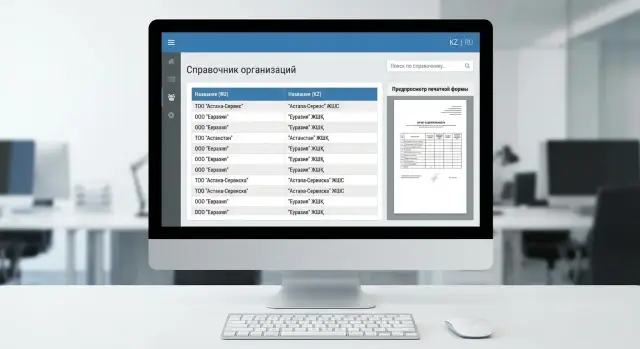
Why avoid duplicate logic
When bilingual support is implemented "naively", you often end up with two sets of screens, two directories and two workflows: a Russian variant and a Kazakh one. It may look faster at the start. In practice this almost always leads to divergence: a field is added in one language and forgotten in the other, a business rule is updated only in one place, and users begin to see different results.
The problem with duplicates is that you effectively maintain two systems inside one. Any change in a process (a new request status, an extra attribute, a new print format) has to be repeated and rechecked twice. Testing doubles, and errors grow noticeably because combinations appear: RU-screen + KZ-directory, KZ-print + RU-data, different access roles in different logic branches.
Usually the first to break are the end-to-end and the "invisible" parts:
- search (works in one language but not the other, or results differ)
- printing and reports (some labels translated, others left, fields mixed up)
- access rights (a button hidden in one language, forgotten in the other)
- integrations and exports (the same fields go out with different codes or names)
In Kazakhstan users often have two different expectations: UI language and data language. A person may choose the Kazakh UI but work with documents where contractors, positions or addresses are recorded in Russian (or vice versa). If the system tightly "binds" data to the UI language version, confusion starts: the same object looks like two different ones, duplicates appear in directories and reports diverge.
A practical example: in a corporate procurement system one department prints contracts in Russian, another in Kazakh, but approvals and statuses must be identical. If logic is split by language, changing a regulation (e.g., making IIN/BIN mandatory or adding an approval step) requires edits in two places. The risk of missing something in print forms and access rules becomes maximal.
It's more reliable when logic is single and only the language changes in presentation: labels, names, wording, search and print variants. That approach is easier to maintain, simpler to test and easier to scale — for example in large rollouts across organizations in RK where quality and predictability matter (as in GSE.kz–level system integration projects).
What exactly should be bilingual
The main mistake when implementing bilingualism is to mix two layers: UI language and data language.
UI bilingualism usually includes buttons, field labels, hints, error messages and section names. These are UI texts and are more convenient to store separately from business logic.
Data language is what users enter and then search for, print and export: organization names, positions, goods, services, statuses, departments. These values live in directories and documents. This is where the temptation to create two directories or two sets of screens most often appears. Better adopt one rule from the start: a single object can have multiple displayed names.
Some data shouldn't be translated: codes, IIN/BIN, serial numbers, SKUs, contract and invoice numbers must be identical in any language. Their meaning doesn't change, and attempting to "translate" such fields only creates divergence and extra checks.
Agree a fallback rule in advance so the interface is predictable even if a translation is missing:
- if KZ is selected and a translation exists — show KZ
- if KZ is selected but translation is missing — show RU (and vice versa)
- if neither RU nor KZ exists — show the code or technical key and mark it as untranslated
To avoid creating versions of the same object you need a single key. For directories this is usually an internal ID (or GUID) that is language-independent. Language labels are separate fields (for example, name_ru and name_kk) or a separate translations table, but always tied to the same key. Then search, access rights, document relations and print forms operate on the same logic and only the displayed text changes.
Directories: data model for RU and KZ
Directories are the most frequent place where bilingualism breaks: they are numerous, used everywhere, and any error turns into hundreds of small bugs. A good data model helps implement bilingualism without copying entities and rules.
The simplest option is separate fields name_ru and name_kk. It's justified when there are exactly two languages, values are short, and directory structure is stable (e.g., document types, statuses, departments). Pros — easy to read and fast to filter. Cons — when a third language is added you face migrations and changes in many places.
A more flexible option is a translations table: entity_id, lang, value (and, if needed, a value type). This is convenient if directories vary, languages may increase, or you need multiple text types (full name, short name, for print). Important to fix from the start: a translation is part of the directory data, not a separate copy of the record.
Don't guess uniqueness. Usually the unique key is the stable record code (for example, code or external_id), not the translation. name_ru and name_kk can match, change, or follow different spelling rules. If the business requires unique names, enforce it per language and per directory.
Plan for name variants. Often you need the official name (for contracts and print), a short name (for tables and cards), an abbreviation (company practice), and alternate search variants for legacy data.
Batch updates of directories should be by code, not by text. Then you can update Russian names without overwriting Kazakh ones and vice versa. Practical rule: import first updates the base record (code, active flag), then updates translations by lang in a separate step, avoiding deletion of missing values unless an explicit "delete" flag is provided.
Displaying directories in the UI without duplicating screens
The idea is simple: one screen, one logic, language is a display setting. Then bilingualism doesn't become two parallel sets of forms, filters and validations.
In directory lists it's usually enough to show one language as primary and the other as a hint. For example, in the "Name" column display the selected language and show the alternative next to it (or in a tooltip or grey text). This helps users recognize terms faster and reduces mistakes when documents contain both variants.
Sorting is where perceived quality often fails. Kazakh and Russian alphabets order letters differently, and if you sort randomly people stop finding items. Practice: sort by the current language field and use the correct collation for it. If your database or search engine supports separate collations, choose collations for KZ and RU rather than a single common one.
To avoid duplicating filter rules and dropdown logic, operate on keys instead of text. A filter should compare identifiers (id, code), and textual labels should be substituted at the last moment in the UI.
A few rules that solve about 80% of problems:
- store a single element code (
code) and two display values (RU and KZ); the screen always works withcode - in dropdowns show the current language and add the secondary label where terms are similar or often confused
- for missing translations use a clear fallback: primary language plus an indicator that translation is missing
- do not duplicate field labels: the screen uses one key (e.g.,
label.customerType) and texts are taken from a translation resource
This way the UI remains one and language switching becomes a setting, not a separate development branch.
Search in two languages: how to make it predictable
Search in a corporate system is not just a line in a directory. Users expect consistent behavior across directory search (contractors, positions), document lists (requests, invoices) and quick field searches (e.g., "Find employee").
Main rule: the user types as they are used to, and the system finds the same result regardless of which language the data were entered in.
Input normalization: remove accidental differences
Normalize queries and data first. Then "Алматы", "алматы" and " Алматы " become identical. Usually it's enough to unify case, trim extra spaces and repeated delimiters, normalize diacritics and letter variants. Handle keyboard layouts too: a common issue is typing in RU while the keyboard is set to KZ (and vice versa).
This gives a predictable base for indexing and ranking.
Indexing and querying: one clear approach
It's convenient to keep one index with separate fields for RU and KZ (for example, name_ru and name_kz), plus a common search_text field that aggregates both forms. Then queries target a single place, and UI language affects only presentation.
To find matches when input is RU but data are KZ (or vice versa), query both language fields simultaneously. If you have transliteration or mapping dictionaries, use them as an additional layer but not the sole dependency.
Keep ranking simple and consistent: exact matches rank highest; matches at the start of a word rank higher than "inside" matches; matches in the active UI language rank slightly higher than the secondary language; transliteration matches rank lower than direct matches.
Example: a procurement user types "Aстана" while a contractor is recorded as "Астана" or "Astana". If input is normalized and search queries both fields, the result will be consistent and users won't feel like "search is broken today."
Print forms: one template, two languages
Print forms often break bilingualism because text becomes hard-coded in templates. To avoid two sets of documents separate responsibilities: template handles structure (tables, blocks, field order), language provides labels and phrasings. You keep one document and change language without copying logic.
Store fixed texts (titles, labels, statuses, standard phrases) in language resources. In templates leave keys like doc.title, sign.customer, status.paid. Data (number, date, amounts, full names, positions, details) should come uniformly, without branching like "if RU then field A."
Make print language a conscious rule, not an accident. UI language and document language do not have to match.
How to choose print language
Common options: by recipient (language stored in the organization card), by regulation (some documents must always be RU or always KZ), or by user preference (default with the option to switch before printing).
The trickiest area is cases and inflections in phrases like "issued to", "received by", "to whom", "from whom". To avoid manual fixes in every document, avoid phrases that require declension and use neutral constructions: "Signer: {name}", "Position: {role}". If declensions are unavoidable, define a minimal set of standard phrasings.
Before release check layout on both languages. Kazakh strings are often longer and characters (Ә, Ө, Ү, Қ, Ң, І, Һ) require correct fonts. Check line breaks in headers and tables, truncation of long names and addresses, consistent date and number formats, font embedding (so characters don't turn into squares), printing on different printers and PDF export (so fields don't shift).
Step-by-step plan to implement bilingualism
Start with a data map and rules, not screen translation. Bilingual issues usually arise where the same meaning is stored and processed differently for RU and KZ.
A practical iterative plan:
-
List entities and fields that must be bilingual. Typically these are directories (positions, departments, statuses, reasons), print labels and system messages. Mark what is not translated (codes, IIN/BIN, contract numbers).
-
Choose a storage model and a fallback rule. Decide upfront: if KZ value is empty, do we show RU or leave blank and highlight? For government documents you may need stricter rules; for internal UI a fallback is acceptable.
-
Implement a single layer for retrieving texts. For UI this is resource keys; for directories — a unified displayName method that selects by language. Screens should not decide what to show; the logic must live in one place.
-
Configure search and indexing so results are predictable. Users may enter Russian transliteration or Kazakh spelling; the record should be found the same. It's often enough to store normalized search fields for RU and KZ (trimmed, single case).
-
Standardize print forms: one template, language parameter, common keys and fields. Keep a single dictionary of labels and a consistent substitution approach so you don't create two almost identical documents.
Add test datasets and automated checks as a separate step. For example: a record with all translations, a record without KZ (check fallback), a record with Kazakh characters in the name and searches against both versions.
This order works well in large rollouts where some users work in Russian and others in Kazakh but processes and print forms must remain unified.
Common mistakes and pitfalls
Bilingual problems usually aren't about translating buttons. Errors appear where data live for years: directories, search, printing and exports. One bad data model choice causes repeated fixes.
The most costly mistake is duplicating directories per language. You end up with two "identical" contractors, two positions, two warehouses. Reports diverge, integrations break, and users argue about "which record is correct." Keeping a single record with separate fields or a translations table is the correct approach.
Another trap is mixing languages in one field without rules. When names sometimes are Russian, sometimes Kazakh, sometimes both together, data quality quickly degrades. You need clear fill-in rules and a simple check: what is mandatory in RU, what in KZ, and where empty values are allowed.
Often translations are done only in the UI while print forms and exports are forgotten. This is painful for government documents and procurement: the UI shows Kazakh but the PDF or Excel contains Russian. Test not only screens but all output channels.
A separate class of problems is search. If the index or full-text search holds only one language version, queries in the second language will behave as if nothing exists. Typical scenario: an accountant searches a position in Kazakh, the system returns nothing though the record exists.
Signs you're on a slippery slope:
- two versions of the same directory instead of translations
- no unified rules for filling RU and KZ fields
- print and exports lag behind the UI
- search indexes only one language
- directories have no owner and translations are not updated
A helpful managerial step: assign an owner for each key directory and a short control cycle. For example, review new entries and translations monthly so they don't diverge between departments.
Quick pre-release checklist
Before release check not only visible labels but system behavior.
Run through key scenarios on a test environment with typical roles (operator, manager, accountant). Use real-like records: with RU and KZ filled, only one language filled, and long names.
- Language switching changes labels, hints and error messages but doesn't reset entered data or "reload" the card so the user loses context.
- In an object card it's clear which fields are RU and which are KZ, and if translation is missing a predictable fallback is used (consistently across screens).
- Search works both ways: a query in Russian finds records where only the Kazakh name is filled, and vice versa.
- Sorting and filters look reasonable in both languages (especially in long directories).
- Print forms and exports correctly show Kazakh characters, line breaks and don't break layout on long values.
Also check translation quality. Without it bilingualism quickly becomes "half the UI in one language."
- Have a report or simple list of missing translations and a clear "who is responsible" field and deadline so items get closed rather than postponed.
Practical example: one system for different roles and languages
Imagine an HR system in a large organization. There is a positions directory and departments, employee cards, orders and reports. In Astana an HR specialist uses the Kazakh UI, while in Almaty the accounting team opens the same data in Russian. It's important that this is one system, not two versions.
The positions directory uses a single identifier per record and two text fields (KZ and RU). Logic is unified: access rules, validations, approval routes, calculations. Only labels and displayed texts change.
Typical search case: an accountant searches for an employee by position and types "бухгалтер". If the position in the card is filled only in Kazakh, correct search queries both fields and finds the person. The user sees results in their UI language without losing the other-language data.
To make this stable, set a few rules:
- a directory record always has one code regardless of language
- text is stored in two fields, not as two records
- search queries both languages while display and sorting follow the UI language
- validations and business rules do not depend on language
Another point — printing an order. Document language is set by regulation (for external audit Russian is required), not by the open UI language. HR can work in Kazakh but print the order in Russian using the same form.
When logic is unified, updates are easier: add a new field to the order once, not in two parallel templates. This significantly reduces the risk of silent errors when one language is fixed and the other is forgotten.
How to organize support and what next
Bilingualism doesn't end at release. After a week new departments, services or positions appear — and with them new directory entries and texts in print forms. Without agreed rules bilingualism soon becomes a set of fragmented translations.
Assign content owners. These are not developers: business units (HR, accounting, procurement) usually own directories, and a copy editor or methodologist owns common terms. You need a simple approval process: who proposes wording, who checks, who approves.
Set a language standard. A short 1–2 page document is enough: how to write positions, how to format abbreviations, which official phrasings to use in contracts and reports. A small glossary of 10–30 key terms helps.
Operational rhythm that helps:
- a single queue for translation requests (instead of chats)
- a rule: a new directory value appears only with a translation
- reviewers: a native speaker or a person who works with the documents daily
- document the source of phrasing (order, regulation, template)
- short regular review: what was added and which terms were disputed
Also implement bilingual test plans. Check not only label visibility but behavior: search must find RU and KZ, and print forms must generate correctly in both languages on the same data.
Next steps typically are: a quick audit (where texts are hard-coded, where directories exist, where screen duplicates exist), a migration plan (move directories to a translations model and replace hard-coded strings with resources), phased rollout without downtime (directories and UI first, then search, then printing), and quality metrics (percent of filled translations and list of missing fields blocking release).
If you lack experience in design, testing and rollout, GSE.kz can join as a system integrator. The team can also assist with infrastructure for corporate solutions (servers and workstations) and ongoing support.
Frequently asked questions
Why is it bad to create two separate sets of screens for Russian and Kazakh?
It's better to keep one business logic and one set of screens, changing only the displayed texts. Two parallel branches (RU and KZ) almost always diverge over time: a field or validation is added in one place and forgotten in the other, and users get different results.
What is the difference between UI language and data language?
The interface comprises buttons, field labels, hints and errors; these texts live in a translation dictionary and should not affect business rules. Data are what users enter (names, positions, departments) and should be single objects with multiple language views, not two separate entities.
How to store bilingual directories correctly to avoid duplicates?
One directory object should have a single stable identifier (id/GUID) and, if needed, a code. Translations should be stored as separate fields (`name_ru`, `name_kk`) or in a translations table. This way relations, permissions, reports and integrations work by key, and language only affects which text is shown.
What to choose: `name_ru`/`name_kk` fields or a separate translations table?
If there are exactly two languages and the directory is simple, two fields are usually enough — they are easier to read and filter. If you may add more languages, different text variants (short/full/for print) or many entity types, use a translations table with `entity_id`, `lang`, `value` so you don't have to change the structure later.
What should be shown if the translation for the selected language is missing?
Agree a single rule in advance and apply it everywhere. Practical approach: show the text in the selected language; if empty — show the other language; if both are empty — show the code or technical name and mark it as untranslated so it can be fixed.
How to provide proper sorting in lists for RU and KZ?
Sort by the field of the current language and use the correct collation for it, otherwise the order will look random and people won't find items. If you can't set collations technically, at least sort by a normalized field (single case, trimmed) so results are stable.
How to configure search so it finds in both Russian and Kazakh?
Search should query both language fields, not just the UI language. Normalize input and data first: unify case, trim extra spaces, and harmonize similar letter variants so “Алматы” and “ алматы ” are found identically.
Should we make two print templates (RU and KZ) or one?
Keep one document template and inject language through a dictionary of labels and phrases, rather than maintaining two copies. Choose print language by a clear rule (by recipient, regulation, or user preference), because UI language and document language often differ.
Which fields and values should not be translated at all?
Typically codes, ИИН/БИН (individual/tax IDs), serial numbers, SKUs, contract and invoice numbers are not translated — their meaning doesn't change with language. Trying to "translate" these fields leads to inconsistencies, extra checks and errors in integrations and reporting.
What must be checked before releasing bilingual support and how can an integrator help?
At minimum — tests for language switching without losing entered data, fallback checks for missing translations, search in both directions (RU query finds KZ-only data and vice versa), and verification of PDFs/exports for Kazakh characters and long strings. For large rollouts, a system integrator can own this quality contour: unified rules, test datasets and end-to-end checks before release.
