8 min read
Bastion host for admins: access schemes, MFA and auditing
A bastion host for admins gives controlled entry to a closed segment: MFA, session recording, command logs and role-based access, with examples using Teleport and Guacamole.
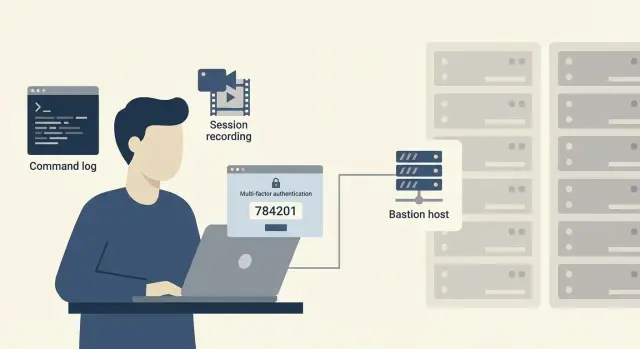
Why admins need a bastion host
A closed network segment is a part of the network that should not be directly accessible from the internet and often not even from the office network. It holds domains, databases, critical servers and admin consoles. If an administrator connects there “directly” (RDP/SSH via VPN, port forwarding, static firewall exceptions), any mistake or credential leak immediately opens access to the most important systems.
The problem is usually not the VPN itself, but that access is hard to manage. In practice you often see “convenient” habits: shared admin accounts, passwords in chats, a single shared SSH key, RDP allowed by IP lists, “temporary” access that remains forever. As a result you can’t answer simple questions: who connected, where, when and what did they do.
Common incidents around admin access tend to look similar:
- phishing and password theft, after which an attacker acts as a “legitimate admin”
- use of shared accounts, making it impossible to find the responsible person (or cause)
- connecting to the “wrong” server and making accidental changes in production
- bypassing procedures using personal tools and saved passwords
A bastion host for admins is a single entry point with uniform rules: mandatory MFA, clear roles, access only to allowed systems and full session auditing. It also makes life easier for admins: a single way to enter, less manual routine, and no need to keep a zoo of passwords and keys.
Simple example: a contractor needs 2 hours to check a service in a closed segment. Instead of handing over a password or a “temporary VPN” you grant access through the bastion with a specific role, enable MFA and session recording. The access expires automatically and you keep a clear audit trail.
Basic concepts: bastion, jump host, PAM
Bastion host — a dedicated entry point for admin access to a closed segment. The idea is simple: admins don’t connect to servers and network gear directly, they go through one controlled node where rules, MFA and auditing are enforced.
A jump host is often confused with a bastion. A jump host usually solves routing: you “jump” into an isolated network because there’s no other path. A bastion is broader: it not only provides a path but enforces access policy (who, where, when and how) and records actions.
PAM (Privileged Access Management) is a class of systems for privilege management. A convenient boundary is: the bastion is responsible for secure entry and session control, while PAM adds lifecycle management of privileges (approval-based issuance, temporary rights, secret storage, password rotation, break-glass and compliance reporting).
A minimal success for a bastion is when admin access stops being based on “trust”: a single entry point and prohibition of direct connections, MFA for admins, roles and clear access rules, plus session recording and command logging. Also make temporary contractor access the norm.
Bastions usually cover SSH for Linux, RDP for Windows, VNC for some systems and access to web consoles (for example, hypervisor management interfaces, network device UIs, BMC).
Example: you have a segment with financial servers. Instead of giving VPN to everyone and storing passwords in chats, open access only to the bastion and then allow specific targets by role and time, with mandatory session recording.
Teleport, Apache Guacamole, Devolutions and alternatives: how to choose
Choosing a solution for an admin bastion usually comes down to the protocols you need, audit requirements and how admins work daily. If the tool makes access harder, people will bypass it.
Quick profile of solutions
Teleport is often chosen where there is a lot of SSH, Kubernetes and cloud access, and where a unified entry via SSO and strict session control are required. Strengths: short-lived credentials (less risk from “permanent” keys), good logging and clear access policies.
Apache Guacamole is convenient when browser access without client installation matters. It proxies RDP, VNC and SSH, which helps for contractors or one-off tasks: you grant access to a session rather than to the whole network. But audit and rights management often need more careful setup and additional components.
Devolutions is typically chosen when you need a central connection management: credential storage, connection templates, roles, approvals and management of many RDP/SSH endpoints. It’s useful for teams with many manual connections that want to get order without spreadsheets and shared passwords.
What to look for when choosing
Before a pilot check: which protocols and scenarios must be covered (SSH, RDP, web consoles, network device access), what audit is required (session recording, command logging, who elevated privileges and when), which integrations you need (AD/LDAP, SSO, MFA support and emergency accounts), how roles and temporary access are handled (approvals, durations, least privilege), and how convenient the solution is for day-to-day work.
If you operate closed segments (e.g., government, finance, healthcare), an approach that favors “resource-specific proxy access” plus strict MFA often wins over a VPN that opens the whole network.
Typical access schemes for a closed segment
The design goal is that an administrator never reaches servers and workstations directly. The logic is simple: one controlled entry point, clear routes, mandatory MFA for admins and reliable auditing.
Four practical schemes
The most common option is one bastion in the DMZ. The admin connects to it (for example, via SSH/RDP through Teleport or Apache Guacamole), and then access is allowed only to required subnets by firewall rules. Pro: simple. Con: when there are many zones the rules grow fast.
When there are many zones and critical systems, use two tiers. An external entry point accepts the user, verifies MFA and roles, then hands the session to an internal bastion in the target zone (e.g., one for server segment and another for virtualization infrastructure). This keeps boundaries clearer and avoids mixing routes.
A third approach is proxy-only access with short-lived sessions and credentials. The admin never knows permanent passwords and gets temporary access for a specific task. This aligns well with least-privilege principles.
A distinct scheme is for contractors and temporary work. Give them a separate bastion, separate policies and preferably a separate network path (VPN/VDI) that doesn’t overlap with internal admins. That makes it easy to revoke access with one click and reduces risk.
How to reduce blast radius
Even a good scheme fails if there are bypass routes. Enforce basic constraints: block direct routes to admin ports except via the bastion (SSH/RDP/WinRM), segment networks by system type (user, server, management, backup), control internet access from closed zones through managed gateways, use separate admin accounts without email or browsers, and employ time-limited access rules with automatic expiry.
This approach fits large organizations with internal admins and contractors and strict logging requirements. In such projects a system integrator like GSE.kz typically helps align zones, pick a scheme and formalize it in procedures so access doesn’t turn into a set of exceptions.
Roles and permissions without chaos: a simple RBAC model
RBAC works only when roles reflect real work, not a generic “all admins” bucket. Start from least privilege: grant access only to the systems and for the time required. Everything else should require a separate request.
Keep practical roles short and clear. For example:
- OS Admin: SSH or RDP access only to servers in their group, no rights to change network rules.
- DB Admin: access to DB consoles and backups, no OS access (except emergency via a separate process).
- Network Engineer: access to network devices and logs, no access to application servers.
- Operator: run routine tasks (restart services, view status) without config edit rights.
- Auditor: read-only access to logs and session records, no host logins.
Separate duties so no one can grant themselves broad access. Typically three functions suffice: who requests and performs work, who approves (system owner or manager), and who reviews logs (without rights to change access).
Temporary access should be standard, not exceptional. Tie permissions to work windows: enable access for 2–4 hours and revoke automatically even if the admin forgets. Keep contractors in a separate zone with separate roles, systems and durations so the bastion doesn’t become a shared thoroughfare.
MFA and admin entry: how to be strict and convenient
For admin access MFA must be mandatory, not optional. If admins can only reach the closed segment through the bastion, the second factor is applied at that entry point. This mitigates the most common risk: stolen passwords or keys.
SSO with a single account reduces password sprawl and makes revocation easier, but introduces a single point of failure: if SSO is unavailable, work may stop. Decide which matters more for your environment — continuity or centralized control — and plan a fallback.
Good admin entry combines MFA with policies that reduce mistake risk. Common practical controls: time restrictions (work windows; otherwise by request), device checks (corporate laptops only, verified state), network restrictions (admin VPN or dedicated subnets), and risk-based checks (extra verification for new devices or unusual geolocations).
Emergency (break-glass) access is necessary but must not become a routine bypass. Make it rare and visible: separate accounts, limited duration, mandatory dual approval and full session recording. After use, investigate and rotate secrets.
Service accounts and keys are another pain point: they are often ownerless, unbounded and copied “just in case.” Rule: each key must have an owner, an expiry, a purpose and a clear revocation path. If that’s impossible, move to temporary tokens, proxy access or isolation.
Audit and logging: commands, sessions, actions
A good bastion is valuable not only as a gate but for the trail it leaves. Any access should be explainable: who connected, why, what they did and who approved it.
Minimum useful logs for IT and security:
- authentication events: successes, failures, device and source information
- privilege issuance and revocation: who requested, who approved, duration
- sessions: start and end times, which systems were accessed
- commands and actions: what was executed in SSH/console and which privileges were used
- file transfers: uploads/downloads, filenames, sizes and direction
Command logging has nuance: it shows what passed through the bastion, not intent. If an admin SSHes through the bastion and then becomes root inside the target (su/sudo), that elevation should also be captured. Interactive programs (vim, TUI tools) may be harder to record than plain commands. For RDP/VNC, session video recordings are often more practical than trying to extract a command list.
Session recording (text/video) isn’t required everywhere. Enable it for critical systems (finance, personal data, domain, core networking) and for contractor or temporary sessions. Access to recordings should follow separation of duties: admins shouldn’t be able to freely delete or modify audit trails, and viewing should be by request or for incident handling.
Agree retention policies ahead of time. A common compromise: shorter retention for heavy screen recordings and longer retention for event logs (auth, privilege changes, session metadata). Regulatory needs, storage size and investigation speed will influence decisions.
If you have a SIEM, start with events that give quick wins: failed logins and suspicious MFA failures, privilege grants and off-role access, connections to critical hosts, file transfers, unusually long sessions or out-of-hours logins.
This audit is easier when bastion and infrastructure are delivered as one project: for example, closed segments and server contours deployed by integrators like GSE.kz together with access policies and support.
How to deploy a bastion host: a step-by-step plan
Start not with product selection but with understanding who currently accesses what. Access often lives in SSH keys, saved passwords, “temporary” VPNs and separate RDP gateways. The bastion should consolidate these into one controlled entry where you can enable MFA, roles and auditing.
Initial work should be short and measurable:
- Inventory: admins, contractors, protocols (SSH/RDP/WEB), critical systems and where secrets are stored.
- Choose a scheme (single entry or zoned) and run a pilot in one segment with clear owners and manageable risk.
- Define roles and session rules: who can enter where, during which hours, with or without approval, and forbidden actions (e.g., direct production access).
After the pilot reach operational level:
- Enable audit: session and command recording, tie events to users and tickets, configure retention.
- Migrate people in waves: internal team, on-call, then contractors. At each step remove old access paths.
- Cement procedures: how to request access, who approves, how temporary rights are issued and how incidents are investigated using logs.
Practical example: if you have servers and workstations in a closed contour (e.g., S200 and L200), the pilot candidate is usually the management segment where MFA and action recording are crucial but rollback is simple.
Common mistakes when configuring admin access
The top mistake is deploying a bastion but not changing habits. People leave direct RDP/SSH into the closed segment “just in case,” and the team keeps connecting directly. Result: incomplete audit and blind incident handling.
Another classic is shared accounts and shared SSH keys. That seems convenient until you need to revoke access for one person or determine who executed a command. You’ll also find passwords saved in managers, on workstations and in scripts.
Too-broad roles break security: one “admin” on everything, no environment separation (prod/test), no expiry. Without temporary rights people ask for permanent access “just in case,” and privileges expand.
Logs are easy to make formalities: collected but not reviewed. No owner, no clear search, no rules for suspicious events. Agree which events you review weekly and how quickly you can find a session by person, host and time.
Contractors and emergency work are another weak point. Without clear processes you get workarounds: temporary VPNs, keys in chats, “let’s keep access until Monday.” Better to have two modes:
- contractor: access only to required hosts, strictly by request, with automatic expiry
- emergency: a break-glass role with MFA, enhanced logging and mandatory post-incident review
Finally, don’t make the bastion a single point of failure. One unreplicated server means maintenance or failure stops all admin work. Minimum protections: a backup node, a proven failover procedure and a clear plan for recovery and maintenance access.
Quick checklist: secure admin access
If admin access was configured ad-hoc, over time there will be bypasses, shared accounts and unclear exceptions. This short checklist helps quickly spot where things are safe and where they still rely on trust.
Agree on a simple rule: any privileged entry must be visible, reviewable and explainable. If there’s at least one “secret route,” assume it will be found eventually.
- All admin entries go only through the bastion (no direct SSH/RDP from office networks).
- MFA is enabled for all privileged roles, not only the few "most important" ones.
- Rights are granted by roles and zones (for example: "Linux-prod-read", "Windows-stage-admin"), not “to Petya just in case.”
- Logins and privilege changes are recorded: who granted access, to whom, when and for how long.
- For critical systems, enable session recording or detailed action logs (commands, connected hosts, time, source).
Then check two often-forgotten points. First: retention periods — logs and recordings must live long enough to investigate incidents that surface late. Second: assigned owners — it must be clear who regularly reviews reports and what is considered suspicious.
Self-check scenario
Imagine: an admin is on vacation and a config fix is needed at night on production. Can the on-call obtain temporary access through the bastion with MFA, auto-expiry in the morning, and preserve a session recording of exactly what was done? If yes, your policy works in practice, not only on paper.
In environments built on local infrastructure and where formal proof of access control and audit is required, this model is easier to adopt where governance and support are mature. Projects with public procurement or transparency requirements typically focus on provable entries and actions rather than just “presence of access."
Example scenario: temporary access to a closed segment
Consider a hospital or a bank: a closed segment houses critical systems (e.g., a patient database server or a payment gateway). An external contractor must quickly fix an issue, but direct VPN into the segment is forbidden and admins don’t want to manually hand out keys and then spend weeks tracking who accessed what.
A bastion solves this with a short, controlled pass.
Practical flow: the on-call engineer creates a temporary rule: access only to a single server in the closed segment (e.g., srv-med-01 on a rack with GSE S200 Series servers), duration 2 hours, and only by one method (SSH or RDP). Optionally limit the allowed action: permit running a single diagnostic command or a specific update script.
To preserve habits, the contractor connects as usual (SSH client or RDP) but confirms the entry via MFA. No permanent passwords or keys are handed out: access is requested and automatically expires.
Minimal steps to grant access:
- assign role “Contractor: incident” and bind it to one host
- require MFA on entry and forbid login without a second factor
- set a 2-hour access window with no default extension
- limit commands or apps where possible
The auditor sees not “someone connected” but a full picture: who requested access, who approved it, exact start and end times, session recording and a list of executed commands or UI actions.
If an incident occurs, you find the session by user and time in the logs, view the recording, immediately block the role or account and revoke active sessions. You don’t have to change passwords on all servers because the contractor never received long-lived secrets.
Next steps: from pilot to operational procedure
To avoid the bastion becoming just another console, start by defining the target: what access scheme you want and which systems you’ll include in the first stage. Typically pick 3–5 critical points: domain controllers, hypervisors, network gear, databases or key application servers. The smaller the initial perimeter, the faster you’ll get feedback.
It’s more important to agree rules than to pick software. Without defined roles and work windows, even perfect MFA becomes annoying and drives bypasses.
Minimum to agree before the pilot
Agree a short set of rules you can later turn into a procedure:
- roles (e.g., on-call admin, project engineer, contractor) and their allowed actions
- work windows and the emergency access process outside those windows
- contractor rules: duration, list of systems, approver, how access is closed
- request format or at least one mandatory comment field
- responsibility for incident review and log checks
Plan the pilot as a small project with rollout readiness criteria. Example: 90% of admins use only the bastion, all privileged sessions are recorded, contractor access auto-expires, and action reports are available without manual screenshots.
Infrastructure: where to place it and how not to lose access
Design the bastion as a service from the start: separate segment, clear routes, redundancy. Have a failure plan: what happens if the node fails, how to access recovery and who can use break-glass.
If you need help with design and deployment, this can be done with GSE.kz as a system integrator: plan the scheme, roles and auditing, and select servers and workstations for the closed segment and local production/support requirements.
Frequently asked questions
Why do admins need a bastion host if there is already a VPN?
A bastion host ensures all privileged access to a closed segment goes through a single controlled point. That makes it easier to enforce mandatory MFA, limit access by roles and have full session audit, instead of a bunch of VPN and firewall exceptions.
How is a bastion host different from a jump host?
A jump host typically solves a routing problem: you "jump" into an isolated network because there's no other way to reach it. A bastion host goes further: it enforces access policy — who can enter, exactly where, for how long — and leaves a clear trail of actions.
How do I know the bastion is configured properly and not just "for show"?
Start with the rule that any privileged entry to the closed segment must go only through the bastion, with no direct SSH or RDP. Then enable MFA, create roles tied to real tasks and enable logging so you can quickly answer who logged in and what they did.
Which protocols and access types should be routed through the bastion first?
Typically you should route SSH for Linux, RDP for Windows, and access to infrastructure web-consoles (hypervisors, hardware management interfaces) through the bastion. If you use VNC or special consoles for network gear, check that the solution can proxy or at least log those connections correctly.
How to choose between Teleport, Apache Guacamole and Devolutions for a bastion?
Choose by scenario: lots of SSH and Kubernetes — you need short-lived credentials and session control (Teleport fits well); browser access without client installation — look for solutions that proxy RDP/VNC (like Apache Guacamole); many manual connections and a credentials store — consider tools like Devolutions. Prioritize admin convenience and high-quality auditing to avoid bypasses.
How to design RBAC for admins without drowning in roles?
Keep roles short and tied to real work — for example by OS, DB, network and environment (prod/test). Grant rights to specific systems and for limited time so "permanent just-in-case access" doesn’t become the norm.
How to implement MFA and SSO so it’s strict but doesn’t cause constant outages?
MFA must be mandatory for entering the bastion for all privileged roles. If you use SSO, plan an outage scenario so IdP failure doesn't halt emergency work, and maintain a tightly controlled break-glass option.
How to safely grant temporary access to contractors in a closed segment?
Give contractors access to a specific target via the bastion, with a role, expiry and mandatory MFA. This way they don’t receive permanent passwords or keys, and you keep a session record and an easy automatic shutdown when time expires.
Which logs and audit data from the bastion are actually useful, not just "for compliance"?
At minimum: authentication logs, records of who was granted and revoked privileges, which systems were accessed and session durations. For critical systems and contractors, enable session recordings or detailed action logs so investigations aren’t left to guesswork.
What are the most frequent mistakes when deploying a bastion host and how to avoid them?
Common mistakes: leaving direct access paths "just in case", which undermines control; shared accounts and SSH keys, which prevent quick revocation and identification; and a single bastion node with no redundancy. Avoid these by removing direct paths, assigning unique accounts/keys and ensuring HA for the bastion.
