7 min read
Bare metal provisioning for servers: Foreman, MAAS, Cobbler
Bare metal provisioning helps bring servers into production faster. We cover ROI signals, compare Foreman, MAAS and Cobbler, and provide a pilot plan.
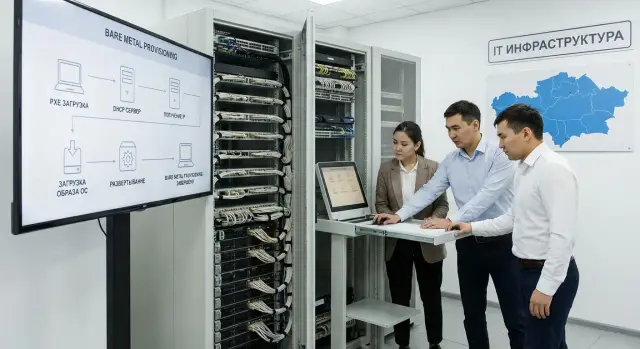
Where time is lost when bringing servers into production
Most of the time is spent not on installing the OS itself, but on dozens of steps around it. While a server turns from “metal in a rack” into a ready node, engineers constantly switch between tasks, accesses and approvals.
The same items usually eat up hours: network (VLAN, IP, DNS, gateways, access to required segments, PXE), accounts and keys, basic security and updates, correct image preparation (OS version, drivers, RAID, UEFI/BIOS), and also inventory and recording (serial numbers, inventory, owner, physical location and connections).
Manual installation almost always produces different results with different engineers. One installs packages “just in case,” another forgets NTP or sysctl, a third names interfaces their own way. After a couple of weeks it becomes the question “why is this server different from the others,” and finding the differences takes longer than building a correct node from scratch.
It’s important to understand the boundaries: bare metal provisioning typically covers the repeatable steps up to the point of “server with OS and basic configuration.” It doesn’t replace monitoring, backups or application deployment, but it can hand off the “baton” prepared with tags, variables and basic agents.
Another source of delay is people and queues. The chain involves platform and network teams, operations (racking, power), security (access and requirements), sometimes procurement and system owners. If steps aren’t formalized, every new server becomes a mini-project. This is where automation of server commissioning yields the most noticeable gains.
What bare metal provisioning is in simple terms
Bare metal provisioning is when a physical server receives an operating system and basic settings automatically: no USB, no long checklist. You power on the server, and after a set time it’s running the desired OS with network parameters, access keys and a basic set of packages.
Typically it looks like this: the server boots over the network and receives instructions on what to install and how to configure. Installation follows a template, and after the first boot post-install commands bring the system to the required state.
A typical scheme involves DHCP (assigning IP and parameters), PXE (starting the boot), an unattended installation file for the OS installer and post-install scripts (agents, policies, basic settings). At the end the server is registered in inventory as ready.
The main idea is standardization. Instead of deciding “what to install on this server” each time, you describe roles (for example hypervisor, database, application server), profiles and tags, and then apply them to specific hardware. This is useful when you have many identical servers in racks or when strict compliance with internal standards is important.
What risks does it mitigate? First, the human factor: forgotten steps, mismatched versions of settings, missed security requirements. Second, deviation from rules: someone configured the network “as usual” instead of “as required.” As a result, commissioning becomes repeatable and predictable.
When automation really speeds things up, and when it doesn’t
Automation provides the most benefit where you repeatedly do the same tasks: install an OS, set network, add keys, install basic packages, register inventory. Bare metal provisioning removes manual steps and makes the result consistent every time.
The effect is strongest when volume, repeatability and control requirements coincide. Even if you have few servers, but they are deployed in bursts for projects or seasonal load, automation often saves deadlines.
Automation usually speeds things up if:
- you have many servers per month, or you introduce them in "waves";
- there are typical roles (virtualization, DB, applications, VDI) and clear templates;
- the network is complex (multiple subnets, VLANs, isolated segments) and IP/name assignment must be accurate;
- security and audit matter: you need to know who and when applied an image and which parameters were used;
- you have remote sites with no experienced engineer on site.
When acceleration is weak, the problem is often not the tool but the source data and process. If each server is unique, decisions are made ad hoc, and the network is built each time, you’ll run into approvals and rework.
Practically, don’t expect miracles if:
- servers are rare (a couple per quarter) and the manual process is already tuned;
- roles and requirements constantly change and aren’t documented;
- you don’t control DHCP/DNS/segmentation and can’t ensure a stable PXE;
- security forbids unattended installation without pre-approved images and procedures.
A simple guideline: automation pays off when you’re ready to describe “how it should be” as a template. Then you set up the process once and repeat it dozens of times.
Signs that provisioning will pay off: simple metrics
To decide whether to invest in bare metal provisioning, you don’t need to guess. Just measure for a couple of weeks how long it takes to commission a server and where you lose time.
3 metrics that quickly show the effect
Start with a simple log for each server (even in a spreadsheet):
- Time to readiness: from unpacking and connecting to the moment the server is in the target OS and ready to take load.
- Number of reworks: how many times the OS was reinstalled, drivers fixed, network parameters changed, RAID recreated.
- Waiting time: hours or days spent waiting for accesses, approvals, manually assigned IPs, VLANs, accounts.
If there’s a lot of “idle” time in these items, automation usually delivers quick wins in commissioning.
ROI appears where repeatability exists. For example, if you have 3–5 typical roles (virtualization, database, applications, VDI, backup) and your fleet is growing. Another strong signal is audit requirements: you must demonstrably show that servers are deployed identically, with a clear change history and no “manual magic” tweaks.
If you deploy 1–2 servers per quarter and each configuration is unique, implementation may not pay off: too many exceptions and templates are seldom reused.
Foreman, MAAS and Cobbler: practical differences
All three tools solve the same task: install an OS on physical servers without manual steps, usually via PXE. In practice they differ in how deeply they manage a host’s lifecycle and how much effort is needed to maintain them.
Foreman is often chosen when provisioning is part of a broader process. Its strength is deployment templates, host groups and predictability: you describe classes of servers (hypervisor, DB, application) and each new host receives identical settings. This is useful when it’s important not just to install an OS but to enforce standards.
MAAS is stronger in hardware management and reuse of servers. It’s suitable when inventory, rapid reassignment of roles and frequent re-provisioning matter (test clusters, temporary stands, rapid pool expansion). You can think of it as a system that keeps the fleet “ready” and hands out nodes quickly for tasks.
Cobbler is often chosen for simplicity: lightweight PXE and basic scenarios with minimal components. It fits when you need to close a clear need quickly, but some logic (role management, standards control, audit) usually remains outside Cobbler.
Before choosing, check basic constraints: UEFI, drivers for NICs and RAID/HBA, remote management via IPMI or Redfish, and how the image catalog and updates will be organized. For bare metal provisioning these often matter more than the "favorite tool."
To avoid religious debates, compare by scenarios: how many roles must be supported, how often you reinstall hardware, audit and repeatability requirements, fleet heterogeneity, and who will operate the solution.
What to prepare before starting: networks, accesses, images, roles
Before enabling Foreman, MAAS or Cobbler, assemble the basics. Most pilot failures are not caused by the tool choice but by an unprepared network, lack of access to hardware and scattered OS images.
Start with a provisioning network. Ideally— a separate VLAN or physically separate network for PXE and installation services. If isolation is impossible, agree in advance on rules: where DHCP is enabled, which subnets participate, and how to prevent accidental address assignment to production segments.
Next you need core services: DHCP, TFTP or HTTP for downloads, DNS (at least for node names), package repositories and NTP. A single inconsistent time source later breaks logs and investigations, so consider NTP mandatory.
Another block is server access. For true bare metal provisioning you usually need IPMI or Redfish to power on/off, control boot order and read status. In large organizations this quickly bumps into security: who creates accounts, where passwords are stored, which commands are allowed, who has console access.
To make the pilot honest, prepare a minimum: 2–3 roles, naming and network parameter rules for each role, one standard disk layout and basic settings, and appointed approvers—who signs off on a role and who accepts the result.
Agree in advance on OS image versions and updates: who builds a new image, how it’s tested and how the exact version is recorded so the installation can be reproduced month later. Also plan logging: which server was installed, when, which template was used, and what the result was.
Pilot plan for 2–4 weeks: step by step
A pilot is not meant to cover the whole fleet immediately but to prove three things: time is reduced, the result is repeatable, and manual errors decrease. Choose one site (one hall or network segment) and 1–2 common roles that are deployed most often.
Agree on success criteria in advance: time from power-on to ready server, share of installations without manual fixes, frequency of failed installs, and how quickly a server can be rebuilt after failure.
Weeks 1–2: build a minimal working flow
Assemble the chain: PXE boot → OS install → post-install (network, accounts, monitoring agent, basic packages). One profile should yield identical results on identical hardware.
Then connect power management and inventory collection. This saves time walking to the server room and helps catch mismatches in disks, NICs and firmware before installation.
Weeks 3–4: runs and acceptance
Perform a series of identical installations and record the numbers:
- 5–10 installs of one role on identical machines
- time measurements per stage (PXE, install, post-install)
- all manual interventions with reasons
- number of reboots and their causes
- time to "recover from scratch"
After that, do a short demo for operations and security: where images and secrets are stored, how auditing is done, and who can trigger a rebuild.
How to measure the pilot’s effect: criteria and figures
To avoid turning the pilot into a matter of opinion, agree on numbers and a baseline beforehand. The most honest approach is to take 3–5 typical servers and install them "the old way," recording time and steps, then repeat the same on the pilot.
The main metric is time to readiness: from powering the hardware to SSH or WinRM access and presence of the required basic role (monitoring agent, domain join, hypervisor packages). Record not only the mean but also the spread: automation is valuable because it makes results predictable.
Track these five metrics per install:
- time to readiness and “operator time” (minutes a person actively spent)
- share of manual actions (BIOS, RAID, network, post-config)
- reliability (percentage of installs without intervention and failure causes)
- repeatability (do packages, versions, network and policies match on identical servers)
- recovery (time to re-provision after disk replacement or failure)
Also check transparency: each run should leave clear logs and evidence. This is important for audits, change requirements or public-sector projects.
A sample target for the pilot: if an engineer previously spent 2–3 hours of active time per server, a reasonable goal is to reduce operator time to 10–20 minutes, even if the full installation takes 40–90 minutes.
Final evaluation is simple: (minutes of operator time saved per server) x (servers per month) = hours returned to the team. If the number is noticeable during the pilot, scale up.
Common mistakes and pitfalls during implementation
The most frequent problems are related to details around provisioning. Automation brings speed, but if basics aren’t aligned you’ll get fast but repeatable failures.
Typical issues:
- Network mixing: the provisioning network is visible from user segments. This is both a security risk and a source of accidental PXE boots.
- UEFI and Secure Boot: some servers boot via BIOS, others via UEFI, Secure Boot keys aren’t prepared. The same template sometimes works, sometimes fails.
- Drivers and RAID: installation completes, but the controller is in the wrong mode or the driver is applied later. You may face low performance, array degradation or odd reboots.
- Overloaded post-install: the template contains everything at once (domain, monitoring, backup, policies, dozens of packages). If an external repo hangs, the rollout pipeline stalls.
- No process owner: images and templates are changed bit by bit and nobody is accountable for the result.
Simple rules help: isolate the provisioning network, unify boot mode and order for the pilot group (UEFI or BIOS). Decide disks and RAID/HBA in advance and test on one machine under load, not only “that it installed.”
Keep templates minimal: OS, network, access, basic packages. Add everything else as a separate stage that can be repeated or skipped.
Also plan rollback. If auto-installation fails during an incident, there must be a documented path back to manual install and a clear point where you switch back.
Short checklist before production rollout
Before enabling bare metal provisioning for real servers, run a few simple checks. They take a day but save weeks of troubleshooting.
Security and access control
Define who and how manages hardware (BMC/iDRAC/iLO), switches and the provisioning tool API. Production must not rely on shared accounts.
- Separate automation accounts from human accounts and grant least privilege.
- Ensure power and console access are logged.
- Segregate roles: who edits templates, who starts installs, who confirms commissioning.
Network, templates and reproducibility
The most common failure is a “rogue” DHCP/PXE that intercepts the wrong machine.
- Verify DHCP/PXE only serves the intended VLAN/segment.
- Use version control for templates (kickstart/preseed/cloud-init) and document the image update process.
- Configure installation logs and artifact storage: which template, which parameters, what result, on which hardware.
- Describe a rollback scenario: safe reinstall and quick server return in case of failure.
Also agree on acceptance: who claims the server after install and the short checklist (access, hostname, disks/RAID, monitoring agent, basic policies).
A realistic example: how it looks in a typical datacenter
Typical task: commission 20 new servers for a private cloud or VDI in 10–14 days. Hardware is en route, the datacenter network exists, but the team is small and also handling incidents.
Before automation everything relies on manual installs. One engineer installs OS, another configures RAID by hand, a third tweaks network. Small differences keep appearing: image versions, missed updates, partitioning differences. Deadlines slip: one server is ready in 2 hours, another takes a day due to rework and queueing for staff.
After introducing bare metal provisioning the approach changes. One approved image and 2–3 roles appear, e.g. “hypervisor”, “VDI node”, “management server”. The process becomes straightforward: create a request, choose a role, assign a profile (network, disks, keys), start auto-install and accept the result by checklist.
Some manual work remains: racking the server, connecting power and network, labeling ports, sometimes agreeing VLANs and IPs. But the main change is that people stop doing the same task 20 times and begin controlling the process instead of "assembling" each server anew.
Next steps: moving from pilot to regular operations
If the pilot saved time and reduced manual errors, lock in the result with a process.
First, choose 1–2 scenarios that truly repeat: adding new nodes to a cluster, reinstallation after failure, mass OS replacement. Define 2–3 metrics to track permanently: time to readiness, share of installs without manual fixes, number of config-related incidents.
Then verify the chosen tool meets your constraints: boot modes (UEFI/Legacy), remote management (IPMI/Redfish), network isolation, security requirements for secret storage. A provisioning flow can be fast in a test network but painful in production if access and segmentation aren’t solved.
Assign owners and updates
The most common breakdown after a month is images and templates. Assign an owner (or small team) with permissions to change OS images, kickstart/preseed/cloud-init templates, post-install steps, drivers and firmware packages. Agree on an update cadence (for example, monthly) and a clear rollback rule.
Expand in stages
To avoid turning the rollout into a large project, expand in steps: add another role on the same hardware, then add a second platform type (different controller, different NIC), move the process into regular change windows and add minimal checks (logging, who and when initiated a run).
If you plan fleet refreshes or new purchases, align requirements for BMC, NICs and boot modes with vendors and integrators in advance. In Kazakhstan such tasks are often handled together with suppliers and integrators: for example, GSE.kz supplies servers, workstations and integration services, which is convenient when you need not only to buy hardware but also to quickly bring it to a repeatable operational standard.
Frequently asked questions
What is bare metal provisioning?
Bare metal provisioning automatically installs an OS and basic settings on a physical server. The server boots over the network and receives the required image, network settings, access credentials, and initial packages from a preconfigured template.
When is server onboarding automation truly worthwhile?
It pays off fastest when servers are provisioned in batches, roles are standardized, and configuration requirements are strict. If the team regularly configures networking, RAID, keys, and packages by hand, templates substantially reduce operator time and errors.
Which metrics help assess the return on investment?
Measure the time from connecting a server to it being ready, the number of reinstalls, and hours spent waiting for access credentials, IP addresses, or VLANs. If these losses recur for every server, an automation pilot usually makes sense.
How do Foreman, MAAS, and Cobbler differ in practice?
Foreman is convenient for templates, host groups, and standard roles. MAAS works well when physical hardware needs to be frequently reassigned and reinstalled. Cobbler is chosen for simpler PXE scenarios when some inventory and control are handled separately.
What should be prepared before starting provisioning?
Set up a separate VLAN or a tightly restricted segment for PXE, DHCP, DNS, a time source, and repository access. Before starting, also agree on IPMI or Redfish, naming rules, network parameters, disk partitioning, and OS image versions.
How do you run a pilot in 2-4 weeks?
Start with one site, one or two common roles, and several identical servers. In the first two weeks, build the PXE, OS installation, and basic post-configuration chain, then perform 5-10 identical installations and document every manual intervention.
How do you know the pilot was successful?
Track more than total installation time: also measure the engineer's active working minutes. It is useful to check the share of runs completed without manual changes, configuration consistency across identical servers, failure causes, and the speed of reinstalling after a failure.
Which mistakes most often break provisioning?
Common issues include DHCP or PXE in the wrong segment, mixing UEFI and BIOS, and unsuitable RAID or network card drivers. Do not overload the initial template: keep the OS, networking, access, and basic packages in it, and move heavier tasks to a separate stage.
Does provisioning replace monitoring and application deployment?
Usually not. Provisioning prepares the server through the OS and basic configuration stage. Monitoring, backups, applications, and complex policies are best added after installation through separate tools and controlled workflows.
How can you start provisioning safely in production?
Use separate accounts for people and automation, minimum permissions, action logging, and clear roles for changing templates and starting installations. Also document a safe fallback to manual installation in case the automated flow fails.
