8 min read
Backup server for an agency: minimal architecture without a second DC
How to design a backup server for an agency: the minimal set of roles, copy storage and a simple failover plan without a second full data center.
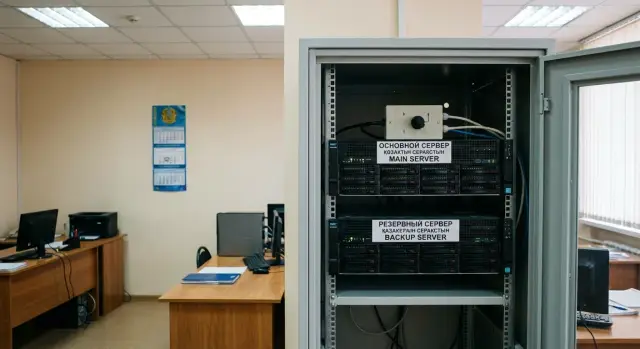
What exactly needs to survive a failure
It’s useful to call things by their real names: a failure is not just “the server died”. In a small agency (typically 5–50 workplaces) there are 1–2 services without which work stops: the accounting system or database, document workflow, mail, a shared file resource, access to specialized registries.
A common scenario is: computers are on, people are ready to work, but one central node becomes a single point of failure. Result: not only IT is down, but citizen reception, approvals, reports and payments halt.
Failures can look similar by symptoms but differ greatly in consequences:
- Total server hardware failure (board, RAM, controller) — services stop immediately.
- Disk or storage failure — data may still exist but the system won’t boot.
- Power issues (tripped breaker, brownout, UPS failure) — sudden shutdown and risk of data corruption.
- Loss of connectivity (provider, router, VPN down) — the server runs but is unreachable.
- Human error (deleted database, bad update, ransomware) — hardware intact, but you can’t operate.
Important: “we have a backup” does not equal “we will recover quickly”. A backup answers “can we restore data”, not “how fast users will be back to work”. If copies live on the same server, restores were never tested, and there’s no documented procedure, an incident will show that hours or days are lost.
Simple example: accounting can’t log into the accounting database, and the records department can’t open the archive. Formally the data exists “somewhere”, but while you look for the latest intact copy and manually bring the service up elsewhere, the agency loses a working day. Surviving a failure means deciding in advance which services must come back first and what should keep working even if power or connectivity fails.
Minimal requirements: RTO and RPO without jargon
For a backup to actually help, agree first on goals: what exactly we protect and how fast it should be back online. For a small agency this is vital: budgets are limited and expectations from IT often sound like “it must always work”.
RTO is how long a service can be down after a failure — simply: “how long can we tolerate the outage”. RPO is how much data you’re willing to lose — simply: “how far back in time can we roll the data”.
A practical step: pick 3–5 critical services and assign business owners (not just IT). For example: mail, file storage, 1С accounting, domain and authentication, agency case tracking. With owners it’s easier to agree realistic numbers rather than a wish for “never to fail”.
For each service answer two questions:
- Maximum downtime (RTO): 30 minutes, 4 hours, 1 day.
- Maximum data loss (RPO): 15 minutes, 1 hour, 24 hours.
Then map services to tiers. This prevents applying the same protection to everything:
- Required: work stops without them (short RTO, small RPO).
- Preferable: hinders work but several hours outage is tolerable.
- Can wait: recovery the next day is acceptable.
Example: for the domain RTO 1–2 hours and RPO 1 hour; for the file archive RTO 1 day and RPO 24 hours; for accounting RTO 4 hours and RPO 4 hours (if data is entered in batches).
These agreements turn a “backup server” purchase into a clear objective: which services to raise first, which data must be fresh, and where you can avoid overspending.
Where to place the backup: nearby, in a branch or at a partner
Location solves half the problem. The same scheme can save you from a disk failure but be useless if there’s a building or connectivity incident. Start from real risks: what happens more often and what’s more critical for you — downtime or data loss.
In practice people pick one of three schemes:
- In the same building. Cheap, fast and easier to coordinate. Good against main server failures, bad updates and some power problems (if the backup has a separate feed and UPS). It won’t help in case of fire, flooding, theft, building-wide outage and sometimes network issues if everything goes through the same cabinet.
- In another building or branch. Better for risk coverage: you survive room problems, local power issues and some security incidents. Cost is often in connectivity and administration: you need a stable channel, clear admin access and a place where equipment can be serviced.
- At a partner site. Suitable if you have a trusted partner and formal grounds to host there. Covers room risks and often gives stronger conditions (security, climate, power). But adds organizational questions: access, rack entry, after-hours access.
Choose based on a simple example. If power trips often in the office but there haven’t been major building incidents for decades, a local backup with a good UPS will already help. If the building undergoes repairs and there’s flood risk, look to another premises.
Before deciding check:
- is there separate power and space for a UPS;
- how stable is connectivity between sites and who is responsible;
- who has physical access to the server and how it’s logged;
- how long it takes to reach the equipment in an incident;
- where copies are stored separately from the backup host.
If you buy hardware locally (for example S200-class servers for the backup site), budget not only “hardware” but also placement conditions. These usually determine whether the scheme will survive a real incident.
Minimal architecture: one host, virtual services, UPS
If budget and space don’t allow a second full DC, the most practical option is one physical server for virtualization. Run several virtual machines on it and prepare them to start quickly so that if the main node fails you can restore key services on the backup host.
Virtualization means you move ready services, not specific hardware. On failure of the primary server you boot required VMs on the backup host and continue in a simplified mode.
Which VMs to keep separate
To avoid one role dragging others down, separate functions into VMs. A minimal set usually contains three:
- domain controller and DNS (user authentication, basic policies);
- file service (shared folders, templates, documents);
- application service or database (preferably separate, but if resources are tight they may be combined).
If you have specialized systems (document workflow, accounting), decide in advance which ones start first and which can wait.
Disks and power: two common mistakes
Minimum for disks: RAID to survive a single disk failure, and clear data separation. It’s practical to have a separate volume (or a separate disk set) for backup copies so they don’t mix with active files and VM disks.
For power you must have a UPS. It’s important not only to “hold 10–15 minutes” but to be able to shut down cleanly if power fails for longer. Configure automated shutdown of the host and VMs on UPS signal, otherwise the risk of corrupted files and databases rises sharply.
Example: a department of 40 users keeps a backup host in a server cabinet and prepares 2–3 VMs in advance. In an incident they start the domain and file VMs first, then the application when power and network are confirmed stable. For such a host people often choose platforms with good local support, for example from the GSE S200 line if local manufacturing and service are important.
Backups and copy storage: so you can actually recover
A backup server won’t help if data can’t be restored. Often it’s not hardware that “fails” but a database, file server or a ransomware infection. Backups are not a checkbox — they are part of minimal high-availability architecture.
A good baseline is the 3-2-1 rule: three copies of data, on two different media, and at least one copy off-site. For a small server room this usually means: copy on local storage, copy on removable media or separate NAS, and another copy in a different place (branch, partner site, protected remote storage).
Set backup frequency not by feel but by data type and cost of loss:
- documents and shared folders: nightly, plus a weekly full copy;
- databases (accounting, case records): more often, e.g. every 1–4 hours if data changes continuously;
- server and network device configurations: after each change and weekly for safety;
- mail and key services (if present): daily, and important logs by a separate policy.
Keep a “fast” copy nearby (to recover within hours) and an “insurance” copy off-site. Simple option: a local repository on the backup host and a removable drive taken out of the server room on a schedule. More robust: a second site in another building or district to survive fire, flood or long power outages.
A frequently missed step is recovery testing. Once a month do a short test: restore a copy to an isolated VM and verify the service really starts.
Minimal checks:
- can the database/folders be opened, are files intact;
- does the last successful backup time match RPO expectations;
- how long did recovery to working state take (RTO);
- is there a log: who ran the backup, were there errors, where did copies go.
If a citizen-facing database is critical, make frequent DB copies and a separate daily documents copy. Then data loss is minimal and recovery is predictable.
Network and access: how users will keep working
Even if the backup site is ready, people can’t work until network access is arranged: how traffic reaches the backup and how users know where to connect. Here simplicity matters: predictability, redundancy and clear access rules.
Between sites you need a channel that can carry normal work load (mail, document workflow, files, remote desktops). For a small agency 100–300 Mbps is often enough if you don’t move large databases or run heavy VDI. More important than “paper speed” is stability: packet loss and jitter will break work faster than limited megabits. If budget allows, keep a second independent channel (another ISP or LTE/5G) at least for key services.
Grant access to the backup site via VPN and on a “need-to” basis. Usually enough:
- a dedicated group of users for critical services (records, mail, accounting);
- a separate VPN profile or segment for admins;
- device and time restrictions where feasible;
- connection logging.
So that users don’t search for a “new server address” after a switch, plan DNS and addressing in advance. A convenient approach is stable service names (e.g., portal, mail, files), and on failure only the DNS record is changed to the new IP. Consider TTL: too large means a long move delay, too small increases DNS load.
Keep an out-of-band admin access for problems with the main network: local console, a separate Internet channel for admin VPNs or at least out-of-band access to network gear. This emergency door saves you when things go wrong.
Step-by-step implementation plan for 2–6 weeks
The plan should be short and verifiable. The goal is not perfection but that after a failure key services actually start and any on-duty person understands the steps.
Start with an inventory: what services exist (AD, file shares, 1С, mail, agency system, VPN), where data resides and who uses it. Then confirm priorities: what must be brought up first, what can wait, and what data cannot be lost even for the last 2–4 hours.
Next prepare a “minimum” site: one host with CPU/RAM headroom, disk subsystem, UPS and a separate network port/channel. It’s practical to prepare 2–3 VM templates immediately (Windows Server, Linux, a blank VM for apps) so recovery doesn’t turn into manual assembly.
In parallel configure backups: schedules, storage and restore tests. If sensible, add replication of critical VMs or data to the backup host, but don’t try to replicate everything.
To fit 2–6 weeks, keep a task rhythm:
- Week 1: inventory, priorities, agree RTO/RPO.
- Week 2: delivery and installation of the host, basic virtualization, VM templates.
- Week 3: backups, test restore of files and one VM, error logging.
- Week 4: switching scenario (who does what), contacts, access, rule “if not restored in 15 minutes — next step”.
- Weeks 5–6 (if needed): work out bottlenecks, train on-duty staff, finalize the runbook.
A mandatory step is a quarterly test. For example simulate primary server failure on a Friday evening: start AD and file services on the backup, verify user logins, access to shared folders, printing and the key application. After the test immediately update instructions and the dependency list. If the host is local hardware, confirm spare parts and support timelines with the vendor so the plan doesn’t fail on details.
Example scenario for a small agency
Imagine an agency with 20 employees. They use an accounting database daily, store documents in a file archive and log into workstations via domain. Internet exists but is not always stable, so relying solely on cloud is risky.
Management requires accounting to be restored quickly: more than 4 hours downtime disrupts reception and reporting. The file archive is less time-sensitive: losing up to one day’s changes is acceptable (e.g., yesterday’s scans can be re-scanned). Other services (internal portals, test DBs, secondary folders) can be restored during the working day.
A scheme without a second full DC: in a small branch or another building there is one backup server with virtualization, UPS and separate disk storage. Key VMs (accounting, domain, files) are regularly copied to this node. Copies run on schedule and quarterly restoration tests ensure services actually start.
A typical failure day is practical: power loss, main server broke or array failed and work stops. To avoid chaos, assign responsibilities in advance: who decides on switching, who starts services, who verifies access.
A one-page procedure is handy:
- On-duty person logs the incident and informs IT lead.
- IT lead decides: recover on-site or activate branch backup.
- On the backup server start the accounting and domain VMs, then the file service.
- Verify: login with a user account, open the database, print a test document, access a shared folder.
- Inform users that work continues in emergency mode and record the time for the RTO report.
A practical point: even if hardware is bought locally, success depends less on brand and more on discipline — backup schedules, a clear runbook and regular recovery tests.
Common mistakes and pitfalls
The most frequent mistake is buying hardware and calling it a backup. A backup scheme works only when it’s clear in advance what to switch, who does it and how fast.
Problems start with responsibility. If “everyone knows Vasya can do it”, on the incident day Vasya may be absent and instructions, access and contractor contacts are in his personal messenger.
A second trap is “we have a backup” but it sits next to the primary service. One fire, power surge or rack theft and you lose both production and copies. At least one copy must be off-site or at a trusted partner, and you must verify it can be read.
Another painful topic is no recovery tests. Without trial runs you discover corrupted archives, wrong DB versions or forgotten encryption keys at the worst moment. Rule of thumb: at least once a quarter restore at least one critical service in a test run and record the time.
A technical trap is putting everything into one VM — AD, mail, file server, 1С, monitoring. In an incident you can’t quickly raise the essential because everything became “equally important”. You need priorities: what comes up in the first 2 hours and what can wait.
Finally, access. If passwords for the hypervisor, backup system and admin accounts live with one person, that’s as much a single point of failure as one disk.
What usually breaks the recovery plan:
- no assigned responsible person and no short step-by-step instruction;
- the only copy of data is stored near the main server;
- recovery was never tested in practice;
- all critical services are in one VM without priorities;
- passwords and keys have no emergency access (for example, a sealed envelope in a safe).
If you buy equipment from an integrator, for example GSE.kz, ask not only for specs but also for a short recovery plan of 1–2 pages. That often brings more value than an extra “spare” disk.
Short checklist before go-live
Before declaring a DR scheme ready, verify agreements and testability, not just hardware. In a small agency failures are more often due to process: unclear recovery priorities, who decides to switch and where the last working copy is.
Minimum items to document in writing:
- Approved list of critical services and their owners (for example: domain and accounts, file resources, 1С/EDS, mail, VPN). For each service it’s clear who owns the data and who confirms it “works normally” after recovery.
- RTO and RPO agreed and understood by management: how long the office can work “manually” and what data loss is acceptable. If leadership expects “everything up in 5 minutes with zero loss”, discuss it before an incident.
Then ensure recovery is physically possible:
- At least two independent copies exist and one is off the main site. “Off-site” is not “another folder on the same server” but a separate device or storage location.
- A short switching instruction of 1–2 pages: what to turn off/on, which services start first, where to change addresses/routes, and how users check access. Nearby — contacts for responsible persons: IT, ISP, security, and the manager who authorizes the switch.
And finally: don’t launch without a real test.
- Record the result of the last restore test: date, what was restored (e.g., file resource and a DB), how long it took, where the bottleneck was. Attach a list of fixes and deadlines for them.
If at least one item exists only “in theory”, postpone the launch and bring it into practice. A minimal architecture is valuable only if it can be repeated by instruction under stress.
Next steps: turning the scheme into a working solution
To make the backup scheme a real protection rather than a “plan folder”, start with a short set of inputs: which services are critical (mail, document workflow, DBs, file resources), peak user count, total data volume and growth rate.
Then honestly choose priorities. A minimal scheme always has trade-offs: cheaper, faster recovery, or better protection from major incidents (fire, flood, long power outage). If the main priority isn’t named, the architecture becomes “average everywhere” and won’t save you in an incident.
Anchor the decision with simple rules:
- which services start first and in what order;
- who decides to switch and who executes it;
- the maximum downtime allowed per service;
- how to check that backups are restorable;
- where passwords, keys and instructions are stored so they’re available in an emergency.
Then plan a pilot, not “everything at once”. Choose one critical service and run the full cycle: backup, restore, start on the backup host, check user access, return to normal mode. It matters not only that it “started” but the time, extra steps, missing rights or unclear instructions.
If the pilot shows lack of capacity, reliable power or service, move to selecting hardware and support. For government organizations it’s often important that supply and maintenance are predictable. It makes sense to consider locally manufactured servers and integration from GSE.kz (gse.kz): the company produces computers and servers in Kazakhstan, performs system integration and provides 24/7 technical support through a service network.
Final step — regularity: a short switching drill every quarter and a selective restore check monthly. That keeps the scheme working even as people, services and loads change.
Frequently asked questions
What counts as a failure besides “the server died”?
By “failure” people usually mean more than just a broken server: loss of connectivity, power outage, disk failure, a bad update or user action. For an agency it’s more important to look at consequences: which services stop and how many people cannot work.
Why doesn’t “we have a backup” mean “we will recover quickly”?
A backup answers the question “can we restore the data”, while recovery answers “when will users be able to work again”. If copies were never tested, are stored next to the production system and there is no runbook, an incident can cost you hours or days despite having backups.
How to quickly determine which services should be protected first?
Start with 3–5 most critical services and agree with business owners how long downtime they can actually tolerate and how much data loss is acceptable. These numbers turn a conversation about a “backup server” into concrete goals rather than endless wishes.
What are RTO and RPO in simple terms and why are they needed?
RTO is the maximum acceptable downtime of a service after a failure — how long you can tolerate it being unavailable. RPO is the acceptable amount of data loss measured in time — how far back you can roll data. These parameters determine backup frequency and recovery complexity.
Can the backup server be in the same building as the primary?
A backup in the same building is usually cheaper and faster to implement and helps against hardware failure and bad updates. But it won’t protect against building-wide incidents, theft, fire or prolonged power outage — so at least one copy must be off-site.
What minimal backup architecture works without a second DC?
The most practical minimum is a single physical host running virtualization with prepared VM templates. On failure you start the necessary virtual machines on the backup host and continue working in a reduced mode without assembling everything from scratch.
Which virtual machines should be prioritized?
Typically keep the domain controller with DNS, the file service and the application or database on separate VMs. Separation allows you to raise the most important services quickly rather than depending on one all-in-one VM.
Why do I need a UPS if outages are short?
A UPS must do more than ‘‘hold power for a few minutes’’. It should enable graceful shutdown if power is out longer. Configure automatic shutdown of the host and VMs on UPS signal — otherwise the risk of corrupted files and databases rises and recovery becomes longer and more painful.
How to organize backups so they can actually be used for recovery?
Follow the 3-2-1 rule: multiple copies on different media, and at least one copy off the main site. Frequency depends on the cost of data loss: databases usually require more frequent backups than document archives. Crucially — regularly test restores, otherwise you don’t know if copies are usable.
How to test the recovery plan so it’s not just “on paper”?
You need a short switching scenario understandable to the on-duty person: who decides, what services start first and how to verify. The best test is simulating a failure and measuring time to a working state, then updating instructions, access and dependencies. Regularity beats perfection.
