7 min read
Auto-populating the CMDB from SMBIOS and BMC: fewer inventory errors
Auto-populating the CMDB from SMBIOS and BMC automatically pulls model, serial and configuration data into inventory, reducing errors and speeding diagnosis.
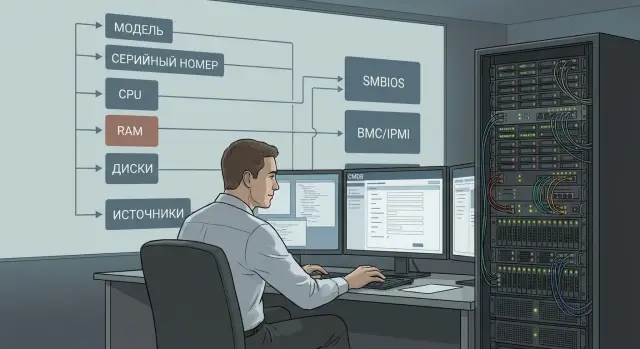
Why a CMDB and where manual inventory wastes time
A CMDB (configuration management database) stores the “passport” of IT assets: what a device is, where it sits, who owns it, how it’s configured and what it’s connected to. During an incident the CMDB is often the first place to check: is this the right server, what’s its serial number, which OS image, which disk controller, and who’s responsible for support.
The problem is that many fields are filled in manually, at different times and by different people. A single mistyped digit in a serial number triggers a chain: the asset isn’t found in the service desk, the wrong spare parts arrive, and the “missing” server turns up in another rack.
Most often people manually enter or correct model and serial number, CPU/RAM composition and disk types, firmware and controller versions, location (site, rack, slot), owner, and service relationships and criticality.
Inaccurate data directly increases diagnosis time. When performance degrades, the team first tries to find the “right” server: they check labels, ask for photos from the data center, and concurrently confirm with procurement what was actually delivered. Hours are spent confirming basic facts.
Manual inventory hurts more than just admins. It affects everyone who makes decisions and bears risks: operations and on-call teams (longer discovery and recovery), security (harder to prove compliance and track changes), procurement and finance (errors in specs and warranties), and service owners (uncertain what actually supports a critical service).
So auto-populating the CMDB from SMBIOS and BMC is not cosmetic — it shortens downtime and removes common human errors from inventory.
SMBIOS and BMC in simple terms: what you can collect
SMBIOS (System Management BIOS) is a set of hardware data the OS receives from firmware. In plain terms, it’s the device’s “passport” visible from the operating system. SMBIOS is commonly used to get vendor, model, serial number, motherboard info, CPU sockets and memory slots.
BMC (Baseboard Management Controller) is a separate controller that manages the server outside the OS. It’s available even when the server is powered off or the OS won’t boot. BMC provides hardware-level data directly: FRU inventory fields, temperature and power sensors, fan speeds, power supply and drive bay status, and an event log (for example: overheating, fan failure, power errors).
Before setting up automatic CMDB population from SMBIOS and BMC, agree which source is authoritative for each field. In practice it often works like this:
- device model and platform type — SMBIOS (if populated correctly)
- chassis serial number — BMC/FRU (usually more reliable for servers)
- board serial and revision — SMBIOS
- components inventory (PSU, fans, backplane) — BMC
- current status and incident reasons (sensors, SEL log) — BMC
Sources can disagree. After a motherboard replacement SMBIOS may show a new board serial while chassis serial in BMC remains the same. Or SMBIOS might contain an empty or generic serial like “To be filled by O.E.M.” while FRU has the correct value. Anticipate these cases: set priorities, store both values with their source noted, and treat discrepancies as a separate signal for inventory and diagnostics.
Which fields to auto-populate in CMDB first
If you collect everything, CMDB quickly becomes a warehouse of fields nobody checks. A practical approach is to start with what uniquely identifies the device and is most often needed during incidents.
Priority one — identification: vendor, model, serial number and UUID (or another stable unique identifier). This is the basis for finding “lost” servers and preventing duplicates.
Priority two — configuration, because it’s often checked during incidents and capacity planning. Usually it’s enough to pull CPU type and count, RAM size, list of drives (at least type and capacity), and network adapters (MACs and interface type/speed).
To make the record useful beyond engineers, keep contextual fields nearby: site/node, rack (if you track it), role (for example DB, virtualization, backup) and service owner. These attributes typically don’t come from hardware but should sit alongside auto-collected data and be filled by clear rules.
Priority three — support attributes: BIOS and BMC versions, firmware versions and maintenance notes. At night a degraded server’s on-call engineer can look at the CMDB and immediately know which remote access profile is needed and which known firmware issues to check.
If equipment is purchased and serviced through a local manufacturer or integrator (for example, GSE.kz), these fields are especially useful: they help keep a unified data format across heterogeneous sites and reduce dependence on manual entry.
Preparation: data rules and matching keys
Automation doesn’t start with polling servers but with organizing the data. Otherwise auto-population will simply accelerate reproducing old mistakes.
First decide where the authoritative asset object and its relations will live: in the CMDB, asset management system, ITSM, or a combination. Each physical device should have one primary object, and other systems should receive data by synchronization, not manual copying.
Next assign a “source of truth” for each field. SMBIOS is usually good for system and board-level data. BMC is often more accurate for chassis serial and inventory fields (when they are entered).
A practical rule that often sticks:
- chassis serial and server model — BMC (if fields are populated correctly)
- UUID, BIOS and board data — SMBIOS
- CPU, RAM, drives — both sources, preferring the one with fewer gaps
- network and ports — often BMC for built-in interfaces
At the same time, normalize reference data: models, device types, sites, racks, environment names. If one place has “S200” and another “S-200” or “Rack server”, matches will be rare and manual cleanup never ends.
Plan matching keys in advance. It’s better to have one stable key and one backup because fields can be empty or change after a board swap.
Common keys are chassis serial, UUID, asset tag and a fixed-interface MAC address (only as a fallback).
Example: after a motherboard replacement the UUID changed. If matching was only by UUID, CMDB will show a “new” server. With chassis serial and asset tag available, the asset history and relations remain intact.
In a multi-vendor infrastructure, agree on common field formats and validations early. In system integration projects GSE.kz often starts with data rules so collection works reliably.
Step-by-step process for auto-populating CMDB from SMBIOS and BMC
For predictable results, the repeatable process matters most: from normalization to update rules and change control.
From collection to writing into CMDB
Start with a test group (10–20 diverse servers). This quickly reveals which fields reliably arrive and which vary.
- Extract SMBIOS from hosts and normalize values: unified vendor names, consistent serial formats, model trimmed of extra spaces, consistent units for memory and disks.
- Separately gather BMC data: FRU info, chassis model, serials, controller identifiers.
- Reconcile records from both sources and eliminate duplicates. Start with serials, then add backup keys (asset tag, UUID, field combinations) for cases where a value is empty or incorrect.
- Update CMDB according to “who’s authoritative” rules. For example, take chassis serial and model from BMC and OS-tied details from the host. Define which fields can be auto-overwritten and which require approval.
- Schedule updates and change control: daily refresh for critical fields (status, network), weekly for configuration, and alerts if serial, UUID or vendor suddenly change.
A small example
After a repair the motherboard was replaced: SMBIOS shows a new serial or UUID while BMC still has the old FRU. A good rule is to mark such discrepancy as “needs verification” rather than immediately overwriting CMDB.
Add a change log: who updated a field and when, which source provided it and what the previous value was. This reduces disputes during diagnosis and makes it easier to see what changed.
Typical data problems and how to handle them
Even with collection enabled, initial runs almost always reveal “dirty” data. Hardware varies, firmware differs, and inventory has been maintained manually for years.
Inconsistent model names
A platform can appear as “S200”, “S200 Series”, “S200-2U” or the vendor’s shipping name. Solve this by normalization: create a canonical model dictionary and parsing rules (series separate, revision separate). Keep raw SMBIOS/BMC strings in an auxiliary field for auditing.
Empty, duplicated or wrong serials
Some components (memory, drives, sometimes motherboard) may have empty or identical serials. Don’t base CI uniqueness on a single field.
Practices that help:
- for servers: priority BMC Serial, then SMBIOS System Serial, then Asset Tag
- store multiple identifiers and their source
- detect duplicates with rules like “one serial appearing on two different hosts”
- mark suspicious records as “needs verification” instead of overwriting
BMC unavailable
Common causes: no route to management network, ACLs, interface disabled, changed password not updated. To avoid turning this into a manual hunt, implement availability checks: monitor whether BMC responds and record the reason for failure (network, credentials, interface down). This distinguishes data problems from infrastructure outages.
OS reinstalls breaking links
If you rely on hostname or an inventory agent, OS reinstall changes some attributes. You need a hardware-stable identifier: SMBIOS UUID, serials or preferably a combination of 2–3 fields. That keeps the server linked to the same CI even if the OS changes.
CMDB not matching physical placement
A server moved racks but CMDB still shows the old location. A compromise is to store both “recorded location” and “last detected (actual) location” and create a reconciliation task when they differ. This helps when nodes are swapped in a rack during maintenance: auto-detection rapidly highlights conflicts and speeds up resolution.
Security and access: collecting data without adding risk
Auto-populating CMDB is useful only if data collection doesn’t introduce new risks. The basic principle: collect the minimum needed, grant minimal rights, and keep logs.
For SMBIOS it’s usually enough to read base attributes from the OS (model, serial, UUID, memory and drive composition). Don’t give the collector blanket administrator rights. If elevated rights are unavoidable, limit them in time, enable auditing and use a dedicated service account.
For BMC (IPMI/Redfish) the rule is stricter: it’s a separate management plane and should be isolated from user networks. Access should be whitelisted and read-only if the task is inventory.
Practical measures:
- separate read-only accounts for collection with no shared passwords
- segment the BMC network and allow access only from dedicated nodes (inventory servers)
- rotate passwords and disable legacy protocols when not needed
- store only necessary fields in CMDB, avoid full configuration dumps and excess identifiers
- collection logs: who ran it, when, from which node, and what fields changed
Don’t collect everything just because you can. For inventory, vendor, model, serial, UUID, BIOS/BMC versions and main characteristics are usually sufficient. Add other fields only for specific use cases to avoid growing both data volume and attack surface.
You also need a procedure for suspicious changes. If serial or UUID suddenly change, it may indicate a motherboard replacement, parsing error or tampering:
- stop auto-accepting changes for those fields
- compare SMBIOS and BMC, and if needed verify with the label or paperwork
- log an incident and restore the last confirmed value
If you build the scheme for government or financial requirements, an integrator like GSE.kz often already has practices for segmentation, logging and access management that can be applied to CMDB collection.
Common mistakes when implementing auto-population
Auto-populating CMDB from SMBIOS and BMC quickly delivers value, but it can also introduce chaos without rules.
The most common mistake is identifying by hostname. Hostnames change during migrations, reinstalls and security policies. A server can appear as “new” while two distinct devices may merge into one record. Rely on serial, UUID and chassis identifiers instead.
Second mistake — unconditional overwrites. If an engineer fixed model, location or notes manually, a bulk import the next day may erase that work without trace. Define source priorities: which fields auto-update and which need requests to change.
Third mistake — no change history. Configuration evolves: RAM added, disk replaced, BIOS updated. If you only store current state, later it’s hard to know when something changed or whether it relates to an incident.
Fourth mistake — one CMDB schema for all hardware without classes. Servers, workstations and all-in-ones share similar fields but have different lifecycles and required attributes. Mixing them creates odd mandatory fields and wrong reports.
Fifth mistake — ignoring duplicates during bulk imports. This happens when partial keys match or some data is temporarily empty.
Minimum measures that usually close risks:
- use a stable matching key (serial or UUID) and store secondary identifiers
- set source priorities and forbid overwriting critical manual fields
- keep a configuration change log
- separate device types and required fields by class
- enable duplicate checks and merge rules before import
Example: after hostname changes in a branch, inventory created two new records “DC-01” and “DC-02” while the old ones remained active. Service desk tickets were opened on the wrong devices and diagnostics dragged on. Switching to serial-based matching and duplicate checks restored order in one sync cycle.
If you deploy this across servers and workstations purchased and serviced in Kazakhstan, agree in advance which identifiers and labels are primary. Vendors and integrators like GSE.kz typically provide stable data through the lifecycle, which simplifies auto-population.
Short checklist before full production rollout
Lock the rules before rolling out CMDB auto-population to the entire fleet. Otherwise automation will rapidly multiply mistakes.
Minimum you shouldn’t go live without
- Each asset has a unique matching key: serial, UUID or another stable identifier. If a key can be empty or change, define a backup (for example serial + asset tag) and flag such cases as a risk.
- For each field define the primary source: what comes from SMBIOS and what from BMC. The rule must be consistent and repeatable.
- Schedule updates and a maintenance window. Decide how often to update (daily, weekly) and when to run without interference, especially if BMC polling creates load.
- Quality checks are configured: clear targets for completeness and matches. For example: at least 98% serials populated, at least 95% model match between sources for typical servers.
- Reports for discrepancies and a remediation process: who receives conflict lists, SLA to close them, and how to handle exceptions (board replacement, bad DMI fields, old firmware, swapped assets).
If your equipment is purchased and serviced locally, agree who is responsible for firmware updates and correct DMI fields — this often reduces discrepancies before launch.
A practical example: how this shortens diagnosis
A service degrades in the evening: response times rise and some requests time out. First-line support sees only a host name and metrics, then a manual hunt begins: what model is this, how much memory, which CPU, was firmware updated recently, is this the correct server for that name?
With CMDB auto-population from SMBIOS and BMC the picture appears immediately. The engineer opens the record and sees model and serial, CPU and RAM composition, BIOS and BMC versions, basic drive and network info. No need to ask the data center for photos or to access the host with elevated privileges to collect facts manually.
The record might show one node’s BIOS is several versions behind, the RAM is below the cluster standard, or the network adapter is a different revision than the reference configuration. The conversation quickly moves from “seems like hardware” to concrete steps: check firmware-driver compatibility, compare the node to neighbors, and decide whether to roll back, update or replace a component.
Communication between teams also improves. First-line attaches precise CMDB fields to the ticket, engineers ask fewer clarifying questions, and procurement gets model and serial to check warranty and source parts. This is especially noticeable in mixed fleets that include servers from GSE.kz and other vendors: a unified CMDB format speeds diagnosis across all types.
Next steps: pilot, scaling and help from GSE.kz
Start with a pilot of 20–50 devices. Choose a representative slice of the fleet: several servers with BMC, a couple of workstations and 5–10 PCs. This quickly shows where data aligns and where normalization rules are needed.
Define pilot success criteria in advance: at least 95% of devices receive model and serial without manual input; duplicate rate in CMDB below 1–2%; CPU/RAM/drive discrepancies appear in reports; and there’s a clear exceptions list (what failed and why).
When the pilot is stable, scale by device type rather than “everything at once.” A common path: servers with BMC, then desktops/workstations via SMBIOS, and only later peripherals and rare models. Add dictionaries at each step: vendor names, serial formats, rules for empty or invalid fields.
Next tie auto-population to lifecycle events: procurement, commissioning, moves between sites, repair and decommissioning. Then you’ll see not only current configuration during incidents but also the change history.
Engage an integrator when rules are disputed (what counts as the “primary” source), when multiple CMDB/accounting systems exist, or when a data model and approval processes must be designed. In these cases GSE.kz can help as a vendor and systems integrator: set up collection, normalization and quality control, then hand the solution over to regular operations with ongoing support.
Frequently asked questions
Which fields are best to start auto-populating in CMDB to see quick results?
Start with identification: vendor, model, chassis serial number and a stable unique identifier (for example UUID). This immediately reduces “lost” servers and duplicates, and speeds up finding the right device during incidents.
How does SMBIOS differ from BMC and which is more reliable for inventory?
SMBIOS are hardware details the OS gets from firmware and are convenient to gather from the host. BMC is a separate management controller that provides FRU inventory fields, sensors and events even without a running OS. In practice, chassis serials are often more reliable in BMC, while some system attributes and UUIDs come from SMBIOS.
What if model or serial number from SMBIOS and BMC don’t match?
Define source priorities for each field in advance and store both values with their origin. If SMBIOS and BMC disagree, don’t overwrite automatically—mark the record as “needs verification” and log what differed. This helps tell apart a board replacement or repair from a parsing error or data garbage.
Which matching keys should be used to avoid creating duplicates in CMDB?
Rely on stable identifiers rather than hostname. Common choices are chassis serial number as the primary key, with UUID and asset tag as backups. If you match only on UUID, replacing a motherboard can create a “new” server in CMDB and break its history.
How do you avoid losing manual edits and important context during automatic updates?
Set rules that define which fields can be overwritten automatically and which require approval. Auto-update what comes from hardware and changes predictably (BIOS/BMC versions, basic configuration), while protecting fields like service owner, role, accounting location and notes from bulk overwrite. Keep a history of changes so you can see who changed what and when.
Why is BMC often unreachable and how to organize collection without manual troubleshooting?
Most often the issue is in the management network and access: no route to BMC, ACLs, disabled interface, or stale credentials. Monitor BMC reachability separately and record why a poll failed. That way CMDB entries don’t unexpectedly “go blank” and the team has a clear list of infrastructure blockers.
How to deal with floating model names like S200, S200 Series and S-200?
Normalize names first: create canonical models and string cleanup rules (remove extra spaces, unify series/modifier formats). Keep raw SMBIOS/BMC values in a separate field for review, but use normalized names for search and reports. Without this, automation will just speed up accumulating multiple names for the same platform.
What to do if serial numbers are empty, duplicate, or look suspicious?
Have 2–3 identifiers and don’t rely on one field for uniqueness. For servers, typical practice is: BMC Serial as primary, then SMBIOS System Serial, then asset tag; UUID is useful but can change when the board is replaced. Component serials (disks, memory) may be empty or duplicated, so treat them as composition attributes rather than CI uniqueness keys.
How to collect data from SMBIOS and BMC safely with minimal privileges?
Use read-only and minimal privileges by default: for SMBIOS read basic attributes from the OS without admin escalation, and for BMC use separate read-only accounts. Isolate the BMC network and allow access only from designated nodes, rotate credentials, disable old protocols, and log collection activity: who ran it, when, from which node, and which fields changed. Collect only what you need to reduce risk.
How to properly run a pilot and know when to scale to the whole fleet?
Run a pilot on 20–50 mixed devices and measure success criteria up front: percentage of devices with model and serial populated without manual input, duplicate rate, divergences between sources. Set schedules and alarms for dangerous changes (serial, UUID, vendor) and then scale by device type: servers with BMC first, then desktops/workstations via SMBIOS. If devices are purchased and serviced locally through a vendor like GSE.kz, align identifier formats and labeling early to reduce discrepancies before a mass rollout.
