8 min read
Fixed Asset Tracking with Barcodes: Labeling and Inventory
Fixed asset tracking with barcodes: how to choose labels, set up inventory and control moves between rooms and branches.
Why track assets with barcodes
Tracking fixed assets with barcodes is not about "a tidy database" — it helps quickly answer simple questions: where an item is, who is responsible for it, and what condition it is in. When every piece of equipment or furniture has a label you can scan, inventory ceases to be an annual chore and becomes a regular, understandable routine.
Barcoding eliminates common pains: long inventories, disputes between offices, losses during moves and repairs, and the "grey areas" when an item seems to exist but no one can document it. This is especially noticeable in organizations with multiple floors or branches where workstations change often and equipment moves on requests.
Without labeling data usually gets lost in three places: in chats and spreadsheets (when moves are recorded "by word"), in acts (when a document exists but isn’t tied to a specific item), and in people's memories (when someone says "we roughly remember this PC was in room 214"). As a result, tracking becomes a search for people, not objects.
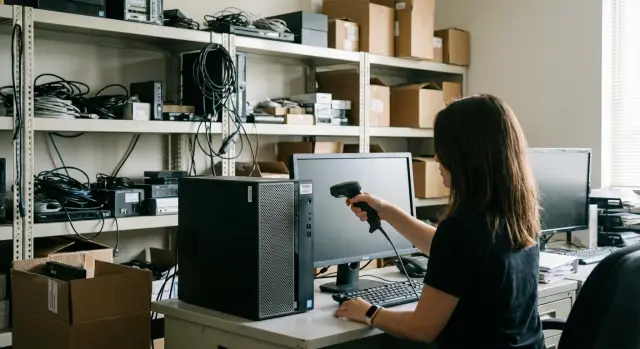
A simple example: in a hospital or school rooms are rearranged, some computers go to repair, some are temporarily moved to another building. If desktop cases, monitors and MFPs have inventory labels, a walk with a scanner immediately shows what stands where and what is "out of place." This works even when workstations or PCs were bought in batches and look identical.
After 1–2 months a well-configured process is usually recognizable by simple signs: inventory takes hours, not days; you can quickly get an actual list per room; moves are recorded immediately without accumulating "tails"; disputes over responsibility drop; there are fewer discrepancies between documents and reality.
Once these signs appear, you can expand coverage: add new asset categories and connect branches without breaking an already working system.
What data to record for each asset
First decide what you consider an asset. Typically fixed assets are items that serve more than a year and have notable cost: desktops and monitors, printers and MFPs, servers, network equipment, office furniture, UPSs, air conditioners, and sometimes retail or medical equipment.
Next you need an asset card. A barcode only helps you quickly find that card; the value is in which fields are filled. A minimal set that really helps during inventory and moves:
- name (simple and clear: "Accountant's PC", "Printer floor 2");
- model and manufacturer;
- serial number (if available);
- inventory number (internal ID);
- custodian (person responsible);
- location (branch, building, room, workstation).
If an asset is critical, add commission date, cost, warranty or service life, and status (in use, in storage, written off, under repair). This doesn’t complicate things if you fill it once and then update only location, custodian and status.
Don’t "bake" changing data into the barcode: room, person, department or even model. Otherwise you’ll need to reprint labels at every move. In practice the code usually contains only the inventory number or a short ID.
A separate topic is kits. For example, PC + monitor + UPS (or a GSE L200 workstation and a monitor). Two practical approaches: track each item separately and link them as a "kit" in the system, or label the kit as one object and keep composition as sub-items. For equipment the first option is often better: monitors and UPSs frequently move separately.
Inventory numbers: simple rules that work
An inventory number should be human-friendly and resistant to changes. A good number reads aloud without mistakes, does not change on moves, and does not depend on a specific employee. That matters: you can reprint a barcode, but the asset identifier should live for the asset's lifetime.
A simple format usually works best: a prefix for the object type + year of registration + sequence number. Example: PC-2026-004812 or SERV-2025-000119. A person immediately sees the item type and approximate age, while the system gets uniqueness.
Branch and room in the number: when it helps and when it hurts
Sometimes people want to include branch and room in the number (e.g., BRH-203). That may seem convenient at the start, but almost always breaks on moves: the room was renamed, the department moved, branches merged. Store place as separate fields (branch, building, room) and keep the number "permanent." Adding a branch code only makes sense when registries are kept separately and there's no unified database; otherwise duplicates and confusion appear quickly.
Asset history: old numbers, write-offs, replacements
If you find "old" numbers, don't rename records retroactively. Keep the previous number as a history attribute and make the current one primary.
Do not reuse inventory numbers after write-off. This is a common source of errors when a new PC "inherits" repairs and documents of the old one.
Example: when replacing a workstation with a new desktop (e.g., a new L200), the old asset gets status "written off" and the new one receives a fresh number, even if it stands in the same room.
To ensure consistent labeling, record rules in a short regulation: who issues numbers and by which counter, what format is standard (prefixes, length, leading zeros), where change history is stored and who updates it, and what to do with "unnamed" equipment found.
Barcodes and labels: what to choose for equipment and furniture
Decisions here are twofold: what code to print and what label material to use. If a label fades or peels off, tracking quickly falls back to manual corrections.
1D or 2D: which is more practical
For inventory marking 1D (e.g., Code 128) is usually enough. It reads fast with almost any scanner and suits cases where the label contains only the inventory number.
Choose 2D (QR) if you need to store more data in the code itself or the label must be very small. The downside is older scanners may not read QR, and on glossy or curved surfaces QR can be less reliable.
Label: material for the surface
Asset surfaces vary: plastic of a monitor, metal of a server case, laminated furniture, textured panels, curved lids. Choose label material to match conditions:
- paper — cheap but wears and dislikes moisture (better for furniture in calm environments);
- polyester (PET) — a universal option for equipment, lasts longer;
- strong adhesive — for rough and textured surfaces;
- destructible/plomb labels — when tamper-evidence is required;
- lamination or protective layer — when the label is wiped often.
Stick the label so it is visible in normal inspection but hard to peel: not on an edge or where hands constantly touch. For furniture it’s convenient to place it inside a door or on a side panel rather than on the facade.
Sometimes two labels help: an external one for quick scanning and an internal spare. For example, on a desktop case put one label on the flat rear part and a second inside the cover. If the external label is torn off during a move, the asset can still be identified.
Equipment and registry system: the basic set
More important than an "expensive system" is the combination of easy scanning and a single registry. If these two parts cooperate, labeling and subsequent moves run smoothly.
What to scan with
The choice depends on volume and working conditions. For office rooms simple solutions are usually enough, while for warehouses and frequent moves sturdier devices are better.
A handheld USB scanner suits an accountant’s or asset manager’s workstation: fast, accurate, minimal setup. A smartphone camera is handy for occasional checks but often struggles with small codes and poor light. A handheld data terminal (TSD) is needed when inventories happen in large batches and connectivity is unstable.
A workstation for labeling
To avoid ad-hoc labeling, set one clear place for issuing labels. Minimum: a label printer (direct thermal or thermal-transfer), suitable inventory labels for equipment and furniture, consumables and templates with consistent appearance.
A practical approach: before labeling import the supplier’s equipment list (model, serial number). This reduces manual input, especially for purchases of PCs, all-in-ones or servers.
Online or offline
Online scanning is convenient when you have stable database access: scan, open the card, assign location and custodian. Offline mode with data export is simpler for field inventories: collect scans on the route, then upload and reconcile.
To reduce errors, basic constraints help: auto-completion from directories, pick-lists instead of free text, duplicate checks and mandatory fields before saving. Also keep data in one registry (not separate files per branch) and schedule backups. Then even with staff or device changes the registry won’t "fall apart."
How to implement labeling — a step-by-step plan
It's easiest to roll out labeling as a small 1–2 week project with clear rules and answers to "who's responsible" and "where it lives." Then the process starts working immediately, not "sometime later."
1) Prepare the registry before printing labels
Collect a single asset list from accounting and actual lists from departments. You will usually find duplicates (one laptop in two cards), omissions (equipment present but no card) and empty fields (no room, no custodian, no serial number). Fix these before labeling, otherwise the chaos just moves to the labels.
2) Agree rules that won't fall apart in a month
Define how inventory numbers look, how locations are recorded (branch, floor, room) and who can change an asset’s "place." Assign zone responsibles: for example, the building administrator confirms moves inside the office, IT confirms moves for equipment.
A consistent action route helps: tidy cards (remove duplicates, fill mandatory fields, verify serial numbers), approve directories (locations, departments, responsibles, asset types and statuses), stick labels according to plan (room by room, starting with busy areas), then do initial reconciliation by scanning and start regular operations (moves and short checks monthly or quarterly).
A small example: while labeling you found 10 monitors in one room but the list shows 8. Mark the two extras immediately as "unidentified", temporarily assign them to the room and search documents or old acts that same day. Discrepancies are closed while the items are still on site.
Moves between rooms and branches without chaos
A move is any case where an asset changes location or responsibility: a room change, a floor move, transfer to a neighboring building, shipment to another city or branch. Even if an item stays in the same department but changes custodian, the registry should record it.
For the process to work you need a simple role scheme. Usually there is an initiator (department head or requesting employee), a releasing custodian (who hands over) and a receiving party (who accepts and becomes responsible). A practical rule: giver and receiver confirm the transfer and accounting or the admin ensures the system record is created.
Record moves as a short entry: date and time, from and to (room, floor, building, branch), reason, who handed over and who accepted, note on condition (e.g., "power supply present").
If equipment left without paperwork, don’t try to chase documents afterward without verification. First find the asset by barcode and confirm the actual location: a quick scan tour often takes less time than exchanges by email. Then create a corrective operation with the real detection date and a comment explaining why it happened. This reveals where the process fails (for example, issuance via security without marking).
A special case is temporary issuance when an item leaves briefly and must be returned: business trips (laptop, projector), repair (service, diagnostics), temporary substitution (a different monitor), or events (moved to a meeting room).
Example: an office moves to another floor and 20 workstations are redistributed to new rooms. If you prepare a "what should be in each room" list and simply scan labels at handover, the picture is clear: what is already in place, what is missing, and who received it. This practice pairs well when a supplier or integrator like GSE.kz hands over equipment by act broken down by rooms and responsibles.
Barcode inventory: check scenario and handling discrepancies
Barcode inventory delivers results when the check has a clear route and unified status rules. Then you get not just "found/not found" but a clear picture: what sits where, what moved, and what needs investigation.
Prepare the basics: an up-to-date locations list (branch, floor, room, storage), zone responsibles and a short schedule. Mark risk zones separately: meeting rooms, shared cabinets, server rooms, temporary workstations, repair areas, and equipment "on the move" (projector, laptop, scanner).
It's convenient to check room by room: enter, scan all labels, reconcile with the registry and log exceptions immediately. Don’t try to "remember" why an asset doesn’t match — the team’s job is to quickly and uniformly mark the fact.
A few discrepancy statuses are usually enough:
- not found (in the registry but not physically found);
- found in a different place (asset exists but location differs);
- no label (label missing or unreadable);
- duplicate label (same barcode on two items);
- not in registry (found something not in the list).
If you discover new equipment, do not add it to the registry from memory. Record it as "not in registry," note model and room, photograph the nameplate (serial number) and pass to the asset manager for documents check (supply, commissioning). For found written-off equipment act the same: log the fact and then raise the write-off act to understand whether the error is in documents or the asset should return to the balance.
To avoid delaying closure, plan final steps in advance: reconcile the report and list corrections, confirm moves and update locations, print and replace labels, resolve "not found" with responsibles and decide (search, memo, write-off), sign final documents and record the closing date.
Practical example: moving equipment and room-based tracking
A company moves to a new office and simultaneously opens a second branch. Initially there are 2 branches, 15 rooms and about 200 pieces of equipment: desktops, all-in-ones, laptops, printers, MFPs, and network gear. Previously tracking was in a spreadsheet, so after every move items went missing and there were disputes about specific PCs.
Labeling was done quickly in 2 days. Day one: technician and storekeeper print inventory labels and stick them in visible places (PC case, rear of monitor, side of printer). Day two: two employees walk room by room with one scanner: one scans, the other verifies the asset card (serial, model, responsible) and records the current location.
A week later they need to move 10 PCs to a new sales room. They create a "move" document, select from/to, scan 10 labels and save. Each unit only changes location and, if needed, custodian. History remains: you can see where the equipment used to be.
Then some equipment goes to the second branch. The registry updates not only the room but the branch and status (e.g., "in transit" on the shipping day). This prevents a situation where an asset is listed at the old location but physically absent.
Managers can open a report and check: how many assets are in each branch and room now, what moved during a period and who processed it, which items were "not found" during checks, whether there are duplicate inventory numbers, and whether any items have unconfirmed locations (no scan after the move).
Thus a move stops being manual chaos: changes are recorded by one scanning operation and discrepancies appear immediately.
Common mistakes in asset barcoding
Barcoding speeds up tracking only if rules are simple and the same for everyone. Most problems come not from the scanner but from small mistakes in labeling and discipline.
Three things are commonly confused: where to stick the label, what counts as the asset, and where to keep the "true" data. For example, the label is placed on a removable part (lid, battery, monitor stand) or where it quickly wears off (edge of the case, constant touch area, near ventilation). Or a single label is used for several items (PC + monitor + keyboard) and later part of the kit moves to another branch.
Another common mistake is keeping registries in multiple files by different people. Accounting, IT and facility admins have different versions and there’s no single "correct" one. Also missing history causes issues: someone changed room, custodian or status and it’s unclear when and why. Finally, baking too much meaning into the barcode (branch, room, purchase date, type, owner) leads to rules changing and old codes becoming inconvenient.
A practical example: during moves monitors and docking stations often "get lost" if the whole kit had one barcode. Later part of the kit goes to another branch and at inventory one item is present while the other is "hanging" in the system. This happens with regular office equipment as well as expensive devices like workstations and servers.
To avoid these pitfalls, stick to simple rules. Attach the label to a non-removable part and test that it survives cleaning. Decide once what is an asset and what is a kit and fix it in a document. Keep a single registry and assign a data owner: who maintains directories and rules, while others submit change requests. Let the barcode be the key (inventory number) and keep everything else in the asset card.
If you buy equipment in batches for branches, agree labeling rules with the supplier and integrator in advance. For example, with supplies from GSE.kz it’s convenient to define label positions and inventory number format so PCs, all-in-ones and servers are tracked the same way across the organization.
Quick checklist and next steps
To make tracking work every day, start with a short foundation check — it will save weeks of rework when moves and the first inventory begin.
Before printing the first labels check at least:
- there is a single asset registry (one source of truth), not several spreadsheets;
- location naming rules are clear (how you name branches, floors, rooms, storage areas) and who maintains them;
- roles are assigned: who sticks labels, who confirms moves, who conducts inventory;
- document templates exist (receipt, move, write-off) and a short rule "what to do on discrepancies";
- mandatory fields per asset are defined (for example: inventory number, model, serial number, current location, status).
Then choose hardware and supplies that survive real use. For equipment and furniture 1D or 2D codes are usually enough, but readability and durability matter more: label material, adhesive and protection against abrasion. Decide how you will print and scan: stationary at a workstation or mobile scanners during rounds.
To avoid drowning in details, start a pilot in one branch or on one asset type (e.g., computers and monitors). The pilot will quickly show where the process breaks: who forgets to record moves, which locations are confusing, which labels fall off.
After the pilot three steps are usually enough: set the frequency of reconciliations and criteria for critical discrepancies, clarify the move rule (no scan and confirmation — no move), and prepare the asset workstation plus a dedicated PC or server for the registry and backups.
If you are in Kazakhstan, some of this preparation can be covered by GSE.kz: as a PC and all-in-one manufacturer and system integrator they can assemble asset workstations, pick a server for the registry and help organize the process on site.
Frequently asked questions
When is barcode-based asset tracking truly needed, and when can you do without it?
If assets frequently move between rooms, buildings or branches, barcodes pay off quickly: you start seeing the actual location and the responsible person without long reconciliations. For a small office with no moves it can be excessive, but with any turnover of equipment labeling noticeably reduces time loss and disputes.
What is better to put in the barcode: an inventory number or “smart” data about room and employee?
Usually you encode only a stable identifier: the inventory number or a short ID. Location, custodian and status are better kept in the asset record because they change — reprinting labels after every move is inconvenient.
Which fields in an asset card are mandatory so inventory doesn't turn into a detective hunt?
At minimum: a clear name, model, serial number (if any), inventory number, current location and custodian. That is enough to quickly answer “where is it”, “who is responsible” and confirm it is the exact item.
Which inventory number format is easiest to maintain over the years?
A common durable format is “type-year-sequence”, so the number is readable and unique. The main rule — the number shouldn’t change when the item is moved and shouldn’t depend on room, department or employee name.
Should inventory numbers include branch, floor or room?
It usually gets in the way because rooms and structure change, while the number should stay for the asset's lifetime. Keep place as separate fields so you can move equipment without breaking identifiers and history.
Which is better for labeling: 1D barcode or QR?
In offices, 1D (e.g., Code 128) is chosen most often: it reads faster and works with most scanners. QR makes sense if you need a very small image or you are sure all readers support 2D and scanning conditions are good.
Which labels should you choose so they don't peel off or wear away?
For equipment PET (polyester) labels with suitable adhesive are usually better so the label survives cleaning and heat. In risky cases use destructible seals or add a protective layer so the label can't be resealed or erased unnoticed.
What is better to scan with: a USB scanner, smartphone or TSD?
A USB scanner is convenient for a fixed registry workstation and produces few errors. A smartphone is OK for occasional checks but worse on small codes and in poor light; a handheld data terminal (TSD) makes sense for bulk inventories when offline data collection and later upload are needed.
How to handle kits: one barcode for the whole kit or separate labels on each item?
For equipment it's safer to tag each item separately and link them into a “kit” in the system, because monitors, UPSs or docks often move independently. A single kit tag is only convenient if the composition almost never changes and truly always moves together.
How to organize moves between rooms and branches so records match reality?
Set a simple rule: any change of location or custodian is recorded immediately after transfer and confirmed by both the giver and receiver. A short record with date, from/to, who handed over and who accepted and a note on condition keeps the history intact and prevents backdated entries.
