8 min read
Antivirus and EDR updates in an isolated network: practical checks
Antivirus and EDR updates in an isolated network: how to set up local mirrors, monitor currency and verify what actually updated.
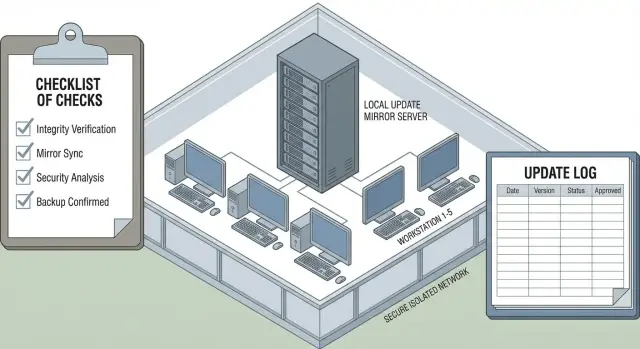
What's the problem with updates in an isolated network
An isolated network rarely means “absolutely nothing is connected.” More often it’s a segment without direct Internet access where external downloads go through a strict gateway, a whitelisted proxy, are transferred via removable media, or passed through a separate staging area. As a result, updates stop being a background event and become a managed process where it’s easy to lose control.
The main trap: “the update succeeded” does not equal “protection is current.” An agent may report a successful operation but in reality the wrong package was applied, it rolled back to an older database after a reboot, the engine update wasn't received, or detection rules remained unchanged due to version incompatibility. In an isolated contour such discrepancies can persist for weeks.
Remember that you are updating multiple layers, not just “an antivirus.” Typically these are:
- signatures and reputation databases;
- the scanning engine (analysis components);
- the endpoint agent;
- policies, detection and response rules;
- EDR modules (sensors, telemetry, drivers).
If any layer lags, a vulnerability window appears. For example, signatures may be fresh but the engine is old and doesn't understand the new format. Or the agent updated while policies didn’t arrive, leaving some detections disabled.
In an isolated network risks are amplified by desynchronization: sites receive packages at different times, mirrors “live their own life,” and individual nodes quietly fall out of the process. That’s how “dead” machines appear: visible in the console but not receiving updates or telemetry for a long time. In aggregate reports this looks like a small statistic until an incident occurs.
Another issue is dependence on people and procedures. InfoSec (requirements and control), IT (infrastructure and access), site administrators (distribution and maintenance windows) and operations (requests, incidents, change control) are usually involved. If roles aren’t separated, responsibility blurs: “mirror updated”, “agent updated”, but “why detections aren’t working” becomes unclear.
A typical scenario: a branch received the content package but didn’t get the agent update due to OS version restrictions. The report shows a green “updated” status, but protection is partially disabled. Such mismatches make updates in closed contours a complex topic.
Working models: mirror, staging and offline packages
In an isolated contour updates almost always become a separate operational process: you can’t just “give Internet” to agents, and management console reports often don’t show what was actually applied on hosts. Choose the model in advance and document it as a regulation, not a one-time setting.
Three basic schemes
1) Local mirror inside the contour. One server in the closed network stores update repositories (signatures, engines, rules, EDR modules) and distributes them to all nodes. The mirror is replenished through a controlled transfer channel (for example, a verified import point). Pros — a single control point, clear statistics, fewer manual operations. Cons — the mirror becomes a single point of failure; it must be backed up and monitored.
2) Intermediate zone (staging). Updates first arrive in a dedicated “gray” network or DMZ where they can be checked, organized into groups (test and production), and then transferred inside on a schedule. Useful when preliminary checks or controlled maintenance windows are needed. Cons — more components and more places where the chain can break.
3) Offline packages. Updates are downloaded in an open environment, packaged and delivered manually to sites (USB, protected media, courier transfer). This is workable for remote locations without a connection or under strict transfer restrictions. Cons — high human workload and error risk: wrong package mixed in, a site missed, or failure to apply.
To prevent the chosen scheme from falling apart in a month, record in one document:
- update sources and package contents (what exactly is updated);
- frequency and acceptable lag per update type;
- control points (where versions are checked and application is confirmed);
- responsible parties and approval flows;
- rollback procedure and actions on failure.
How to choose the right approach
Choice is guided by constraints and scale, not preference:
- 10–200 nodes in a single site: a local mirror is usually sufficient.
- Multiple sites and different maintenance windows: staging with scheduling and groups is often better.
- No connectivity or very strict transfer rules: offline packages with strict logging.
- High criticality (hospitals, finance, government): staging + a test group before production.
- Regulatory and audit requirements: choose a scheme where the chain “received — checked — applied” is easiest to prove.
Large organizations commonly combine schemes: a central mirror in the head office, staging for validation and offline packages as a fallback for remote sites.
Step by step: deploying a local mirror and distribution
Before starting, fix what exactly you will update. Endpoints and servers, management consoles, behavioral modules, drivers, signatures and investigation components often coexist in the contour. Without a complete inventory you may get “everything updated” while detection remains on old rules.
Preparing the mirror server
Choose a server for the mirror and provision disk space. A common mistake is planning disk size only for the bases and forgetting caches, temp files, logs and storage of multiple package generations. Decide up front where logs will live (so they don’t consume update storage) and how to back up configuration.
Even without a separate DMZ, it’s useful to logically separate two zones: staging (where updates land after download) and production (from where they are distributed internally). This reduces the risk of distributing “raw” packages.
Workflow steps
A simple sequence that usually yields predictable results:
- Build a product/component matrix (AV, EDR, agents, console, plugins, bases, policies and rules). For each item note where to check version and date.
- Deploy the mirror: storage directories, disk quotas, schedule for cleaning old packages, logging of downloads and distribution.
- Configure loading into staging (or export to media for offline). Define allowed traffic windows and load limits.
- Organize distribution inside the contour by groups: test — pilot — rest. Tie distribution to maintenance windows so critical systems aren’t updated during business hours.
- Record expected versions for the pilot: which base numbers and agent versions should appear after the update and where to verify them on hosts.
After the pilot, have a rollback plan with concrete actions: where to get the previous package, how to disable a problematic module, how to restore a policy, and how to quickly exclude a group from updates.
A real example: in a small isolated network updates were pushed to everyone at once, and a faulty EDR driver caused many workstations to reboot. After introducing staging and phased distribution by groups the failure was caught on 10 test machines rather than on hundreds, and rollback took minutes instead of hours.
How to control currency: versions, dates and acceptable lag
In an isolated contour few reports can be trusted without verification. Control is easier when based on measurable indicators: what’s on the mirror, what the console sees and what is actually applied on the endpoint. One failed transfer can look “all green” for a week.
Metrics to record
Keep the same minimum for all sites so comparisons are fair:
- release date of signatures and install date on the host;
- engine version and its update date;
- EDR agent version and versions of key components (sensor, driver, prevention module);
- last successful update check and its source (local mirror or other server);
- update policy status (allowed, paused, scheduled).
Collect this in one place (console export, spreadsheet, simple summary) and keep history. A single snapshot “today” doesn’t show degradation.
Define acceptable lag in advance
“Normal” lag depends on the segment. Critical subnets usually allow less lag, though updates there are harder due to maintenance windows. A practical approach: set thresholds by levels (critical, office, test) and separately for signatures, engine and agent. Signatures typically require more frequent updates; agent updates can be less frequent but must follow a plan to avoid accumulating vulnerabilities and incompatibilities.
Check status on three levels, otherwise you’ll argue about “who is right”:
-
Mirror: which packages actually reside there, their timestamps and integrity markers.
-
Management console: what versions it expects and what it reports by group.
-
Endpoints: what is actually installed locally (version, install date), not just “last contact.”
How to find silent failures
Problems often don’t shout — they pretend everything is fine. Watch for situations where:
- a host hasn’t checked in for a long time but still appears “successful” in the console;
- the agent is installed but services aren’t running or the sensor was damaged after an OS update;
- a policy blocks updates (freeze or incorrect maintenance window enabled by mistake);
- the host is pointing to an old address or proxy cache instead of the local mirror;
- signatures are present on the mirror but the engine package is missing, so “the wrong thing” updated.
A weekly spot check of 5–10 machines per segment — comparing versions on the host with the console and the mirror — is useful.
Exceptions register: so “temporary” doesn’t become “forever”
Exceptions are inevitable: a server can’t be rebooted, medical gear requires an old driver, a test lab lags behind. Keep a simple register: who approved it, what is deferred (signatures, engine, agent), duration, reason, accepted risk and review date.
Verifying “what actually updated”, not just “what reported”
In an isolated network it’s easy to have a pretty “updated” status in the console while hosts run on old bases. Separate two facts: what the management system reported and what actually changed on disk and in services.
The verification principle is simple: check artifacts, not tasks. Look at file/component versions, signature/content dates and numbers, package identifiers, and the actual time the update was applied on the host.
What to check on a host
Start from three sources: the local update log, the agent’s component version info, and traces in the filesystem (or registry if the product stores versions there). Distinguish update types: signatures change often, engine and agent updates less often and sometimes require a restart.
A practical routine that almost always clarifies the picture:
- Take a “before” snapshot: agent version, engine version, content/base number and last update check time.
- Trigger the update by the normal method (scheduled or manual).
- Immediately check the local log: download, signature verification, unpack, apply steps.
- Take an “after” snapshot: did package numbers, base dates or module versions change?
- Repeat on a sample: 2–3 hosts in each segment and site, including the most remote branch.
Don’t limit checks to endpoints. On the mirror server verify new packages actually appeared by last sync time, file sizes and download logs. In the console look beyond “success”: which package was assigned, which applied, and why a skip may have occurred.
Recording findings and actions on discrepancies
A concise “before/after” protocol works well: date/time of check, list of hosts checked, versions and package numbers, update source (mirror/staging), result.
If the console shows “updated” but artifacts didn’t change, escalate gradually:
- re-run the update and check whether you’re in a window where the package was downloaded but not yet applied;
- clear the host update cache and restart the agent service (per vendor instructions);
- check mirror accessibility from the segment: DNS, route, ports, proxy, certificates;
- verify the host receives the correct policy and isn’t pinned to an old source;
- if the discrepancy persists, reinstall the agent on one problematic host as a control and escalate with logs.
A mini-case: in a government contour the central site updated but a branch reported “success” for weeks. A spot artifact check revealed the branch pointed to an old mirror due to a DNS entry; console statuses reflected task completion, not actual application.
Secure transfer of updates into the closed contour
In an isolated network the main risk is not late updates but the wrong updates entering the contour. Transfer must be a controlled process with roles, checks and audit trails. The console report alone is insufficient.
Who does what
Separate duties so one person can’t substitute a package unnoticed and immediately apply it. Define roles in a responsibility matrix and treat each transfer as a small delivery:
- package preparation: InfoSec (or a designated admin) downloads from a trusted source and records version, date, size;
- delivery: an authorized person transports the media and is accountable for its custody;
- acceptance: the closed contour admin verifies integrity and compliance with the request;
- upload to the local mirror: performed by a distinct account without rights to change EDR policies;
- confirmation: InfoSec verifies updates were actually applied on control hosts.
Introduce a pause between stages for independent verification, not an immediate “bring and install” routine.
Controls before loading
Minimum practical controls: checksum (or vendor signature) plus an independent version check against the request document.
Pay special attention to media and transfer workstations. Validate the media on a clean machine in the open contour, then again on the receiver in the closed contour. Reserve these workstations for transfer tasks only, do not use them for office work, and keep them protected.
Store media like keys: label, issuance and return log, defined service life (e.g., planned replacement every N months), and ban personal USBs. Using the same media for multiple products dramatically increases the risk of mixing versions and leftover files.
Common offline package mistakes:
- mixing packages from different dates in one folder and uploading the “wrong” one;
- losing the checksum proof and not being able to prove which file was applied;
- media moving between offices without tracking and eventually becoming infected;
- package applied on the mirror but clients don’t receive it due to wrong path, permissions or schedule.
The documentation set should be short: a brief transfer regulation, an update journal (what, when, who, how verified) and a responsibility matrix. That’s usually sufficient for repeatability and auditability.
Typical operational errors and how to detect them
With updates in isolated networks discipline fails more often than technology: someone didn’t check sync, one policy applied to all, or updates happen only “when convenient.”
First group of problems is mirror-related. Sync can silently stop because of full disk, failed schedule, proxy changes, or expired credentials. Part of reports may continue to show “all fine” until lag becomes obvious.
Signs that the mirror or distribution isn’t working as you believe:
- mirror files’ timestamps look fresh, but endpoint base versions don’t change;
- number of “update error” hosts jumps after weekends or holidays;
- different signature versions appear in one segment without explanation;
- mirror logs show recurring errors that nobody addresses;
- hosts report “success” but a test detection (EICAR or similar) doesn’t trigger.
Second common mistake is lack of test/production separation. One failed update can degrade performance, break software compatibility or cause reboots. Rule of thumb: start with a small pilot (5–10% typical workstations and 1–2 servers), then expand.
Third mistake is “we update rarely because transfer is inconvenient.” Without scheduled windows and a responsible person, offline transfers become ad-hoc. On a chart this looks like batch updates followed by weeks of silence.
EDR-specific issue: an agent can be installed but non-functional. Typical causes — no console connectivity, registration token expired, broken certificate chain, incorrect host time. The inventory contains the host but telemetry is absent.
Simple metrics help detect these quickly:
- how many hosts lag behind the reference beyond the allowed threshold;
- how many hosts haven’t checked in with the EDR console for N hours;
- number of update errors per day and by segment;
- comparison “mirror version vs control-host version” by segment;
- weekly spot checks of 5–10 hosts’ agent logs.
A short example: in a closed contour monthly manual reporting hid a two-week mirror outage caused by full disk; the “green” status was maintained by cache. The fix wasn’t a new system but rules: a lag threshold, a daily automated summary and a responsible person who confirms updates on a control group rather than trusting a pretty report.
Short checklist for IT and InfoSec
To avoid trusting reports blindly, keep one short set of checks. It should be understandable by both IT and InfoSec and executed on schedule.
Regular scheduled checks
- Daily: verify date and base versions on the local mirror and the share of hosts that actually updated in the last 24 hours. Record not only “success” but how many devices didn’t reach current state.
- Weekly: run a before/after spot check on 5–10 hosts across segments (finance, production, server room, protected segment). Capture versions before update, trigger the update, capture versions after and compare.
- Monthly: reconcile EDR agent versions and schedule updates for lagging groups. A common situation: the agent was updated on the pilot, but heavy servers or old workstations stayed on the previous branch and silently lost functionality.
After every transfer add two habits: integrity verification of the package and an entry in the journal. The journal can be simple: date, who transferred, source, hash/checksum, what was transferred (bases, engine, agent), where placed, distribution result.
Quick checks “on event”
In an incident you need to know which versions were on the host at the event time, not what “should have been” per the report. Make sure you can quickly retrieve history: base/engine/agent versions, last successful mirror sync time and update errors.
When to escalate
- many hosts fail to update (sharp drop in daily updated share);
- mirror shows fresh bases but clients are stuck on an old date;
- one segment’s versions differ significantly from others without a clear reason;
- increasing signature/integrity check failures or corrupted downloads;
- reports are all “green” but before/after spot checks show no version changes.
If the checklist is followed, problems usually become visible within a day or two, not a month after the first missed update.
Practical example: bring order without adding complexity
A common case: three sites, closed contour, Internet unavailable, bases and packages delivered weekly on media. Formally everything looked “under control,” but InfoSec couldn’t confidently say who actually updated and who merely reported.
The scheme was simplified. Outside, a staging node in the open segment downloads vendor updates, checks them and prepares a “weekly package.” Inside, packages are imported per regulation to the local mirror. Clients get updates not “all at once” but by groups so failures are easier to isolate and network load is controlled.
To stop relying on aggregate reports, they added quick checks that take minutes but give an honest picture:
- compare mirror versions and timestamps with the delivered material to avoid partial loads or wrong directories;
- control the percent of updated hosts by group, not a single organisation-wide number;
- spot-check logs on 5–10 machines across subnets to see who fetched which package and when;
- set an acceptable lag threshold (e.g., no more than 7 days for workstations, less for critical ones).
Within weeks they found some PCs and laptops consistently missed the update window — some devices were turned off, others never joined the network during the nightly distribution. Lag accumulated unnoticed until incidents or auditor queries surfaced.
The fix was discipline, not new tools: two update windows (night and day), a report on “sleeping” hosts and a dedicated group for critical PCs to catch up first.
The result wasn’t a magical 100% but transparency. It became clear where the chain broke: during import, on the mirror, in group distribution or on specific hosts. When lag recurred, responsibilities were clear and fixes straightforward, without unnecessary infrastructure complexity.
Next steps: formalize the process and scale infrastructure as needed
To keep updates from becoming a “manual ritual,” formalize the process and schedule checks. The most important things are a simple scheme, clear roles and pre-defined thresholds that define when an issue is an incident rather than a small delay.
Document a short regulation (1–2 pages)
A good regulation answers five questions: where updates come from, who transfers them, who verifies, how often and what is considered normal. Add control points: hash/signature checks, mirror version reconciliation and spot checks on endpoints. Also fix acceptable lag (N days for signatures, agent/module updates per plan and criticality).
Assign roles to avoid dependence on individuals: process owner (usually InfoSec), transfer executor (IT or InfoSec) and update controller (InfoSec performing spot host checks). If there are multiple contours, assign site-level owners.
Produce a minimal weekly report
Managers don’t need a 500-line log. They need a concise snapshot showing where the process failed:
- date and mirror base/content version and lag relative to the reference;
- percentage of hosts updated in the week and a list of lagging groups;
- top 3–5 causes of failures (no connectivity, full disk, signature error, outdated agent);
- agent updates planned vs actually applied;
- threshold breaches and mitigation actions.
If the mirror is fresh but 20–30% of hosts lag for weeks, the cause is almost always routing, permissions, schedules or legacy agents — not “bad updates.”
Then assess whether the mirror infrastructure needs strengthening. Time to scale when:
- free space is less than 2–4 weeks of updates and archives;
- distribution speed degrades during update windows with many timeouts;
- the mirror is a single server with no redundancy and any outage stops updates;
- there is no integrity control or transfer journal.
Also perform inventory: PC and server models, OS versions, which hosts run agents and of which generation. Agent rollout often needs a separate plan, especially for server segments.
If a dedicated, reliable mirror server and 24/7 process support are required, this is usually solved via system integration and managed operations. For example, GSE.kz as a vendor and integrator often addresses this with straightforward elements: dedicated server contours, repository infrastructure and monitoring of update state as part of support.
A practical next step is a pilot in one segment (e.g., 50–100 hosts): refine transfer, checks and reporting, then replicate the template across sites.
Frequently asked questions
Why does the console show “updated”, while protection may actually be out of date?
In an isolated network, “successful” often only means the task started and reported back — the package may not have been applied, may have rolled back after a reboot, or been partially installed. It’s more reliable to check facts on the host: component versions, content/base dates and local update logs.
What needs updating in AV/EDR besides “signatures”?
Several layers are usually updated: content/bases, the scanning engine, the agent, policies and EDR components. If one layer lags behind, a vulnerability window appears — for example, new signatures won’t work with an old engine, or the agent updated while detection rules didn’t arrive.
How to choose: mirror, staging or offline packages?
For a single office, a local mirror inside the contour is often enough: easier control and fewer manual steps. If you have multiple sites and need test windows, a staging zone with phased transfer is more convenient. Offline packages are for when there’s no channel or transfers are allowed only via media; they require strict version control and logging.
How to determine acceptable update lag in a closed contour?
Set thresholds in advance and separately for types of updates: signatures typically must be brought up to date more often, agent and EDR modules less often but on a schedule. A practical approach is to define a reference (what’s on the mirror) and a maximum lag per segment so that any exceedance is treated as an incident, not merely a delay.
How to quickly verify on a workstation that an update was actually applied?
Check three things: the local update log, current component versions reported by the agent, and tangible artifacts on disk/registry (what changed and when). Take a “before” snapshot, run the update normally, take an “after” snapshot and compare. Repeat on several machines across segments, including the most remote branch.
What if the console shows success but versions on hosts don’t change?
First exclude the “waiting to be applied” case — a package can be downloaded but scheduled for later install. Then check connectivity to the mirror (DNS, routes, ports, proxy, certificates), the update policy, and whether the host is pinned to an old source. Clearing the update cache and restarting agent services per vendor instructions often helps; reinstalling the agent on one test host is a useful control.
How to find “dead” machines that stopped updating and sending telemetry?
Look for quiet signs: no recent check-in, no telemetry, agent services stopped, while the inventory still lists the host as active. Regular spot checks of several machines per segment and comparing “mirror — console — host” usually expose dropped devices quickly.
How to properly split responsibilities between IT and InfoSec for transfer and application of updates?
Keep roles separated and insert a pause for verification between stages. One person prepares and records the package version, another delivers the media, the contour admin verifies integrity on reception, and an independent controller confirms application on control hosts. This makes the chain “received — verified — applied” auditable and reduces risk of accidental or malicious substitution.
How to safely transfer updates via removable media into a closed contour?
Start with checksums or vendor signatures plus an independent version check against the request form. Treat media and transfer workstations like keys: label them, log issuance/return, replace on a schedule, and forbid personal USB. The most common problems are mixing packages from different dates and missing integrity proof, so a short operation log really helps during audits or incident investigations.
Why run a pilot and keep a rollback plan if updates usually succeed?
A small pilot group reduces the risk of a widespread driver, sensor or compatibility failure. Before rollout, record expected versions and keep the previous package and a clear rollback plan: how to disable a problematic module, revert policy and exclude a group from updates. That way a failure is caught on a few machines, not the whole organisation.
