7 min read
AI in Kazakhstan's Branch Network: Caches, Index Proxies, and Degradation
How to run AI in Kazakhstan's branch network despite latency and outages: local caches, index proxies, degradation modes, a checklist and an example.
Where the problem starts: latency and outages in branches
AI in a branch network usually breaks not because of the model itself, but because of the path to data and services. When a request goes to the central office or data center, an extra 200–500 ms quickly becomes seconds. The user sees a spinner, clicks again, gets two errors in a row, and the system creates a flood of duplicates.
The worst part of latency is unpredictability. The same knowledge search can take 2 seconds today, 20 seconds tomorrow, or sometimes fail entirely. To staff it looks like "AI is not working," even if the center is stable.
What autonomy means in practice
Measure autonomy not in words but in time: how many minutes or hours a branch should operate without a connection and what counts as "working." A reception desk, for example, should be able to accept a patient and print standard forms even if document recognition is slower. A call-center agent should at least search a local fragment of knowledge when the link is flaky.
It helps to define two failure windows in advance:
- short blips of 1–5 minutes (spikes, packet loss)
- longer outages of 30–240 minutes (provider incidents, maintenance)
Which AI scenarios fail first
Scenarios that need context and many small queries suffer the most: document search, operator suggestions, ticket classification, and scan OCR. One "smart" answer can require dozens of calls to an index, databases, and access-check services.
Responsibility must be split. The network team is responsible for link availability and basic routing. The application architecture is responsible for behavior under latency: where to keep a local cache, how to proxy the index, how to queue requests and which degradation modes to enable. If branches have local infrastructure (a server or a powerful workstation), the architecture determines whether the service remains usable during short outages or everything stops because one central component is unreachable.
Define the goals: what must work in any situation
Before drawing cache and proxy diagrams, agree on simple goals. In Kazakhstan's branch networks, predictable behavior under a poor link often matters more than "maximum accuracy": what a user can do right now even if the connection fluctuates.
Pick 3–5 scenarios the service must support in degraded mode. For example: search local documents and return a short answer; open a client or ticket card from a local copy (no live updates); create a draft letter or report from a template (no external data); view the latest instructions and regulations already downloaded to the branch; enqueue a request so it reaches the center after reconnection.
Then measure the real network, not the "plan speed." Collect metrics for at least 1–2 weeks:
- latency (RTT) and 95th percentile
- packet loss and frequency of short outages
- jitter (how much latency varies)
- real throughput during peak and off-peak
- average outage duration and how many occur per day
Next, split traffic by purpose. Model requests, data access (documents, databases), index and model updates are different flows. They need different priorities and limits.
Write SLOs in plain language. For example: "In 95% of cases, a response on local content appears within 3 seconds; during link problems the service honestly states it’s answering from a local version and may be incomplete; enqueuing a request takes up to 10 seconds." This becomes the backbone for architecture and tests.
Basic resilience building blocks: cache, proxy and queue
A common pain in branches is users waiting because requests travel to the central data center and the link slows or drops. Resilience starts not with "faster internet" but with three local components: cache, proxy and queue.
Cache: answer near the user
A local cache helps where requests repeat. It stores not only ready-made answers but also "pieces of context" needed by the model: excerpts from policies, email templates, instructions and directories. Divide data into hot (used daily) and cold (rarely requested). Keep hot data in the branch and fetch cold data on demand.
Caching must have clear rules: what can be stored for 7 days, what for 1 day, and what must never be stored. General safety instructions can be kept locally; personal data should not.
Index proxy: reduce identical calls over the link
Even if the search index is central, a branch benefits from a proxy that reuses results. Staff often ask the same questions: "how to request leave", "what are the deadlines for an application", "contact of the responsible person". The proxy remembers results of popular queries and prevents identical searches from traversing the slow link.
Queue: accept now, process later
A queue is needed where a request must not be lost but can be delayed: ticket submission, file upload, quality log synchronization, cache updates.
A reasonable set of rules for queues:
- serve critical operations immediately; everything else goes to the queue
- make operations idempotent so retries don’t corrupt data
- limit queue size and raise alerts on overflow
- keep metadata locally and upload heavy attachments after reconnection
How to design local caches: a step-by-step plan
Local caches make answers and context fast and prevent total service failure during link issues. In practice a cache often yields more improvement than trying to "squeeze" the link: users stop waiting and the system depends less on the center.
1) Start with a data-flow map
Draw the request path: user screen -> branch service (if present) -> central components (models, search, databases) -> response back. Mark where data repeats: the same documents, identical prompts, standard questions.
Then walk through these steps:
- decide what to cache on the device, in the branch, and only in the center
- classify data types (search results, document fragments, embeddings, ready answers, metadata) and set TTL for each
- set TTL by importance: directories and policies live longer; operational statuses and tickets update more often
- define when the cache cannot be used (document version change, revocation of access, index update, suspected incorrect answer)
- add observability: hits and misses, miss reasons, data age, cache size, response time
2) Give the cache clear rules
A good cache is an agreement. For example: "If the link is unstable, use the last confirmed version of the guideline and mark the answer as possibly outdated."
The quality criterion is simple: on a normal day the cache speeds things up, and on a bad day it reliably keeps the service at a minimally useful level.
Index proxy: bringing search and context closer to the branch
In an AI service the index is what lets the model quickly find context: documents and versions, knowledge cards, database excerpts, sometimes logs and instructions. When a branch queries the index over a slow link, responses become slow or fail. An index proxy solves this by keeping a small but useful search layer close to users.
What to keep in the branch and what to leave in the center
You don’t need the entire index locally—only what that branch needs most. Usually keep one or several "slices": popular instructions and templates; regional documents for the branch; recent changes for the last N days; a minimal search layer (embeddings and metadata), while full texts are fetched on demand.
This reduces latency and keeps the service useful during outages.
Sync, size and quality control
Synchronize on a schedule and by events: bulk sync at night, priority changes pushed during the day. When versions conflict, a simple rule usually works: the central version wins, and local edits become separate notes or tickets.
Limit volume with quotas and eviction. For rare documents store only metadata and embeddings; keep full texts locally only for critical instructions.
Track metrics: time since last sync, share of queries returning empty, percent of documents with mismatched hashes. Show on-duty staff a clear status: "index fresh", "partially fresh", "needs sync".
Degradation modes: how the service keeps working during failures
Decide in advance what happens when the link degrades: the center is unreachable or part of the data didn’t arrive. A degradation mode is a predefined behavior that preserves user value and avoids breaking processes.
Four levels usually suffice. They switch automatically based on metrics (packet loss, latency, API errors) and are visible in logs:
- full functionality: all data sources available
- simplified mode: less context, shorter answers, some expensive checks disabled
- read-only: cannot create requests or change data, but search and reference are available
- enqueue-only: requests are recorded and will be processed later; the user sees a number and status
Prepare fallbacks before launch. Keep approved answers and templates for typical questions. Define local rules: what can be answered without calling central systems. Another approach is switching to a smaller model running on a local server or dedicated node—simpler answers but offline-capable.
When data is unavailable, the service can operate from a local copy and explicitly mark results as preliminary. This reduces the risk of staff making decisions on stale information. In healthcare, for example, a branch may lose connection but continue to provide instructions and reference data from local storage, showing the last update time.
Recovery from degradation must be calm: catch-up synchronization, queue reconciliation, and reprocessing only unconfirmed items. User messages should avoid technical details and be simple:
- "Connection is unstable. The answer may be brief."
- "Data is updating. Showing the version from 10:40."
- "Request accepted. We’ll process it when the connection is restored."
Data and security: local storage without surprises
Local caches and proxies bring speed and autonomy but add risk: the branch may suddenly hold data that used to live only in the center.
First, classify data. Local storage usually holds items that don’t change every minute and are not strictly confidential: directories, public policies, instructions, templates, anonymized knowledge fragments. Personal data, financial details, medical records and internal system dumps should not be cached, or must be stored encrypted with short TTL.
Minimum rules for branches:
- keep locally only approved data types necessary for operations
- enable disk encryption and encrypt traffic between branch and center
- enforce least privilege: operators see results, admins cannot read cache content without separate access
- disable export of answers and context to files by default
- maintain an audit log for incident analysis
A cache itself can be a leak vector. Set TTLs, enable regular cleanup and event-driven deletion (e.g., employee change or device compromise). For sensitive fields mask before writing: store a hash or shortened identifier instead of an IIN or contract number.
Audits should answer: who requested, which source was used, what answer returned, whether offline mode was used. This helps distinguish model errors from data issues and speeds up incident resolution.
Updates are a separate topic. For remote sites use signed packages, phased rollouts and rollback capability. A practical pattern: deploy a new version to one branch, then a group, then everywhere, and send update logs to the center.
Common mistakes in branch AI architectures
Major failures are often not the model but how cache, sync and offline behavior are implemented.
The first mistake is a cache without rules. If a branch stores "everything" without versions and source tags, updates become a lottery. Users see a mix of old and new data and the team can’t quickly know what is in the branch.
Second, overly aggressive TTLs. Long-lived cached answers become stale and convincing—more dangerous than an obvious error because staff may act on outdated policies or prices.
Third, no offline mode. When the link drops the service simply fails, even though basic functions could remain: local document search, cached answers marked with freshness, enqueuing requests.
Fourth, unconstrained synchronization. Bulk updates at night can saturate the link so cash registers, mail and video fail in the morning. Throttle syncs and be able to interrupt them.
Fifth, no metrics. If you only learn of problems from complaints, you’ve already lost time.
Simple rules work best:
- version your cache and store source, date and update policy per data type
- use different TTLs: short for answers, longer for immutable directories
- predefine degradation scenarios and user-facing messages for offline
- limit sync by windows and bandwidth, add priorities
- collect basic metrics: latency, offline-response rate, queue size, data freshness
Example: a regional branch loses connection for 20–30 minutes. Without versioned cache or offline mode, operators wait. With a local proxy and cache tagged by freshness, work continues and updates catch up after reconnection.
Short checklist before launch
Before launch check not only "does an answer appear" but "what happens when the link is bad." It’s better to find weak points in a pilot than on day one of operations.
Start with the branch task list: regulation search, product questions, IT tickets, operator prompts. For each task mark what must always work and what can be simplified temporarily.
Record degradation modes and switching conditions. Example: if latency exceeds 2–3 seconds switch to local cached answers; if the link is down show only verified instructions and last-synced data; on reconnection start a catch-up sync with traffic limits.
Before release verify:
- 5–10 critical branch scenarios with priorities and owners
- described degradation levels, triggers and clear user behavior
- cache rules: what is stored locally, TTLs, update policy, conflict handling
- index sync plan and traffic limits (windows, quotas, what not to download during the day)
- metrics and alerts: latency, cache misses, share of requests in degradation, sync errors
A simple pre-launch test: cut internet for 30 minutes in one branch and run 20 typical questions. If users still get useful results (even simplified) the architecture is ready for reality.
If you use local infrastructure in branches, check that hardware and support can run 24/7, especially if load grows after launch.
Example scenario: branches with unstable links and a single knowledge base
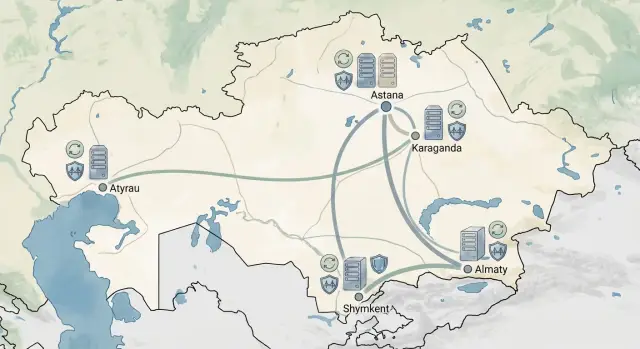
Imagine 12 branches across Kazakhstan: offices in small towns with intermittent or slow links. Staff need fast searches through regulations, templates, client-handling instructions and internal policies. If every query goes to the central office, the service is a lottery: it works in the morning, stalls during the day.
Each branch must be able to answer locally while the center stays the source of truth. Each branch runs a local index proxy that stores only needed sections of the knowledge base (its regional documents plus corporate common sections). On top of that is a local cache of popular queries and context (excerpts of regulations commonly used in answers).
Normal operation
The service checks cache first, then local index, and only consults the center for rare documents or updates. This gives fast responses even with average link quality.
During an outage
If the link drops, the service keeps working: it searches the local store, returns answers from available context, accepts new requests and queuing updates, and marks answers where fresh documents might be missing.
When the link returns a background sync runs: changes are downloaded, document versions compared, and a mismatch report is generated (e.g., a branch still has an old edition).
Success is measured simply: median response time at the branch and the share of queries that had to go to the center. A good sign is most queries closing locally, with the center needed mainly for updates and rare cases.
Next steps: pilot, operation and infrastructure choices
To make AI in Kazakhstan's branch network predictable, start with a short pilot. It quickly reveals the real problem: bandwidth, latency, packet loss or frequent outages.
Collect link metrics for 2–4 weeks (ping to the data center, jitter, loss rate, average and peak throughput, downtime). Then select 1–2 pilot branches: one with a stable link and one with problems. This checks both normal mode and degradation.
Define in advance what must work offline or under heavy delay. Describe levels as follows:
- level 0: all online, full search and context
- level 1: search via local index proxy, answers with limited context
- level 2: only local knowledge cache and templated answers, no updates
- level 3: service unavailable, but queue and a clear user message remain
Decide where the local cache and proxy will live. A small branch often needs a mini-server or a powerful workstation holding the index, document cache and queue. A large office generally needs a dedicated server and backup power.
A pilot will fail without operations plans. Define minimum processes: how indexes update (windows and traffic limits), who monitors disk and queue, what to do on cache corruption, and how fast to restore a branch. Add user-facing monitoring: response time, share of requests in degradation, and retry frequency.
If you need on-site servers and system integration under your policies, it’s often practical in Kazakhstan to work with a single contractor who handles supply and support. For example, GSE.kz as a local computer and server manufacturer and system integrator can be useful where local delivery, supply-chain transparency and a single point of responsibility are priorities.
Frequently asked questions
Where to start if AI in branches is "slow" or sometimes completely unresponsive?
Start by listing 3–5 critical scenarios that must work with a poor connection, and measure the real network for 1–2 weeks: latency, packet loss, jitter and outage duration. Then set simple SLOs in plain language and design cache, proxy and queue around them.
Which AI scenarios are most affected by latency in branches?
Usually the first to suffer are scenarios that require many small calls to data: document search, operator prompts, request classification, and scanned document OCR. These need context, permission checks and several services at once, so an unstable network quickly turns milliseconds into seconds.
How to define a branch's "autonomy" for an AI service?
Be specific: define how many minutes or hours a branch must operate without a network and which functions count as "working." Commonly this means local document search, viewing the latest instructions, drafting templates, and accepting requests into a queue for later delivery to the center.
What exactly should be cached in a branch to speed up AI?
Cache answers and, importantly, pieces of context: excerpts from regulations, templates, directories and metadata. For each data type define TTL and rules when the cache must not be used (version change, revoked access, index update, suspected incorrect answer).
Why have an index proxy if search is already in the central data center?
A proxy cuts identical queries over the link and smooths latency, even if the main index lives in the central data center. It remembers results of popular queries and can keep a local "slice" of the index most relevant to that branch.
When is a queue better than trying to "wait for an online response"?
Use a queue when a request must not be lost but can be processed later: tickets, file uploads, log synchronization, cache updates. Make operations idempotent, store metadata locally, limit queue size and show the user a clear status that the request was accepted.
How to set degradation modes so the service doesn't "break" during outages?
Predefine levels: full mode, simplified mode, read-only, and queue-only, and tie switching to metrics (API errors, rising latency, packet loss). The user should see a simple message that responses come from a local version or that the request will be processed after reconnection.
How to avoid security problems from local caches and proxies?
Classify data by sensitivity and decide what is allowed locally. Typically store instructions, templates and anonymized knowledge fragments locally; personal and financial data should either not be cached or be stored encrypted with short TTL and audited access.
What mistakes are most common in branch AI architecture?
Common mistakes: a cache without rules (no versions or sources), too-long TTLs, no offline mode, and unconstrained sync that floods the link. Fix these with versioned caches, different TTLs per data type, clear fallbacks and sync windows/limits.
How to quickly test if a branch will survive a real outage?
A simple test: disconnect the internet for 30 minutes at one branch and run typical user queries. If users still get useful (even simplified) results, and requests queue and catch up after reconnection, the basic resilience is in place.
