8 min read
Access control in an LLM service: RBAC, ABAC and auditing
Access control in an LLM service: how to set up RBAC and ABAC, filter context by permissions and provide sources for audit without leaks.
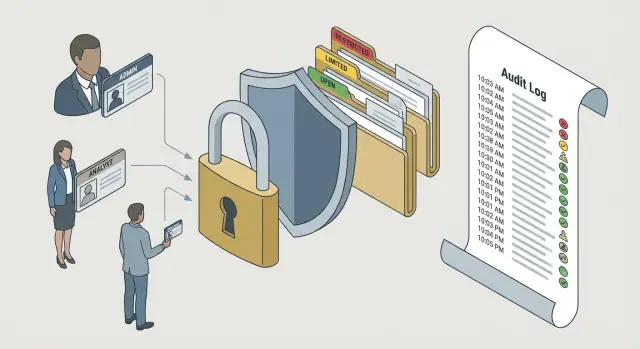
The problem: an LLM can "mix" permissions
LLMs answer well because they build responses from the entire context they receive: system instructions, chat history, retrieved documents and data from integrations. If extra information gets into that context, the model often doesn't recognize it as confidential. It simply uses the information to be helpful, and does so without obvious mistakes.
A common scenario is a single corporate chatbot used across the company. Finance asks about payments, HR about candidates, legal about contracts, and IT about incidents. When everyone uses the same interface and shared knowledge base, a query from one department can accidentally pull documents from another. The risk is especially high when project names, client names or file names are similar.
The danger is not only direct leakage. There are quieter scenarios: the model may paraphrase a restricted report section, reveal numbers from a closed table, or infer facts from data the user shouldn't see. As a result, people make wrong decisions, and during an investigation it's hard to explain where a specific detail in the answer came from.
Success in such a system is simple and measurable. Only information the user is allowed to see appears in the response (principle of least privilege). Context is filtered before generation, so nothing unnecessary is passed to the model at all. There are verifiable sources: you can show a quote and a document identifier without revealing more. And there is an audit trail showing what data was used and why it was permitted.
Threat model in plain terms: what we protect and from whom
An LLM service uses more than just text prompts. Under the hood there are documents, knowledge base pages, files from shared folders, emails, CRM records and support tickets. Sometimes fragments from internal databases are added via search or integrations. You need to protect corporate data, access rules to that data, and records of who saw what.
Risks appear across the chain, not at one point. The most common failure: a user formally lacks rights to a document, but the service still pulled a fragment into the context and the model freely paraphrased it. Another problem: even if the response didn't expose a secret directly, it may indicate that a document exists, name an internal project, or reveal a contract number.
Danger often arises in several places: during retrieval and source selection, when assembling the context (extra quotes, metadata, file names get into the prompt), during generation (the model mixes fragments), in logs and analytics (requests, context and answers are stored), and when exposing sources (showing a link or identifier that itself leaks information).
Who attacks? More often it's not an external hacker but a curious employee, an insider, or simple integration/configuration mistakes where permissions from a DMS, email or CRM are interpreted incorrectly.
For audit purposes, decide in advance what to record. At minimum: who asked (which account and role), which sources the service could have used by permissions at the time of the request, what actually entered the context, and what was returned (including quotes and the list of sources). That way incidents can be investigated without guesswork, and you can demonstrably explain why a user received a particular answer.
RBAC in practice: roles, access matrix and limits
A role in RBAC is a simple answer to “who are you in the system.” It's easy to explain to the business: you don't need to manage dozens of separate permissions per person. Assign a clear role and get predictable system behavior.
In practice, roles are named the way people already talk inside the company. For example: a call-center operator sees a ticket card and status, a doctor sees a patient's history and prescriptions, an accountant sees invoices and statements, a procurement specialist sees requests and contracts, an administrator sees users and settings.
An access matrix is usually built as “role – resource – action.” Resources may be customer profile, medical record, contract, report, knowledge base, correspondence. Actions are read, create, edit, delete, export, approve. In an LLM service you must tie this not only to the UI but also to which documents the model may include in the context and which pieces of data may be shown in the response.
To make RBAC work in a live system, add constraints that are often forgotten: block export and copy for roles that don't need it; separate permissions for access to logs, prompts and chat histories; distinct roles for viewing and approving (e.g., contracts); and minimal default privileges.
RBAC quickly shows its limits. The same role “doctor” shouldn't see all patients, and “procurement” shouldn't see all projects. Role answers “who,” but poorly describes “in what context”: which patient, branch, project, region, or classification level. So RBAC almost always becomes the base, and precise restrictions are added via attribute rules (ABAC).
ABAC in practice: attribute rules and real examples
ABAC (Attribute-Based Access Control) handles cases where roles alone are insufficient. This is especially visible in an LLM service: the same person can be an “engineer” but work on different projects, in different branches and with different clearance levels.
ABAC relies on attributes in three groups: the requester (user), the requested resource, and the conditions under which the request is made (context). It's like traffic rules for data: it's important not only who you are but also the mode you're operating in right now.
Common attributes are:
- User: branch, department, clearance level, project membership.
- Resource: document type, owner, confidentiality tag, project.
- Context: time, location (corporate network or not), contract or request status.
A useful step before automating is to describe rules in plain language so the data owner (not just InfoSec) can understand them. For example: “An employee sees only documents for their project if they have active clearance and are working from the corporate network.” Once agreed, it's easier to translate into a technical rule.
Example for an LLM: a systems integrator runs multiple projects for different clients. An engineer asks about server configuration and the model searches internal materials. ABAC prevents mixing another project's documents, even if everyone has the same role.
Typical rules look like: allow answers only based on resources with the same ProjectId as the user; deny resources tagged “Commercial Secret” if clearance is below required; show contracts only if status is “active” and the user is from procurement; restrict access to support incidents to the user's own region or branch.
ABAC is especially helpful when there are many projects, frequent exceptions, and structure changes faster than roles can be updated. Roles remain the skeleton, while attributes and rules provide precision.
How to combine RBAC and ABAC without adding complexity
A good practice is not to choose between RBAC and ABAC but to separate their responsibilities. RBAC defines a clear foundation: who you are and the general bounds of what you may do. ABAC then refines access for a specific request: which project's, branch's, confidentiality class or document type can be accessed right now.
Simple pattern: “role first, attributes next”
Start with 5–10 roles and firmly assign basic rights to them. For example: “Employee,” “Project Manager,” “Legal,” “Finance,” “Administrator.” Add attributes only where they are necessary, and keep attributes uniform.
Hybrid rules work well in production: a role sets the frame and an attribute narrows it. A manager sees documents only for their region; a project member gets context only for projects where they are listed on the team; a lawyer can read contracts but not payroll lists; finance sees amounts while others see only payment statuses.
Short example: in a multi-site company a support role asks about incidents. RBAC permits access to the incidents database, and ABAC filters out records from other branches and hides personal fields if the user lacks a separate clearance attribute.
How to avoid a “rule zoo”
The main risk of a hybrid approach is endless exceptions. To keep things manageable, keep rules flat: fewer conditions, more standard attributes. If a rule becomes a long chain of AND/ORs, you are probably treating a symptom (wrong role or bad data classification) rather than the cause.
Make rules maintainable by documenting for each rule: the owner (who approves changes), purpose (which threat it mitigates and which business need it supports), scope (which data and users it affects), verification criteria (how to test that access hasn't widened accidentally) and review interval.
This approach gives you a predictable RBAC base and ABAC precision without overload and constant manual exceptions.
Filtering context by permissions: what exactly to filter out
In an LLM service, context is the fuel for answers. If fragments of documents a user has no rights to get into that context, the leakage has already happened—even if the model didn't show the file whole. So access control must be enforced at several points, not just once.
Apply permissions at least at three stages. Before retrieval: don't even run queries against indexes and stores the user cannot access. After retrieval: filter results by ACLs, roles and attributes before taking fragments into the prompt. Before answering: a final check that the draft response and quotes contain no forbidden pieces (for example, from cache or shared snippets).
Filtering should work at the fragment level, not only at the document level. One file may be broadly accessible but contain restricted sections: an appendix with personal data, a salary table, commercial conditions. Only fragments that pass checks should enter the prompt, and only in the minimal necessary volume.
Metadata is the basis of such filtering. Every document and fragment should have tags: owner, department, classification level, project, expiry, internal/public flag. If metadata is missing or dubious, prefer the safe mode: don't mix the content, ask for clarification, or send the user to the access request process.
Edge cases will always exist. For example, a general regulation mentions contract numbers from a closed project. Simple rules help: allow the general document but mask sensitive fields; on partial matches return a short summary without figures and names and offer to request access; never use cached fragments without re-checking permissions for the specific user.
This keeps context useful without turning it into a leakage channel.
Safe disclosure of primary sources: links, quotes and audit
The request “show sources” sounds safe, but it's a frequent leakage point. Even if the model didn't reveal document text, the mere existence of a file, its title, owner or contract number can be sensitive. So rules must cover not only the answer but any supporting “evidence.”
The most dangerous case is a user asking about a topic they can't access, and the system returns “a link to the document.” That's effectively a hint where to find secret data. The same applies to quotes: a small fragment can expose personal data, prices, tender terms or internal tags.
It's safer to treat a “link” as a controlled source card. Show minimal metadata: an internal identifier, a neutral title (no extra details), owning department, version or date, and an access-level tag. The main rule: show a source only if the user already has the right to open that document in the original system. If they don't, return “source hidden by access policy” rather than revealing its title.
The same principle applies to quotes. Provide quotes only from allowed documents and only in the amount needed for verification. Often one or two lines with masking are enough: hide numbers, names, account details.
To make audit meaningful, record evidence on the service side, not in the visible answer. Good logging includes:
- who requested (user, role, key attributes);
- which sources were candidates and which passed permission checks;
- the policy decision (allowed/denied) and the reason;
- document versions and timestamps;
- hashes of fragments rather than full text (privacy boundary).
This proves why an answer was formed, without turning logs into another leak repository.
Step-by-step implementation plan: roles to checks and logs
Implementing access control in an LLM service is best treated as a data project, not as a single setting. Start simply: who owns the data, who consumes it, and how will you prove to an auditor that the model didn't reveal anything extra.
First, inventory sources: knowledge bases, files, tickets, CRM, internal regulations. Assign a data owner for each source who can approve access. This is more important than choosing RBAC vs ABAC.
Next, define roles and attributes. Roles provide a clear frame (e.g., “HR,” “Finance,” “Procurement,” “Support”), while attributes add precision (department, clearance, country, project, document type). Align this with InfoSec and the business early, otherwise rules will be bypassed “on request.”
To make rules reliable, tag resources with access labels and use unified identifiers: user, role, document, source, document version. Without this, logs and checks become noise.
Minimum for a RAG pipeline:
- permission checks before retrieval (which sources are available to the user at all);
- filtering of retrieval results (remove fragments without required tags);
- response-level control (prevent paraphrasing of hidden data via prompts);
- source disclosure policy: when to show a quote, when to show only a title, and when to hide the source;
- audit log: who asked, what was retrieved, which rules fired, and what answer was returned.
The final step is leakage tests and regular rule review. Run “red-team” queries (attempts to extract salaries, contracts, personal data) and verify the system doesn't reveal them directly or via sources. For example, in a company like GSE.kz the same question about a supplier should yield different details for procurement and support, and this difference should be visible in the logs.
Common mistakes and pitfalls that lead to leaks
Most dangerous LLM leaks happen not from hacks but from small architectural and configuration mistakes—especially when access control is built on “we checked the user once at login.”
First trap: perimeter-only permission checks. A user is authenticated, the request is accepted, but the model receives context from search in full. If results contain fragments from another department, the model will paraphrase them because it doesn't know access boundaries. Permissions must apply to each fragment (chunk), not only to the session.
Second common error: a shared index for all departments without tags and attributes. Even if documents were in separate folders originally, after indexing they become one sea of text. Without explicit tags (owner, department, classification, expiry) filtering is guesswork.
Third trap: exposing primary sources “for transparency” without re-checking access. A user might not have the right to open a document but receives its title, ID, path fragment or a quote—enough to reconstruct sensitive information.
Logs pose a separate risk. Often they contain everything: prompts, retrieved fragments, answers, tokens, names and numbers. If logging doesn't mask personal data and secrets, you create a second leakage repository.
The same things usually break security: a single overly-permissive role for convenience; missing attributes on documents and chunks after splitting; filtering at document level but not at quote/source level; storing raw prompts and context in logs without masking; temporary accesses that never expire or are not reviewed.
A good rule: if data cannot be shown to a user in the source system, it cannot be shown via the LLM—in responses, sources or logs.
Short pre-launch checklist
Before release, ensure access control in the LLM service relies on enforceable rules and logs, not trust in prompts.
Check basic data hygiene. Every document and chunk should have an owner and a clear access label: e.g., “HR only,” “Finance,” “all employees,” “confidential.” If labels are missing or applied manually without control, the system will quickly leak.
Then ensure permission checks exist in two places, not one:
- during retrieval: search and ranking return only fragments allowed for the user;
- during response: a final check before showing text and sources.
Also verify that sources and quotes are shown only to those with access and without extra details (e.g., no closed-folder names). The audit log must be readable: who, when, what query, what result, which sources were used. And there must be a process owner responsible for roles, attributes and regular rule reviews.
Run provocative tests. Prepare queries that often cause leaks: “show salaries,” “give the contract with supplier X,” “what was in the director's email,” “summarize a document without showing the source.” A good test is asking the same question as a user with and without access: answers should differ and forbidden facts must not be inferable even by hints.
If any item fails, stop and fix it rather than explaining an incident later.
Example scenario: one LLM, different departments, different answers
In a large organization one assistant serves procurement and finance. The question is the same: “Show which contracts for project ‘Astana-2026’ can be paid this month, and why.”
Rules and permissions are set so the system behaves predictably for everyone. Roles define basic access, and attributes refine boundaries: project, branch, limit, contract status, reporting period.
In practice it works like this. A procurement manager sees only contracts from their branch with status “in approval” or “signed,” but without bank details and internal finance notes. A financial controller sees signed contracts, payment calendar and limits, but not draft commercial offers or correspondence with the supplier. A director gets an aggregated summary across branches and risk indicators, but no personal data or per-account details. An auditor sees only closed periods and immutable document versions.
The LLM answers differently not because of model randomness but because the context is chosen by permissions: the prompt contains different sets of documents (contract registry, budget limits, approval protocols) and different fields from them.
Sources for verification are also disclosed safely. Instead of “here's a link,” the user gets short quotes and precise indicators that can be opened in the corporate system if they have rights: document ID and version, date, owner, status; a 1–2 sentence excerpt with masked fields; a section or page tag and a checksum (hash) for audit.
This gives an auditor something to check while preventing unauthorized users from finding the primary source.
Next steps: pilot, scaling and infrastructure
Start with a small pilot: one process, one team, a clear goal (e.g., answering questions about regulations or supporting requests) and only the set of documents actually needed. This lets you test access control without risking overexposure or debates about “everything at once.”
Before the pilot, prepare artifacts you won't need to redo: a role matrix (who can read, ask and see in answers), a list of data attributes (confidentiality, department, project, expiry, owner), a source policy for audit (when to show a quote, when only a title, when to hide the source), and log retention rules (what is logged, who can access logs).
Scale via unified tags and change control. Each document set should have an owner responsible for classification and periodic review. Good practice: any change in roles, attributes or source-disclosure rules goes through a short approval and test run on typical queries.
Infrastructure choices depend on security needs and data types. On-prem or dedicated environments are usually required for classified, medical, pre-publication financial data, or when policy forbids moving documents outside the perimeter. This is also needed when predictable performance and full control over updates matter.
Implementation can be done by an internal security and IT team or by a system integrator to build architecture, configure access and select server infrastructure. In Kazakhstan, for example, such projects often rely on local infrastructure and integrator-level support from GSE.kz when supply, service and equipment chain transparency are important.
Frequently asked questions
Is it enough to check a user's permissions when they sign in to an LLM service?
No. Checks are needed before retrieval, after retrieval, and before displaying the answer. Once the service has passed a restricted snippet to the model, the risk of leakage remains, even if the response looks safe.
How does RBAC differ from ABAC?
RBAC defines baseline permissions by job title or function, such as accountant, lawyer, or administrator. ABAC adds conditions such as project, branch office, clearance level, document status, and corporate network.
How can you combine RBAC and ABAC without making the rules too complex?
Start with a few clear roles and use them to limit the overall data scope. Then add attributes only where a role does not provide enough precision, for example to separate projects or branch offices.
How do you protect the context an LLM receives from a knowledge base?
The service must filter retrieved materials before sending them to the model. It compares the user's permissions, role, and attributes with the labels on the document and each snippet, then includes only the minimum permitted content.
Why can't access be checked only at the document level?
Because a single document often contains data with different access levels. A general policy may include an appendix with personal data or commercial terms, so each snippet must be checked separately.
Can you show links and quotes from restricted documents?
Show the source only to people who can already open it in the original system. If they do not have access, do not disclose the file name, path, contract number, or quote. Instead, state that the source is hidden by the access policy.
What should be recorded in an LLM service audit log?
At a minimum, the audit log should record the user, role and relevant attributes, permitted sources, snippets included in the context, the policy decision, and issued citations. Instead of storing the full text of snippets, it is better to store their hashes and document versions.
What should you do if a document does not have reliable access labels?
Do not pass such data into the context. The service can ask the user to clarify the request, show a permitted brief summary without sensitive fields, or direct the user through the access-request process.
How do you test an LLM service for access leaks?
Verify that retrieval does not return forbidden snippets and that the answer and sources do not reveal them indirectly. Run the same question as users with different permissions, then compare the results and audit records.
Which mistakes most often lead to leaks through an LLM?
The most common causes are a shared index without labels, permission checks only at sign-in, links without reauthorization, and logs containing full prompts. Temporary permissions that no one revokes create another risk.
