7 min read
3-2-1 Backup: Implementation, Mistakes, and Tests
3-2-1 Backup: step-by-step setup of copies, choosing media, regularly testing restores and avoiding unrecoverable backups.
Why follow the 3-2-1 scheme
Data is usually lost not because of a dramatic "cyber war" but because of ordinary, painful events. Someone deleted a folder “for a minute”, an update broke a database, a disk failed, or ransomware reached the servers. Sometimes it’s worse: fire, flood, or theft.
The problem is that "we have a backup" doesn’t automatically mean "we can recover." A copy can be useless for simple reasons: it was stored on a single external disk, the wrong data were backed up, the file is corrupted, a password is lost, or the backup itself was encrypted by the same virus as the production data. This usually becomes obvious at the worst possible moment.
For a business, data loss almost always means money and stress: halted sales or production (or patient intake), missed deadlines and contracts, fines and reporting problems, reputational damage, emergency recovery costs and manual data entry.
The 3-2-1 scheme is practical because it reflects reality. It reduces the risk of a single point of failure: if one media fails, another remains; if the office is unavailable, a copy exists offsite; if ransomware encrypts all reachable storage, you still have an isolated copy.
In short, 3-2-1 provides three things: a fallback plan for different failures, a clear storage structure, and discipline. Discipline in backups matters more than the “perfect” technology: in a crisis you follow a preprepared plan instead of trying to remember where the last working copy was.
The 3-2-1 scheme in plain language
The 3-2-1 backup rule is a way to avoid losing data when a disk dies, a server is encrypted, or someone accidentally deletes an important folder. The idea is to always have several independent recovery options.
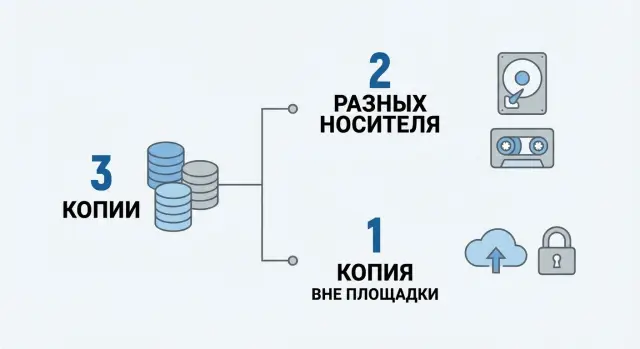
The rule reads: keep three copies of the data, two on different types of media, and one copy offsite.
What counts as "three copies"
The first copy is the working data (what you use every day). You need at least two backup copies in addition to that.
Important: “we have a backup on the server” is usually just one backup. For 3-2-1 you need at least one more separate copy.
What “different media” and “offsite” mean
"Different media" are not two partitions on the same server or two disks in the same RAID. They are two independent storage places that do not fail together.
"Offsite" means a physically separate location (a second office, a separate server room, a data center) or cloud storage. But not just “put it in the cloud”: access should be limited and preferably separated so that an infected server cannot delete those backups.
A practical example looks like this:
- working files and databases on the primary office server;
- daily backups to a local storage of a different type (for example, a NAS);
- a copy of those backups stored in another location or in the cloud with separate credentials.
If one layer fails, you still have at least one other chance to recover.
Where to start: inventory and objectives (RPO/RTO)
Any 3-2-1 scheme begins not with choosing disks or a cloud, but with a simple list: what you protect and how painful its loss would be. Without an inventory it’s easy to back up “a bit of everything” but miss what’s truly important.
Gather a list of critical data and systems. Usually this includes accounting and financial databases, CRM/ERP and other operational databases, corporate email and archives, shared folders with documents and contracts, and configurations for servers, network equipment and critical applications.
Next, set two questions that frame the whole backup plan for the company.
RPO (Recovery Point Objective): how much data you can afford to lose. This is about "how far back you can roll back." For example, if RPO = 4 hours, backups must happen often enough that you’d lose no more than 4 hours of changes.
RTO (Recovery Time Objective): how quickly you need to recover. This is about downtime. If RTO = 2 hours, the service must be restored to a minimally acceptable state within 2 hours after the incident.
Then classify data by priority so you don’t spend the same resources on everything:
- A: stops the business (cash registers, payments, key databases);
- B: can tolerate a day of downtime but with losses (email, some documents);
- C: nice to have, not critical (archives, old projects).
One more practical step: assign data owners. Record who is responsible for each system and who decides during an incident (for example, “restore the sales database first, then email”). This saves hours when time is short.
Choosing media and storage locations for 3-2-1
The point of 3-2-1 is not “three folders” but ensuring one device, media type or site failing won’t destroy all copies at once. First, honestly assess likely failures: disk failure, ransomware, admin error, office fire, loss of account access.
The first backup is usually kept near production systems for fast recovery. This can be a separate repository server, NAS or disk storage. Important: this should not be the same machine running your services, and the storage should use separate accounts and permissions.
The second copy, on a different media type, protects against identical failure causes. If the primary backup is on disks, the second can be on tape, rotating external drives, or a different class of storage (different controller, firmware or disk pool). The idea is simple: a single defect or mistake should not affect both backups.
The third copy must be offsite. This can be cloud storage or a second site (another office, a server room in another building). Key points: separate credentials, minimal privileges, and, where possible, immutable storage so backups can’t be deleted or overwritten in minutes. If you use a second site, verify it doesn’t depend on the same network, domain or admin accounts without role separation.
Common choices look like this:
- small office: local NAS for quick restores + external drives rotated and stored offsite + cloud copy for critical data;
- organization with a server room: dedicated backup server (e.g., a rack server as a repository) + second media (tape or separate storage) + offsite copy in cloud or second site.
The main mistake is making “different copies” that actually depend on the same thing: same vendor, same domain, same admin accounts, same rack or same power source. If one compromised account can delete all backups, the media choice is wrong even if you have three copies.
Backup security: access, encryption, immutability
Even a correctly built 3-2-1 scheme won’t help if an attacker gains access to storage or an admin accidentally deletes the backup chain. Backup security is more than antivirus. It’s access rules, key management and deletion protection.
Start with roles and permissions. The logic is simple: one person should not be able to quietly change policies, erase copies and hide the traces.
- Backup operator runs tasks and sees reports but cannot delete storage.
- Storage admin manages disk pools but does not change backup policies.
- Auditor or security officer reads logs and reports without change rights.
- System owner confirms RPO/RTO and data criticality.
- Emergency access is handled by a separate procedure and separate credentials.
Encrypt data both in transit and at rest. Keep keys separate from the copies: use a protected key store and a clear access procedure (who, when, on what basis). Lost keys turn backups into an unreadable archive.
To protect against deletion, use immutable copies or WORM where risk is highest: for weekly and monthly restore points and for copies sent offsite or to isolated storage. This is critical for key services: ransomware often tries to remove backups first.
Use separate accounts for backups and enable multi-factor authentication. Don’t use a domain admin for daily backup tasks.
Audit logs must record policy changes, deletion of points and login attempts. At minimum, check regularly: who changed schedules, who deleted what, where encryption was disabled, access errors to storage, and login attempts from unusual devices or addresses.
Step-by-step plan to implement 3-2-1
3-2-1 works only when three things are decided in advance: which data are most important, where copies physically reside, and how you’ll detect failures before you need to recover.
Start by classifying data. Example: critical (accounting, 1C databases, email), important (department shared files), secondary (archives, old projects). For each class set backup frequency and allowable data loss: for a database that might be hourly, for shared folders once a day.
Then create a clear plan:
- Identify sources and frequency: what to back up (DBs, VMs, file shares, executive laptops) and how often for each data class.
- Set schedules and backup types: daily incremental, weekly full, monthly archive (with separate rules if needed).
- Implement 3-2-1 across storage locations: first copy near production (fast recovery), second on another media, third offsite.
- Add quality control: integrity checks, automated reports and error alerts so backup failures aren’t unnoticed for weeks.
- Document retention and responsibilities: retention periods, rotation (what is deleted and when), and a short recovery instruction (who does what, where copies live, which passwords or keys are needed, step order).
A simple example: a small clinic has a patient database and a shared file archive. Daily copies go to local storage for quick rollbacks, weekly full backups to a separate medium, and a daily offsite copy. If ransomware hits the network, an isolated offsite copy can be used to restore even if the network is fully compromised.
Document not only "where it is" but also "how to verify it will restore." This saves hours during an incident.
Retention policies: frequency, depth, rotation
A retention policy answers three questions: how often you back up, how far back you can recover, and when old copies are deleted. Without this, 3-2-1 easily becomes “a backup folder” that runs out of space or lacks the needed version.
Start from criticality. Systems that keep business running (mail, 1C, patient DBs, sales file shares) need more frequent and longer retention. Archives that are kept for history can be backed up less often and kept longer.
Frequency and depth: how many restore points
Choose granularity by data type. Files often need the ability to recover a single document. VMs may require quick full rollbacks. Databases should be backed up so recovery is predictable (e.g., full backup plus logs or incrementals).
A simple scheme to explain to management:
- daily: quick copies (incremental/differential) for working data;
- weekly: full backups of key systems;
- monthly: a "month snapshot" for long-term storage.
Also back up configurations. Backups of network device configs, hypervisor, domain controller, storage systems and other "small but important" items are often forgotten. After an incident you may restore servers and still lose network settings, roles and access.
Rotation: what to delete and what to keep long-term
Rotation prevents running out of capacity. A simple approach: keep many recent points (e.g., 14–30 days), fewer medium-term points (8–12 weeks) and only the necessary long-term points (12–36 months) for legal or reporting needs.
Plan for data growth. Review quarterly: how many terabytes added, backup windows and restore times, capacity on local and offsite storage. When buying servers and storage, provision extra capacity for backups, not just bare minimums.
Common mistakes and why backups become unrecoverable
The main reason backups are unrecoverable is simple: copying is set up, but the actual recovery scenario isn’t thought through. On the incident day you learn the copy is corrupt, inaccessible, or recovery takes days instead of hours.
Frequent mistakes that break recovery even with a formally set up scheme:
- The copy is stored next to the source: same server, same storage or same virtual infrastructure. Fire, ransomware or a controller failure takes both production and backup.
- The offsite copy exists only “on paper”: it’s missing, or it’s shipped weekly though the business needs same-day recovery. Replication lag or manual disk transport doesn’t match RPO expectations.
- Backup errors are not monitored: tasks “run” but logs are red for weeks, alerts are off, or notifications go to an unread mailbox.
- They back up the wrong things for startup: files are saved but databases, application configs, service accounts, licenses, certificates and keys are forgotten. Data are restored but the system won’t boot.
- Encryption is enabled but keys aren’t managed: keys live in an open folder or with one person only. Lose the key and you have unreadable files.
Another issue is nobody knows the recovery order or real downtime. After a ransomware attack the team finds the last copy but doesn’t know which service to restore first (AD, DBs, file shares), where passwords live, or if there is space to redeploy.
A sign of maturity is a short recovery playbook and a clear answer to: “If the server won’t turn on right now, what do we do in the first 30 minutes?”
Regular recovery tests: how to run them and what to record
Backups are valuable only if you can actually restore from them. Recovery tests must be regular and scheduled, not "when something breaks." Even with 3-2-1, a reasonable minimum is a monthly test for one critical service (accounting, mail or file storage).
Two test levels: quick and full-scale
Start small and repeat consistently, then add more complex checks.
- Restore a file or folder from the required point in time.
- Restore a whole system: bring up a VM or server from scratch including settings and access.
- Check integrity: ensure data open and are not corrupted.
- Check availability: ensure users can log in and work.
Test outside production: use a separate test environment or an isolated network segment where restores won’t overwrite production data or expose secrets. If no separate environment exists, at least isolate by network and set clear rules about what can be powered on and by whom.
Success criteria and what to log
Agree in advance what counts as success: did you meet the recovery time, was data loss within RPO, is the service available to users.
Record results so someone else can repeat the procedure:
- checklist of steps and actual times (compare with RTO);
- which restore point was used and data volume (verify RPO);
- backup system logs and any errors;
- conclusions and action items: what to fix, who’s responsible, deadline.
Practical example: 3-2-1 in a small organization
Imagine a small clinic (or school): a file server with documents (contracts, orders, scans) and a separate accounting system with a database (schedules, billing, patient records). Staff are few and there may be no dedicated admin, so the scheme must be simple and verifiable.
Objectives set the rules. For documents the clinic chooses RPO = 24 hours (a day’s changes are acceptable). For the accounting DB RPO = 4 hours (otherwise appointments and payments must be recovered manually). Recovery time targets: documents in 2–3 hours, database in 1–2 hours.
They build 3-2-1 so it works without heroics:
- Copy 1 (working): data on the server.
- Copy 2 (local): daily file backups to separate local storage; database backups every 4 hours.
- Copy 3 (offsite): daily transfer to a remote site (another office or secure cloud). Weekly archive on a separate, not-permanently-connected drive.
A month later a typical incident occurs: an employee opens an attachment and ransomware spreads to network folders. Important: the local backup storage is not accessible with regular user accounts and isn't mounted as a shared drive for everyone.
Steps taken:
- disconnect infected machines and server from the network, note incident start time;
- check which backups predate the infection (via logs and checksums);
- deploy a clean VM or reinstall the server;
- restore the database from the last healthy copy (e.g., 2 hours of loss instead of 4), then restore documents from the nightly copy;
- verify the accounting system and key shared folders, then let users back in gradually.
Result: database restored in 1.5 hours, documents in 3 hours, document loss stayed within one day. After the incident they added separate backup accounts, monthly recovery tests and immutability for offsite copies so ransomware couldn’t reach them.
Checklist and next steps
Quick test: answer “yes” to each item.
- There are at least 3 copies of data (including the working copy).
- Copies are on at least 2 different media types or platforms.
- One copy is stored offsite.
- Not only files but critical databases, configs, keys and licenses are backed up.
- Clear RPO and RTO exist for each system.
- Failure alerts are enabled and actually read.
- Access to backups is restricted and separated from regular accounts.
- Copies are encrypted and keys are stored separately.
- Deletion protection exists (immutability or at least separate rights).
- Recovery tests were performed last month and results are recorded.
If many answers are “no,” start small and follow the plan.
What to do in 1 day: list systems and data (what to protect first), assign a backup owner and a backup deputy, enable alerts for failed jobs or low space, define minimal RPO/RTO for the top 3–5 services, and perform a trial restore of one file and one folder to a separate machine.
What to do in 1–2 weeks: set up an offsite copy with separate credentials, schedule recovery tests (e.g., weekly for one service), write a one-page recovery instruction (where backups are, who triggers recovery, who to call), add integrity checks and reports, and test “everything’s broken” scenarios: domain loss, ransomware, disk array failure.
Consider an integrator when you have many disparate systems (virtualization, databases, mail, branches), compliance/audit requirements, or your IT team lacks time to maintain regular tests.
If you need infrastructure help, GSE.kz (gse.kz) can assist with a repository server and recovery site, selecting storage and organizing support so backups aren’t dependent on one person.
Frequently asked questions
What is the 3-2-1 rule in plain terms?
The 3-2-1 rule is the minimum "insurance" against data loss: - **3 copies**: the working data plus at least two backups; - **2 different media/platforms**: so the same failure won’t destroy all copies; - **1 offsite copy**: to survive fire, theft, office unavailability or full network compromise.
What counts as the “three copies,” and why are the working data counted?
It’s usually counted like this: - **Copy #1** — the working data (server/PC/VM/DB); - **Copy #2** — the first backup (for quick restores nearby); - **Copy #3** — the second independent backup and/or an offsite copy. Important: “a backup on the same server” or “another disk in the same RAID” is almost never a true separate copy in the 3-2-1 sense.
Are two disks in the same server acceptable instead of “two media”?
No. Two partitions, two volumes or two disks in the same array usually fail for the same reason: controller, power, admin error, or a malware that can see the whole infrastructure. A good test: if a single action (one account or one outage) can remove both copies, they are not different media.
What media are commonly used for 3-2-1 in real companies?
A typical small-office setup: - a local copy on separate storage (NAS/repository server) for quick restores; - a second copy on **rotating external drives** or **tape**; - plus an **offsite** copy (second site or cloud storage with separate accounts). If budget is limited, start with an offsite copy of critical data and strict access controls — that yields the biggest benefit first.
Which is better for offsite: cloud or a second site?
Choose the option you can actually operate: - **Second site** (another office/server room/data center) — good for large volumes and predictable throughput; - **Cloud** — convenient for small and medium volumes and as insurance against site loss. The key: the offsite copy must use **separate credentials**, minimal privileges and preferably deletion protection (immutability/WORM).
How to choose RPO and RTO so 3-2-1 fits the business?
Start with practical, simple numbers: - **RPO**: how much data you can afford to lose (e.g., 4 hours means backups must run more often than every 4 hours); - **RTO**: how quickly you must be back online (e.g., 2 hours means recovery procedures must be fast and tested). A useful step: split systems into A/B/C classes and assign different RPO/RTO so you’re not trying to protect everything the same way.
How to set backup frequency and retention so storage doesn’t run out?
A basic plan that’s easy to implement: - daily copies for working data (usually incremental); - weekly full backup of key systems; - monthly “month snapshot” for long-term retention. Add rotation: many short points (14–30 days), fewer medium points (8–12 weeks), and only legally or operationally required long-term points (12–36 months).
How to protect backups from ransomware and accidental deletion?
The minimum that actually helps: - separate accounts for backup tasks (not a domain admin); - MFA where possible; - role separation (operator/storage admin/auditor); - encryption in transit and at rest, keys stored separately; - **immutable** restore points (WORM) at least for weekly/monthly copies. The goal is to prevent ransomware or human error from deleting all recovery points in minutes.
How often should recovery be tested and what should be checked?
Because “we have a backup” doesn’t mean “we can recover.” Minimum regular testing: - restore one file/folder from the required point in time; - once a month — restore a whole service (VM or database) into an isolated environment; - record actual times and compare to RTO. If tests fail, better to find out now than during an incident.
What common mistakes make backups unrecoverable, and when to call an integrator?
Most common causes that break recovery: - copies live “next to” the source and depend on the same site/domain/accounts; - you don’t back up everything needed to run (configs, certificates, service accounts, keys); - no alerts or monitoring — backups are "red" for weeks unnoticed; - encryption keys are lost or widely accessible; - no short recovery playbook: who restores what first and who decides. If you have many systems/branches or lack time for regular tests, bring in an integrator. For example, GSE.kz can help set up a repository server/restore site and organize support so backups don’t rest on one person.
