6 min read
1U or 2U server for 3–5 years: leaving headroom for GPU and NVMe
How to choose a 1U or 2U server for 3–5 years so you leave room for GPUs, NVMe and network cards without overpaying for unused options.
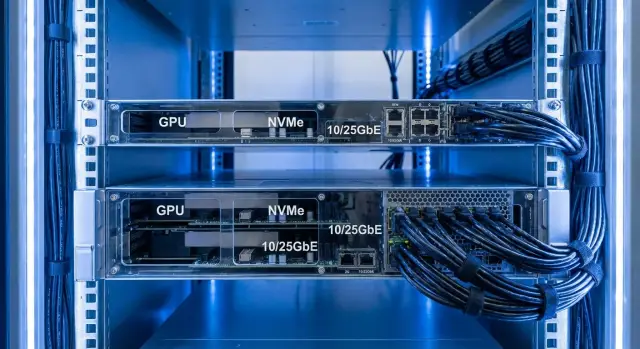
What to plan for 3–5 years
When planning a 1U or 2U server for 3–5 years, the most important thing is to understand in advance what you will definitely add and what you won’t want to replace. The phrase “we’ll buy it later” often ends with having to change half the server: not enough slots, power, or cooling. Downtime usually costs more than any saved money.
The first upgrade requests typically appear after 12–24 months: load grows, services are added, and requirements for speed and storage tighten.
Often you suddenly need GPUs for analytics or video, more NVMe for databases and virtualization, an extra 10/25GbE network card (and often a second port for redundancy), more RAM, and a second power supply.
"Leaving room" doesn’t mean buying everything now. It means choosing a chassis and layout so that expansion takes hours, not a full project to replace the case. If today you only need a couple of NVMe drives and one network card, but next year you plan more NVMe and 25GbE, make sure there are mounting points and free PCIe lanes for that.
Most upgrades hit four limits: PCIe lanes (not enough for GPU, NVMe and network at the same time), power supply capacity, cooling (especially in 1U), and physical layout (riser cards, drive cages, cabling).
Before buying, check the basic headroom without overpaying:
- Is there a free PCIe slot of the needed form factor and the correct riser card?
- Is the PSU powerful enough with some margin for a future card or GPU?
- Is cooling planned for hotter components?
- Are there free bays for NVMe (M.2 or U.2/U.3) without complex adapters?
- Can you add a second network card without PCIe lane conflicts?
A practical example: an office installs a server for virtualization and file storage, then a year later adds video surveillance and analytics. If cooling and power for a GPU weren’t considered up front, the upgrade will bump against physics, not budget.
1U vs 2U: the differences, without marketing
When choosing 1U or 2U for 3–5 years the real difference is physical: how much room for hardware, how much airflow you can push through the chassis, and how convenient service in the rack will be.
Space for cards and heatsinks
Height in 1U is limited. Even if a PCIe slot exists, a card may not fit by thickness or cooler height. For GPUs this is critical: you often hit limits in dimensions, power connectors and thermal profile.
2U offers more freedom: it’s easier to install additional cards (GPU, HBA/RAID, 10/25GbE), to select models by length and cooling, and to leave expansion headroom.
Cooling and power in real life
1U typically relies on fast fans and tight layouts. That works, but thermal headroom is smaller and airflow requirements are stricter. Adding hot components (GPU, many NVMe) in 1U often requires very specific card choices and the right shrouds/riser setup.
2U is easier: more fans, lower RPMs, more stable temperatures. Power logic is similar: 1U often has less wattage headroom, and redundancy (two PSUs) consumes more space and budget.
Practical rule:
- Choose 1U if rack density matters and you’re confident expansion will be minimal.
- Choose 2U if you allow for GPUs, many NVMe or a second network card, even if "sometime later."
- If unsure, 2U is usually cheaper in terms of risk: fewer chances to be blocked by thermal, power or compatibility limits.
2U is also often easier to service: access to drives, fans and cards is simpler right in the rack.
Typical expansion scenarios: GPU, NVMe and network
Server expansion almost always has a clear goal: compute faster, store faster, transfer faster. If you name 2–3 likely scenarios up front, you’re less likely to overpay for unused hardware.
When a GPU makes sense
A GPU is needed when you have a specific load: AI inference (recognition, search, classification), VDI with 3D graphics, video analytics, video encoding, or certain analytics tasks. Buying a GPU “just in case” often leads to extra costs for power and cooling.
Example: a small clinic starts with virtualization and image archive, then after a year pilots image recognition. A GPU is a justified upgrade only if a slot and power headroom were left for it.
NVMe and network: where you see quick benefits
NVMe often pays back faster than a GPU. It’s added when databases slow down, there are many small disk operations, the number of VMs grows, or a fast cache is needed. Network is upgraded when backups, VM migrations, storage access or user growth hit bandwidth limits.
Typical 3–5 year scenarios:
- Virtualization: NVMe for datastore/cache and 10/25GbE for migrations and backups.
- Database: several NVMe for journal and "hot" data plus a fast interface to applications.
- VDI: 10/25GbE and GPU if graphics are required.
- External disk shelves: HBA/SAS controller only if SAS or external JBOD is planned.
In practice NVMe or a faster NIC are most often added first. Expensive accelerators and niche network features make sense only with a clear plan and measurable requirements.
Main constraints: PCIe, power and cooling
PCIe: slots, sizes and generations
Upgrade headroom most often fails not because you "want a GPU" but because there’s nowhere to put it and connect it. Look not only at slot count but at format: full-height or low-profile, supported card length, and whether a dual-width card can fit.
PCIe generation matters for bandwidth. Newer generations give more bandwidth per lane—important for fast NVMe and 25/40/100GbE NICs. For many use cases more important than the latest generation is having the required number of lanes and a free slot.
Clarify how many PCIe lanes are actually available: some go to onboard controllers, NVMe backplanes, RAID/HBA, or extra ports. 1U usually has less layout flexibility, so lock the slot plan in advance.
Power and cooling: why 1U and 2U behave differently
A GPU has not just a published TDP but also power connector requirements (for example, 8-pin) and airflow needs. In 1U fans are small and very fast, and space around a card is tight. The same card may throttle in 1U but run stably in 2U thanks to better cooling.
For power, check the total budget: CPU, memory, drives, GPU, NICs and a safety margin. If PSUs are sized tightly, an upgrade can force replacing the PSU or even the whole platform.
Riser cards are another factor: they determine which slots are exposed, the clearance for card height, and how many cards fit.
Quick checks before choosing a platform:
- How many slots will you need in 2–3 years and of which type (full-height/low-profile)?
- Is a dual-slot GPU needed and what maximum card length is supported?
- Will there be enough PCIe lanes after adding NVMe and a second NIC?
- Is there at least 20–30% PSU headroom?
- Does the chassis support the riser configurations you need?
Example: if today 10GbE and a couple of NVMe are enough, but next year you plan a GPU for analytics and 25GbE, 2U will often be cheaper over time: fewer riser constraints, easier cooling, lower risk of hitting power and size limits.
Step-by-step plan to choose a config without overpaying
If you choose a 1U or 2U server for 3–5 years, don’t buy everything upfront; leave clear growth points. A simple approach works: fix a base and ensure compatibility for future upgrades.
Make a short 30–40 minute plan with IT and whoever controls the budget:
- Split requirements into "must have day one" and "possible later." For example: now 64–128 GB RAM and 2 SSDs, later GPU and 10/25GbE.
- Calculate the minimum PCIe slots needed and their purpose: x16 for GPU, x8 for network, and which PCIe version matters for you.
- Sketch a network roadmap: what will be added later — two 10/25GbE ports, a card for storage/replication, redundancy.
- Choose an approach for drives: SATA/SAS for capacity, NVMe for databases, cache and VMs.
- Build platform-level headroom for power and cooling: support for larger PSUs and appropriate fans. Buying the maximum now is not necessary.
Also check hardware compatibility: which risers are actually available, what cable kits are required, whether there are front bays for U.2/U.3, where M.2 sockets are, and the supported card length and thickness. A common mistake is selecting a server by specs only to find the required layout is not offered or blocks adjacent slots.
Planning NVMe: M.2 or U.2/U.3 and how many
NVMe delivers low latency and high throughput. Overspend happens when NVMe is bought without a plan: what data will live there, what capacity, failure handling and serviceability.
M.2: when it’s a good option
M.2 is convenient if you need 1–2 fast drives without trays or cables. It’s often used for boot, cache or small databases.
Caveats: cooling and accessibility. In 1U/2U M.2 can run hotter and replacing it may require shutting down the server and removing covers. In a small server room without a full-time engineer this can be inconvenient.
U.2/U.3: when serviceability and load matter
U.2/U.3 are typically mounted in front drive bays. They’re easier to replace, easier to monitor, and often better cooled. This is a good choice for heavy write loads (journals, virtualization, active databases) and when you need quick front-access service.
How many NVMe to plan depends on their role. Practical guidelines:
- 2 drives (mirror) for journal/cache or small critical data.
- 2–4 drives for an active dataset (VMs, databases) if it’s truly hot.
- Use SATA/SAS for archive and infrequently accessed files.
Plan two points in advance: what happens if an NVMe fails and how backups are organized. Speed doesn’t replace copies.
Often it makes sense to start with SATA/SAS for capacity and reserve slots for NVMe growth: choose a chassis with U.2/U.3 bays or at least the option to add them later.
Network cards: leaving room for 10/25GbE and beyond
Network is commonly underestimated: servers ship with a pair of 1GbE ports for now, then fast NAS, backups and virtualization appear. 1GbE becomes a bottleneck.
Moving to 10/25GbE affects more than the NIC. You need free PCIe slots, proper PCIe generation and good cooling around the slot. 1U offers fewer card height options and layout flexibility, making it harder to leave space for a second NIC alongside NVMe adapters or a GPU. 2U usually makes this easier.
A practical approach: keep onboard 1GbE for management and emergency tasks, and install a separate high-speed NIC for production. That way, when you change standard (for example from 10 to 25GbE), swapping the card is easier.
Before buying check:
- Is there at least one free PCIe x8/x16 slot for a future NIC?
- Are required speeds and interfaces supported (10/25/40/100GbE, SFP+/SFP28/QSFP or RJ-45)?
- Are NIC and drivers compatible with your OS/hypervisor?
- Do switch capabilities match (port speed, optics type, LACP/VLAN)?
Budget optical modules and cables in advance but you don’t need to buy them immediately: standards and switch compatibility are often finalized closer to deployment.
Common mistakes when choosing 1U/2U for growth
One frequent mistake is buying the most powerful CPU without checking what that gives for expansion. In some platforms more cores do not mean more PCIe lanes, so you won’t get extra slots for GPU, NVMe cards or a second NIC.
Another pain point is chassis and riser kits. Slots may exist on the board but without the correct riser you can’t install a card or you face strict limits on card length and height. This is especially noticeable in 1U.
Power is often underestimated: "it powered on" is not enough. Under load (GPU, many NVMe, 25GbE) insufficient headroom can cause overheating, throttling and spontaneous reboots. Check not only wattage but how the chassis dissipates heat.
With NVMe the common miss is serviceability. M.2 is handy for boot and cache but replacement can require downtime. U.2/U.3 are easier to service from the front if quick access matters.
Another unnecessary expense is buying trays and controllers "just in case." If you have no plan to use a RAID controller or all bays, you pay for backplanes and cables that remain empty.
Quick pre-purchase check: a 10-minute checklist
This check helps understand whether the chosen 1U or 2U server will last 3–5 years without costly rework. Take the spec sheet and photos of the internals and confirm what is included in the kit.
-
Are there at least 1–2 free PCIe slots of the needed size (and do they overlap with drive cages or risers)?
-
Which riser cards are required and are they included? A common trap: "slot listed" but without the right riser it’s inaccessible.
-
Is there enough power with a margin and is redundancy supported? Sum the consumption of CPU, future GPU, NVMe and NIC, then add a safety margin.
-
Cooling: what TDP is supported for future cards and which fans are installed? In 1U you can quickly hit heat and noise limits.
-
NVMe and network planned: where will NVMe be (M.2 on board or front U.2/U.3), is hot-swap needed, what network speeds are planned and how many ports are needed now and later?
If the supplier can’t answer two of these clearly, ask for a specification listing risers, backplanes, PSUs and supported expansion cards.
Example scenario: an office and a small data center
A company with 150 employees runs 1C and SQL, file services, mail and several apps. To avoid many separate machines, everything runs on virtualization: 6–10 VMs, some latency-sensitive.
Typical starter config: one server, 128–256 GB RAM, capacity storage for VMs on SATA/SAS and 1GbE networking. Overspend begins when they try to "guess the future" and buy the maximum of everything. It’s more practical to reserve room for expansion without buying it day one.
How such a server can grow without full replacement:
- Immediately: a chassis with PCIe and cooling headroom, two PSUs, drive bays and at least one free slot for a future NIC.
- After 9–12 months: 1–2 NVMe drives for journals and DB cache to smooth peaks without migrating all storage.
- In 2–3 years: 10/25GbE (or a second NIC) for new storage, a backup channel or segmentation.
- As needed: more RAM and, if necessary, add controllers/disks.
If GPU probability is real (VDI with graphics, video analytics, local AI models, CAD), it’s safer to look at 2U from the start: more room for full-size PCIe x16, easier thermal behavior, fewer upgrade constraints.
Next steps: how to formalize requirements and choose a supplier
Draft a short one-page specification: what is needed day one and how the server should evolve over 3–5 years. Fix three blocks: workload (what runs and how many users), growth plan (GPU, NVMe, network) and site constraints (rack units, available power, noise and temperature limits).
Ask the supplier not just for specs but for an expansion diagram: which PCIe slots remain free, where lanes go, which drive bays are available and which are occupied. This quickly reveals bottlenecks before purchase.
Compare 1U and 2U not by initial price but by the cost of future changes and risks. 1U often looks cheaper until you discover that a GPU or extra NVMe requires a different server, or you must buy more expensive parts due to slot and cooling limits.
If predictable supply and local support matter, in Kazakhstan consider a local manufacturer and integrator. For example, GSE.kz produces S200 series servers in Kazakhstan and helps plan configurations with future upgrades in mind, providing support through a 24/7 service network.
Frequently asked questions
Which should I choose for 3-5 years: 1U or 2U?
For most servers that are likely to grow, 2U is the better choice. This chassis makes it easier to add a GPU, several NVMe drives, and network cards, while cooling and servicing usually impose fewer constraints.
When is a 1U server sufficient?
1U works when rack density matters and the hardware configuration is unlikely to change much. Before buying, still check the available PCIe slots, power supply capacity, and supported card dimensions.
Should I buy a GPU right away?
Plan for a GPU based on a specific workload: video analytics, AI inference, graphics-enabled VDI, video encoding, or compute. If none of these workloads are planned, leave a compatible slot and sufficient power headroom instead of buying an accelerator in advance.
How many PCIe slots should I leave in reserve?
Count not only free slots, but also the PCIe lanes required by NVMe drives, the network card, and onboard controllers. A future GPU usually needs a free x16 slot, while a fast NIC often needs x8 or x16.
How do I calculate power headroom?
Leave at least 20-30% power headroom after accounting for CPUs, memory, drives, network cards, and a planned GPU. Also confirm that the chassis supports the required power cables and higher-capacity power supplies.
Which should I choose for NVMe: M.2 or U.2/U.3?
M.2 is suitable for boot drives, cache, and a couple of fast drives if infrequent replacement with server downtime is acceptable. U.2/U.3 is more convenient for heavily used databases and virtualization: drives are often front-accessible and easier to service.
How many NVMe drives should I plan for?
First, check where the drives are installed, how they are cooled, and whether hot swapping and mirroring are required. For critical data, it makes sense to use two NVMe drives in a mirror and configure backups separately.
How do I prepare for a move to 10/25GbE?
It is best to install high-speed networking on a separate card and keep the onboard 1GbE ports for management and emergency access. This lets you move from 10GbE to 25GbE by replacing the NIC, provided the chassis retains a suitable free slot.
Why should I check riser cards?
A riser card determines the placement and height of PCIe cards in a server. Without the right riser, a slot may be inaccessible, and a full-height or dual-slot GPU may not fit.
What should I request from the supplier before buying?
Ask for a specification listing the installed riser cards, backplanes, power supplies, and supported cards. Also request a diagram showing which PCIe lanes and drive bays will remain available after the initial configuration.
